Beam logo

Beam Review

Visit

GPU cloud infrastructure for AI sandboxes, inference, and task queues

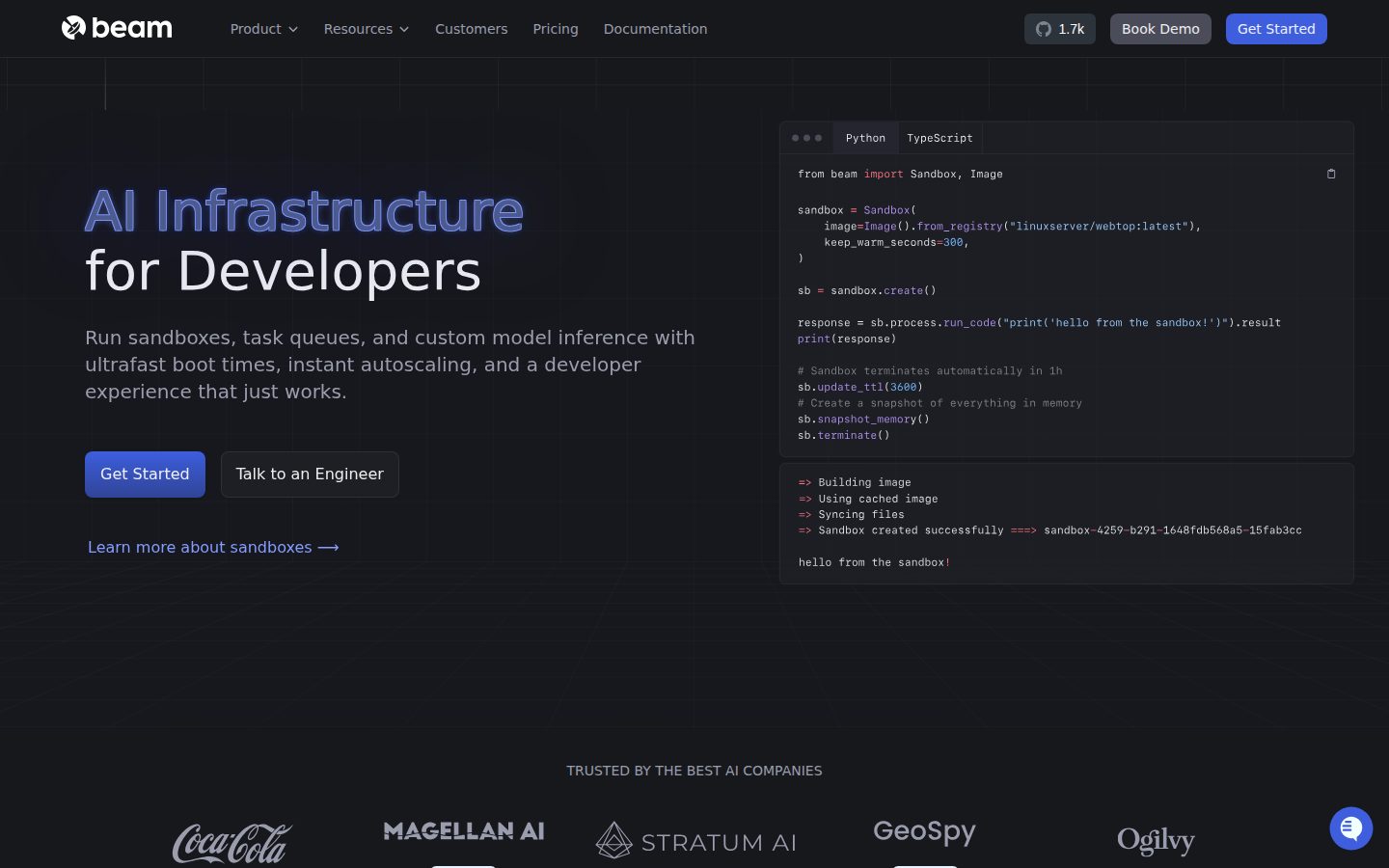
Beam is a cloud infrastructure platform for developers building AI applications that require GPU compute, sandboxed code execution, and scalable model inference.

AI Panel Score

8.0/10

6 AI reviews

Reviewed

About Beam

Developers interact with Beam primarily through a Python SDK, where switching hardware types requires changing a single line of code. Workloads are deployed from the CLI or via GitHub Actions CI/CD integration. Local debugging uses the same configuration as production, reducing environment mismatch. Containers support Docker-in-Docker and multiple workers per container for vertical scaling.

Beam distinguishes itself with a set of composable primitives: durable task queues for async workloads, secure sandboxed execution environments for running LLM-generated code, custom model inference endpoints that accept user-supplied Docker images, and support for training and fine-tuning models ranging from SLMs to diffusion models. It also supports deploying Streamlit and Gradio frontends, Jupyter notebooks, and headless or headed Chromium instances for web scraping at scale.

Beam targets machine learning engineers and AI developers who need on-demand GPU access without managing virtual machines or cloud provider tooling. Pricing is usage-based, and new users receive $30 in free credits refreshed monthly. Beam competes in a category alongside AWS SageMaker, Google Vertex AI, Modal, and RunPod, with user testimonials specifically citing it as easier and more cost-efficient than SageMaker and Vertex AI.

The platform is open source and supports bring-your-own-cloud deployment, allowing teams to run workloads on their own infrastructure rather than Beam's managed cloud. Integration with GitHub Actions enables automated deployments within existing CI/CD pipelines.

Features

AI

  • LLM Code Sandboxes

    Securely executes code generated by LLMs in isolated sandbox environments, enabling safe remote code execution for AI-driven applications.

Analytics

  • CI/CD Integration & Deployment Logs

    Integrates into CI/CD pipelines and streams real-time deployment logs so teams can monitor, version, and manage their running applications from the dashboard.

Automation

  • Instant Autoscaling

    Automatically scales deployments from zero to thousands of containers based on queue depth or traffic, then scales back to zero when idle.

  • Scheduled Jobs

    Supports scheduled (cron-style) jobs that run Python functions on a defined schedule on remote cloud infrastructure.

  • Task Queues

    Deploys resilient background task queues with configurable retry policies and no timeouts, serving as a drop-in replacement for systems like Celery.

Core

  • Distributed Storage Volumes

    Creates highly-available storage volumes mountable across tasks for storing model weights, large datasets, or other persistent data shared between apps.

  • Serverless GPU & CPU Compute

    Runs serverless workloads on both CPUs and GPUs (including A10G, 4090s, H100s) with pay-per-millisecond billing so you only pay when code is executing.

  • Ultrafast Container Boot Times

    Launches containers in under one second using a custom container runtime, enabling near-instant cold starts for AI inference and other workloads.

Customization

  • Custom Container Images

    Supports custom Docker/container images, including pulling from private registries like AWS ECR, to package any software dependencies your application requires.

Integration

  • Python & TypeScript SDKs

    Provides a Pythonic SDK (with a TypeScript SDK in beta) to define runtimes, configure GPU/CPU resources, and deploy workloads with minimal boilerplate code.

  • REST API Deployment

    Instantly deploys any Python function or existing Docker image as a persistent REST API endpoint with a single decorator.

Security

  • Secrets Manager

    Stores and manages secrets and environment variables scoped globally or per-app, accessible inside deployed workloads as standard environment variables.

Preview

Beam desktop previewBeam mobile preview

Pricing Plans

Developer

Free

Individual developers getting started with GPU workloads on Beam

  • $30 monthly credits included
  • Unlimited apps
  • 5 GPU containers concurrency
  • 30 CPU containers concurrency
  • 30-day log retention
  • 1 seat
  • Community support
Popular

Team

$89/monthly

Teams running GPU workloads at scale with higher concurrency limits

  • $30 monthly credits included
  • Unlimited apps
  • 50 GPU containers concurrency
  • 1000 CPU containers concurrency
  • 30-day log retention
  • 3 seats included ($25 per additional seat)
  • Live chat support

Growth

Contact sales

Large teams and enterprises needing custom concurrency, unlimited seats, and dedicated support

  • $30 monthly credits included
  • Unlimited apps
  • Custom GPU concurrency
  • Unlimited CPU containers
  • 1-year log retention
  • Unlimited seats
  • Private Slack channel support

AI Panel Reviews

The Decision Maker

The Decision Maker

Strategic bet, vendor viability, timing, adoption approval
7.8/10

Serverless GPU infra that ships faster than SageMaker lets you log in.

Beam does one thing well: get ML engineers from code to deployed GPU workload in minutes, not days. The open-source angle and bring-your-own-cloud option give it staying power most infra startups can't claim.

Sub-second container boot times and H100 access at pay-per-millisecond pricing is a real offer. Users report something running in 5 minutes via CLI. That's not marketing — that's a genuine gap versus SageMaker and Vertex AI, which both require configuration cycles that kill momentum.

Two things I'd watch. One: no public funding data, so the 36-month survival question is open. Two: the $89/month Team tier buys only 3 seats and 50 GPU containers — teams scaling fast will hit that ceiling and need to negotiate Growth pricing blind. That's a procurement conversation worth having early.

The LLM sandbox execution feature is the sleeper here. AI agents running untrusted code need exactly this. Pilot it with two or three ML engineers on a real inference workload. If they don't hit the concurrency wall in 90 days, the math on staying is easy.

Competitive Positioning7.8

Modal is the closest direct competitor; Beam's open-source self-hosting option is a meaningful differentiator Modal doesn't match.

Reputation Risk7.5

Open-source, bring-your-own-cloud deployment, and named competition against AWS SageMaker makes this a defensible board conversation.

Speed to Value9.0

Six lines of code and a Hugging Face model running on GPUs in minutes is a credible, documented claim.

Strategic Fit8.2

Composable primitives — sandboxes, task queues, inference endpoints — advance AI product capabilities, not just cost reduction.

Vendor Viability6.5

No public funding data and no disclosed team size — open-source codebase helps, but runway is unverifiable.

Pros

  • Sub-second cold starts — the changelog and feature docs back this up, it's not aspirational
  • LLM sandbox execution is purpose-built for AI agent use cases most infra tools ignore
  • $30 monthly credits refreshed means real ongoing evaluation, not a 14-day clock
  • Open source with bring-your-own-cloud removes the lock-in objection before it's raised

Cons

  • No public funding data — survival past 24 months is a real question, not a hedge
  • Team tier caps at 50 GPU containers and 3 seats for $89/month — scales up in cost fast
  • TypeScript SDK still in beta, so non-Python teams are second-class citizens for now

Right for

ML engineers who need GPU inference or LLM agent sandboxes running in hours, not sprint cycles.

Avoid if

Your team runs primarily TypeScript or needs contractual SLA guarantees before procurement signs off.

The Domain Strategist

The Domain Strategist

Craft and strategy in the product's domain — adapts identity per category, same lens
8.1/10

Open-source GPU serverless with sub-second cold starts — a serious Modal challenger.

Beam packages serverless GPU compute, LLM sandboxes, and durable task queues into a Python-first developer experience that outpaces SageMaker on simplicity and cost. The open-source core plus bring-your-own-cloud option removes the usual vendor lock-in anxiety.

Sub-second container boot using a custom runtime is the architectural claim that matters most here. That's not a marketing number — cold-start latency is the core SLA problem for inference workloads, and solving it in the runtime layer rather than by keeping containers warm is the right approach. Twelve documented primitives including Docker-in-Docker support, distributed storage volumes, and a Celery-compatible task queue signal someone who's actually shipped production ML pipelines.

The open-source foundation changes the lock-in calculus. If Beam's managed cloud disappears or raises prices, the same primitives run on your own VPC. That's a meaningfully different 3-year posture than Modal or RunPod, neither of which offers self-hosted parity. The Python SDK single-line hardware swap is also real leverage for teams iterating across A10G, 4090, and H100 tiers.

The $89/month Team tier caps GPU concurrency at 50 containers — fine for most teams today, potentially friction at scale. TypeScript SDK is still in beta, so non-Python workloads are second-class citizens for now. Neither concern kills the buy for an ML engineering team.

Category Positioning7.8

Sits between Modal's developer ergonomics and RunPod's raw cost play, with the open-source self-hosted option as a differentiator neither direct competitor matches.

Domain Fit8.6

Python SDK with single-decorator REST deployment and local-prod environment parity maps directly to how ML engineers actually iterate on inference workloads.

Integration Surface7.9

GitHub Actions CI/CD, private ECR registry support, and Secrets Manager cover standard MLOps pipeline needs; TypeScript SDK still in beta limits polyglot teams.

Long-term Implications8.2

100% open-source with bring-your-own-cloud means the management plane, not the compute primitives, is where lock-in lives — a much safer 3-year posture than SageMaker.

Strategic Depth8.4

Custom container runtime for sub-second boots plus composable primitives (queues, sandboxes, inference, storage) show genuine systems-level thinking, not assembled cloud wrappers.

Pros

  • Sub-second cold starts via custom runtime — architectural advantage, not config tuning
  • Open-source core enables self-hosted deployment, eliminating cloud-provider hostage scenarios
  • Celery-compatible task queues plus LLM sandboxes in one platform reduces infrastructure surface area
  • $30 monthly free credits with usage-based billing makes real GPU experimentation accessible

Cons

  • 50 GPU container concurrency cap on the $89 Team tier will hit scaling teams faster than expected
  • TypeScript SDK in beta means non-Python teams are building on an unfinished surface
  • No public funding data limits visibility into long-term runway and roadmap credibility

Right for

ML engineering teams who need production-grade GPU inference without owning VMs or tolerating SageMaker's operational weight.

Avoid if

Your team ships primarily in TypeScript or needs more than 50 concurrent GPU containers without moving to custom enterprise pricing.

The Finance Lead

The Finance Lead

Money, total cost of ownership, contracts, procurement math
8.1/10

$89/month flat plus pay-per-millisecond GPU — rare pricing honesty in this category

Beam's pricing page shows three tiers without a sales call. Usage-based billing on GPU compute keeps year-3 math predictable for most teams.

$89/month buys the Team tier. 50 GPU containers concurrent, 1,000 CPU, 3 seats. Additional seats at $25 each. A 10-person team lands at $89 + ($25 × 7) = $264/month base, plus compute. At 200 GPU-hours/month on A10Gs, compute adds roughly $200-400 depending on workload. Year-1 all-in: ~$8K. Year-3 with 30% usage creep: ~$13K. Compare that to AWS SageMaker, where testimonials cite Beam as materially cheaper. The math is defensible.

The Developer tier includes $30 monthly credits — real money, refreshed, no trial cliff. That's procurement-friendly for pilots. The Growth tier is custom-priced, which means a sales call eventually. No published overage rate on compute is the real risk. Pay-per-millisecond billing is honest in principle, but invoice predictability depends on workload discipline.

Contract terms aren't published. Auto-renewal window and termination rights are unknown from public materials — standard procurement gap in this category. The open-source, bring-your-own-cloud option does reduce lock-in materially versus Modal or SageMaker. That's a genuine exit ramp.

Billing & Procurement8.0

Monthly credits, usage-based compute, and a visible Team tier at $89 reduce procurement friction for SMB and mid-market buyers.

Contract Flexibility6.5

Auto-renewal terms and termination-for-convenience clauses aren't published; open-source self-hosting is a real but operationally costly exit option.

Pricing Transparency8.5

Three tiers fully visible on the pricing page, compute rates published, no SSO tax visible — Growth tier is the only opaque line.

ROI Clarity7.9

Pay-per-millisecond billing and zero-to-zero autoscaling make idle cost zero — measurable ROI versus always-on VM alternatives like SageMaker.

Total Cost of Ownership7.8

Usage-based GPU billing at millisecond granularity keeps base TCO predictable, but no published overage cap creates invoice risk at scale.

Pros

  • Three tiers fully visible without a sales call
  • $30 monthly credits refresh — pilot-friendly
  • Pay-per-millisecond billing eliminates idle GPU waste
  • Open-source with bring-your-own-cloud reduces lock-in

Cons

  • No published compute overage cap — invoice risk at high volume
  • Growth tier pricing requires a sales call
  • Contract terms, auto-renewal window not publicly documented
  • Additional seats at $25 each add up fast past 10 users

Right for

ML engineers and small AI teams who need predictable GPU spend without managing cloud infrastructure.

Avoid if

Your procurement team requires published SLAs and contract terms before signing.

The Domain Practitioner

The Domain Practitioner

Daily hands-on reality in the product's domain — adapts identity per category, same lens
8.2/10

Modal's scrappier rival ships sub-second cold starts and a Python decorator workflow that actually sticks

Beam targets ML engineers who want GPU compute without babysitting cloud provider tooling. The composable primitives — sandboxes, task queues, inference endpoints — are well-scoped for day-to-day AI workloads.

Sub-second container boot times with a custom runtime. That's the claim, and the changelog backs ongoing investment there. Switching from an A10G to an H100 is one line of code change in the SDK. That's not marketing — that's the actual shape of the workflow. CI/CD deploys via GitHub Actions with streaming deployment logs. Local config mirrors production. These are the things that save you from 11pm environment-mismatch debugging sessions.

The task queue system ships with configurable retry policies and no timeouts — a real replacement for Celery without the operational overhead. Docker-in-Docker support and multiple workers per container mean vertical scaling isn't an afterthought. At $89/month for the Team tier, you get 50 GPU containers concurrently. Modal sits in the same category; Beam's open-source, bring-your-own-cloud option is a moat Modal doesn't have.

The TypeScript SDK is still in beta, so Node-heavy shops are second-class citizens for now. Free tier caps at 5 concurrent GPU containers — tight if you're load-testing inference pipelines. Docs appear practitioner-written based on the "6 lines of code, 5 minutes" framing, but gaps will surface once you're wiring custom Docker images from private ECR registries.

Day-3 Reality8.1

One-decorator REST deployment and local-mirrors-production config removes the usual environment drift that kills day-three momentum.

Documentation Practitioner-Fit8.0

The '6 lines of code on Hugging Face' framing and CLI-first quickstart suggest docs written by engineers, not a content team.

Friction Surface7.8

TypeScript SDK in beta and a 5-container GPU concurrency ceiling on the free tier are real friction points for teams at scale.

Power-User Depth8.2

Docker-in-Docker, private ECR registry support, distributed storage volumes, and bring-your-own-cloud give power users real surface area to work with.

Workflow Integration8.4

GitHub Actions CI/CD, Python SDK decorators, and CLI deploys slot into existing pipelines without demanding new toolchain habits.

Pros

  • Sub-second cold starts via custom container runtime — solves the biggest latency pain in serverless GPU inference
  • Single-line hardware switching in the Python SDK; no YAML archaeology required
  • Task queues with retry policies and no timeouts replace Celery without the ops overhead
  • 100% open source with BYOC deployment — escape hatch that Modal doesn't offer

Cons

  • TypeScript SDK still in beta; non-Python stacks aren't first-class yet
  • Free tier caps at 5 concurrent GPU containers — too tight for serious load testing
  • No public API docs surfaced in the evidence; REST API discoverability is unclear

Right for

ML engineers who want serverless GPU inference and task queues without managing cloud provider IAM and VPC sprawl.

Avoid if

Your team builds primarily in TypeScript or needs more than 5 concurrent GPU containers before you're ready to commit $89/month.

The Power User

The Power User

Daily human experience, onboarding, polish, learning curve, reliability
8.1/10

Six lines of code to GPU inference — Modal better watch its back

Beam makes serverless GPU compute feel like it was designed by someone who hated SageMaker as much as you do. Python SDK, sub-second container boots, and $30 monthly free credits make the on-ramp genuinely painless.

The pitch lands immediately: change one line of code to switch from a 4090 to an H100. The docs indicate you can have an open-source Hugging Face model running on GPU in under 5 minutes from the CLI. That's not marketing fluff — that's a workflow decision. Compared to AWS SageMaker's IAM maze and Vertex AI's configuration overhead, the friction gap is real.

The composable primitives are the actual product. Task queues with retry policies, LLM code sandboxes for safe agent execution, REST API deployment via a single decorator — these aren't bolted-on features, they feel like someone mapped out what ML engineers actually need at 2am. The bring-your-own-cloud option plus full open-source access is a serious moat for teams with compliance requirements.

The tradeoff: this is a developer tool, full stop. The web platform at $89/month for teams is usage-billed on top, so costs scale with workload in ways that require watching. Mobile parity is an afterthought — the changelog shows no evidence otherwise. Solo hobbyists probably stay on the Developer tier forever.

Daily Polish7.8

CI/CD integration with real-time deployment log streaming shows someone thought about the daily loop, not just the demo.

Learning Curve7.9

The SDK abstracts complexity well early on, but Task Queues, Docker-in-Docker, and distributed storage volumes will demand real ML engineering depth by month two.

Mobile Parity4.5

Platform is listed as web-only with a Python/TypeScript SDK — this is a desktop developer tool and makes no pretense otherwise.

Onboarding Experience8.5

Six lines of code to a running GPU model, $30 free credits refreshed monthly, and local config that matches production — that's a fast first ten minutes.

Reliability Feel8.0

Sub-second container boot times and instant autoscaling from zero to thousands of containers are architecture choices that signal reliability intention.

Pros

  • Sub-second cold starts via custom container runtime — not a category-average claim
  • LLM code sandboxes for agent workloads is a genuinely differentiated primitive
  • $30 monthly free credits refreshed indefinitely on the Developer tier
  • Open source + bring-your-own-cloud is a real answer to compliance and lock-in questions

Cons

  • Team plan at $89/month is the base, then compute costs layer on top — budget math gets complicated fast
  • Mobile is read-only at best, nonexistent at likely
  • TypeScript SDK is still in beta — non-Python shops are second-class citizens for now
  • Community support only on the free tier means you're on your own when something breaks at midnight

Right for

ML engineers who want GPU infrastructure without managing VMs and are already living in Python and GitHub Actions.

Avoid if

You're not writing code — there's no meaningful no-code or low-code surface here.

The Skeptic

The Skeptic

Contrarian. Watch-outs, deal-breakers, broken promises, category patterns
7.6/10

Modal with a BYOC escape hatch — stronger than it looks, one data point short of conviction

Beam is a serverless GPU platform that actually ships composable primitives instead of just promising them. The open-source angle and bring-your-own-cloud option are real differentiators — not marketing fluff.

Three things I'd normally flag as warning signs are absent here. Pricing page exists. Changelog exists. The feature list doesn't repeat itself with different names. Sub-second container boot times and pay-per-millisecond billing are specific, falsifiable claims — the kind that age better than 'best-in-class performance.' The $30 monthly credit refresh is a real on-ramp, not a one-time trial bait.

The Modal comparison is unavoidable. Same Python SDK pattern, same serverless GPU pitch, same zero-to-thousands autoscaling story. Beam's edge is the BYOC path and 100% open-source codebase — Modal doesn't offer that. The LLM sandbox primitive is also genuinely differentiated, not just an inference wrapper.

Two yellow flags. No public funding data visible. The Growth tier says 'Free' in the pricing table — almost certainly a label error, and those erode trust fast. SageMaker refugees will adopt this. Teams needing vendor-lock-free GPU infra have a real option here.

Competitive Differentiation7.5

BYOC, open source, and LLM sandbox primitives separate it from Modal; the Python SDK pattern is table stakes but execution details suggest real engineering depth.

Exit Portability8.5

Open-source codebase plus BYOC deployment means you're not trapped — worst case you self-host the same platform on your own infra.

Long-term Viability6.8

Changelog and tiered pricing suggest an active team, but no named investors or funding round is publicly visible — a three-year bet requires more signal than this.

Marketing Honesty7.8

Claims are specific and falsifiable — sub-second boots, 6-line deploy — but the Growth tier labeled 'Free' on the pricing page is a credibility stumble.

Track Record Match7.2

Matches the Modal/RunPod survival pattern more than the SageMaker-competitor graveyard; changelog and docs presence are positive signals, but no public funding data.

Pros

  • Sub-second container cold starts is a specific, falsifiable claim — not a vague performance promise
  • BYOC + open source gives a real exit path Modal and RunPod don't offer
  • LLM sandbox execution is a genuine primitive, not just an inference endpoint rename
  • $30 monthly credit refresh lowers the ongoing evaluation cost

Cons

  • No public funding data — hard to assess 3-year runway
  • Growth tier labeled 'Free' in pricing table looks like an error, which dents credibility
  • TypeScript SDK still in beta — Python-only teams are fine, others wait
  • 5 GPU container concurrency on the Developer tier is tight for any real load testing

Right for

ML engineers who want Modal-style DX but need vendor independence or private infrastructure deployment.

Avoid if

Your stack is TypeScript-first or you need SLA documentation before procurement sign-off.

Buyer Questions

Common questions answered by our AI research team

Pricing

How much free credit does Beam give new users?

New users get $30 of free credit, refreshed every month.

Features

Can Beam run on my own infrastructure?

Yes, Beam runs on its own cloud or your own infrastructure. It is 100% open source.

Security

Does Beam support sandboxed code execution for AI agents?

Yes, Beam supports sandboxed code execution for AI agents, running LLM-generated code in secure execution environments.

Integration

How do I deploy to Beam from GitHub Actions?

Beam integrates with GitHub Actions via CI/CD — add Beam to your existing pipeline to deploy APIs automatically.

Setup

How quickly can I get a model running on Beam?

You can deploy an open source model on Hugging Face running on GPUs in a few minutes with 6 lines of code. One user reported having something running on the cloud in 5 minutes via the CLI.

Product Information

  • Pricing

    From $89/mo
  • Free Trial

    Available

Platforms

web

Connect

Resources

Documentation
Blog
Changelog

Also in AI Cloud