Daily planner that combines tasks, calendar, and focus tools for professionals
Sunsama is a daily planning application for professionals who want to manage tasks, meetings, and focus time in a single workflow.
AI Panel Score
6 AI reviews
Reviewed
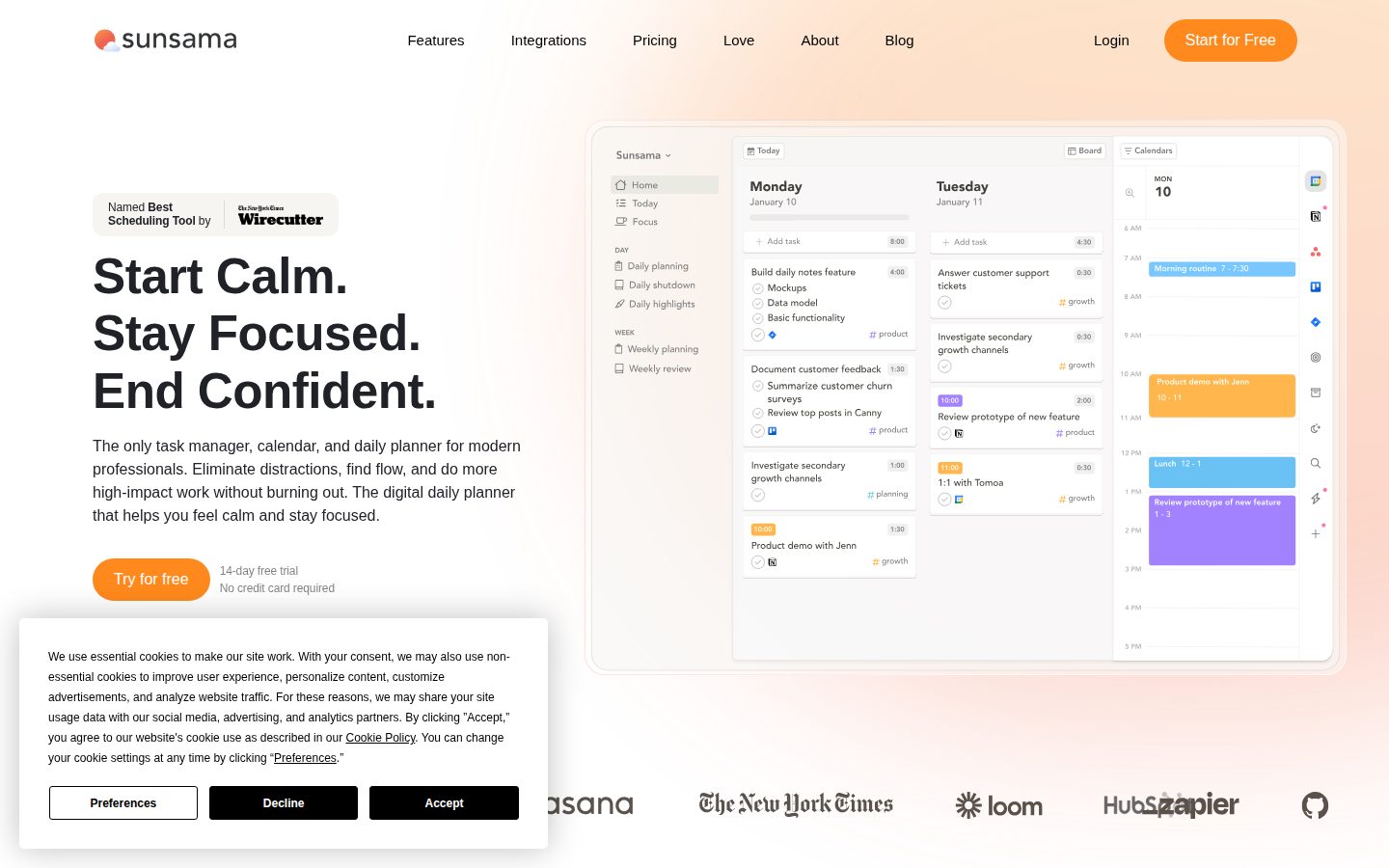
AI Editor ApprovedApproved and published by our AI Editor-in-Chief after full panel analysis.Sunsama structures the workday into three phases: a morning planning session where users gather tasks from connected tools, set priorities, and block time on their calendar; a work phase where users track progress, mute distractions, and adjust the plan as new tasks arrive; and an end-of-day shutdown that logs completed work and closes the day intentionally. The interface presents tasks and calendar events side by side, allowing users to drag tasks onto time slots to create a realistic daily schedule.
The product includes several specific features highlighted on its website: bi-directional sync with Google, Outlook, and Apple Calendar; integrations with Asana, Trello, Jira, ClickUp, Linear, Monday.com, Notion, Todoist, GitHub, Gmail, Slack, Teams, Toggl, and Zapier; a built-in Pomodoro timer; weekly objectives tracking; time analytics showing where hours were spent; focus mode to reduce app interruptions; and automatic break reminders. Enterprise plans include SOC2 compliance and SAML/SSO support.
Sunsama is positioned for individual professionals — including engineers, designers, product managers, executives, founders, marketers, and operations leads — who use multiple work tools and want a unified daily plan. The product offers a 14-day free trial with no credit card required. Exact pricing is not stated on the homepage, but the product operates on a subscription model. It competes in the daily planner and task management space alongside tools like Todoist, TickTick, and Motion.
Sunsama is available on web, iOS, iPadOS, Android, macOS, Windows, and Linux, giving it broad cross-platform coverage for users who work across devices.

Provides visibility into daily and weekly time use so users can understand and optimize their workload and energy.
Connects Sunsama to Zapier's 9,000+ apps to streamline workflows and trigger task creation automatically.
An end-of-day workflow that automatically tracks daily wins, records progress, and helps users finish work on time without guilt.
Allows users to mute apps and reduce interruptions during work sessions to protect focus time.
A structured daily planning ritual that walks users through aligning goals, prioritizing tasks, and setting a realistic workload each morning.
Built-in Pomodoro timer to help users maintain focus and flow while preventing burnout during work sessions.
Allows users to block and visualize time for tasks directly on their calendar so they can see what realistically fits in the day.
Enables users to set and track weekly goals to maintain focus on what truly matters beyond the daily plan.
Syncs with Google, Outlook, and Apple Calendar to display all calendar events alongside tasks in a unified daily view.
Lets users drag emails or convert Slack and Microsoft Teams messages directly into tasks so follow-ups are not missed.
Pulls tasks from tools like Asana, Trello, Jira, ClickUp, Linear, Monday.com, and Notion into a focused daily plan.
Offers SOC2 compliance and SAML/SSO support on the enterprise tier to meet IT and security team requirements.
For busy professionals - full daily-planning workspace; $17/mo equivalent when billed annually. 14-day free trial, no credit card required.
For enterprises with custom security, compliance, integration and billing needs. Pricing requires contacting the vendor.
Sunsama at $22/month solves the scattered-professional problem with real discipline.
“It's a focused daily planner that actually connects to the tools your team already uses. The ritual-based workflow is the product — not just a feature.”
Fourteen integrations including Jira, Linear, Notion, and Slack. Bi-directional calendar sync. A Pomodoro timer baked in. At $17/seat annually, this isn't a toy — it's a deliberate system for professionals who lose hours to context-switching. Motion targets the same buyer with AI scheduling; Sunsama bets on structured habit over algorithmic automation.
The tradeoff worth naming: this is a personal productivity layer, not a team tool. It won't replace your project management stack — it sits on top of it. That's the pitch, but it also means adoption is individual, not org-wide. Rollout can't be mandated, only modeled.
No public funding data and no changelog visible. That's a yellow flag on the viability question. The SOC2 compliance and SAML/SSO on enterprise suggest they're pitching IT buyers, which means they're not planning to disappear quietly.
Motion offers AI-driven auto-scheduling in the same segment; Sunsama wins on intentional ritual, not automation horsepower.
Clean positioning, professional-grade integrations with Jira and Linear, and SOC2 compliance make this an easy board conversation.
14-day free trial with no card required means a single engineer can validate value before anyone signs a contract.
Advances individual execution discipline — not a cost-save, but won't shift your competitive position either.
SOC2 compliance and enterprise tier suggest operational maturity, but no public funding data limits confidence on a 3-year horizon.
Individual contributors or founders who juggle five-plus tools and need one daily view to stay sane.
You need team-level coordination or a tool the whole org adopts from the top down.
Sunsama is the daily planning layer that busy operators actually stick to.
“At $22/month, Sunsama wraps task capture, calendar blocking, and shutdown rituals into a structured daily operating cadence. It won't replace your project management stack, but it will stop that stack from running you.”
The guided daily planning ritual is the operational core here. Morning intake pulls from 9+ project tools — Asana, Jira, Linear, Notion among them — time-boxes tasks against live calendar events, and forces a realistic capacity check before the day starts. That's a workflow discipline problem most productivity tools ignore entirely.
The integration surface is genuinely broad: bi-directional sync across Google, Outlook, and Apple Calendar, plus Slack and Gmail task capture, covers the real daily signal sources for most knowledge workers. SOC2 compliance and SAML/SSO on enterprise tier means IT won't block it. The tradeoff: this is a personal discipline tool, not a team coordination layer — Motion and ClickUp both push harder into managed scheduling and team visibility.
If you adopt Sunsama, in three years you have a team of high-output individuals with strong daily habits but no shared operational rhythm built inside the tool. That's a feature for some orgs and a gap for others.
Sits between lightweight planners like Todoist and AI-scheduled tools like Motion — a defensible middle lane with a distinct ritual-based identity.
Built explicitly for the professional who lives across multiple tools; the integration list maps almost exactly to a senior operator's actual stack.
14 named integrations plus Zapier's 9,000+ app network gives this a connection surface most daily planners can't match.
Strong individual habit formation, but no team-level coordination layer means org-wide adoption has a ceiling.
The three-phase daily structure — planning, work, shutdown — reflects genuine workflow design thinking, not feature accumulation.
A senior individual contributor or executive who works across 4+ tools daily and needs one place to run their personal operating system.
You need a tool that also manages team workload, shared priorities, or cross-functional visibility.
$22/seat monthly, SOC2 included — but enterprise pricing is a black box
“Sunsama publishes a clean $22/month Pro tier with no SSO tax at that level. Enterprise pricing disappears behind a sales call, which complicates any multi-seat procurement.”
$22/month per seat. Annual discount lands at $17/seat — $204/year. Solo or small team, the math is clean. 10 users × $204 = $2,040/year. No integration add-ons based on their pricing page; Zapier, calendar sync, and 14+ project tool connections are included in Pro.
Year-3 TCO for 50 seats requires a call. Enterprise tier publishes no number. That's the real friction — not the sticker, the unknown invoice. Category norm for tools like Motion or Todoist Business is $8–20/seat; Sunsama Pro sits at the high end for an individual-focused planner. Seat creep is low here since it's a personal workflow tool, not a team platform.
Contract terms aren't published. Auto-renewal window and cancellation policy require digging. No API listed, limiting custom procurement workflows. The 14-day free trial with no credit card is clean — procurement won't fight that. SOC2 on Pro tier is genuinely rare at $22; most competitors charge enterprise rates for it.
Single Pro tier simplifies SMB procurement; no credit card trial removes early friction.
Auto-renewal window and cancellation terms aren't published, which is a procurement red flag.
Pro tier fully visible at $22/month; Enterprise requires contact — standard for that tier but opaque.
Time analytics and daily shutdown ritual provide measurable output data, but productivity ROI remains self-reported.
Integrations included in Pro; no published overage or add-on costs, but Enterprise TCO is unquantifiable without a call.
Individual professionals or small teams under 20 seats who want a structured daily planning workflow without procurement complexity.
Your team exceeds 20 seats and needs predictable enterprise pricing without a sales cycle.
Sunsama nails the morning ritual; $22/month demands you actually show up for it.
“Sunsama is a structured daily planning layer that sits on top of your existing tools — Jira, Notion, Linear, Gmail — and pulls them into one prioritized day. The guided planning and shutdown rituals are the real product; everything else is scaffolding.”
The integration list is serious: Asana, Jira, Linear, ClickUp, Notion, Slack, Gmail, bi-directional calendar sync with Google and Outlook. For a knowledge worker who lives across five tabs, that coverage matters. Pulling a Jira ticket into a time-boxed daily plan without leaving the app is exactly the workflow glue that category competitors like Todoist never built. The timeboxing against a live calendar view is the differentiator Motion also chases, but Sunsama's approach is slower and more intentional by design.
Day 3 is where the ritual model gets tested. The guided morning planning works beautifully when you have 15 minutes. On a day with a 9am hard start, it becomes friction. The shutdown ritual is the same — valuable when you have margin, skippable when you don't, and the tool's whole value proposition depends on you doing both consistently. That's a habit tax, not a feature.
At $22/month (or $17/month annually per the pricing page), this is priced for professionals who bill their time or manage serious cognitive load. No free plan means the 14-day trial is your only ramp. The Pomodoro timer and focus mode are solid supporting features, but the weekly objectives tracking is where power users will either deepen or plateau.
The ritual structure is the product — on low-margin days the guided planning sessions flip from asset to bottleneck.
Docs exist but no changelog indicator in the evidence suggests transparency about product evolution is limited.
No changelog published publicly, and no free plan means onboarding friction starts at the trial gate; daily use friction depends heavily on ritual compliance.
Weekly objectives, time analytics, Zapier integration, and MCP support on the Pro tier at $22/month give real depth beyond basic task capture.
Fourteen named integrations including Jira, Linear, Notion, Slack, and bi-directional calendar sync cover most professional stacks convincingly.
Professionals with autonomy over their schedule who manage work across multiple tools and want a single daily planning layer.
Your days are meeting-heavy and reactive — the ritual model won't survive a calendar that owns you.
Sunsama turns daily chaos into a ritual that actually sticks
“At $22/month, it's priced for people who take their workday seriously. The guided planning ritual is the real product — everything else supports it.”
The Guided Daily Planning feature is the whole pitch. Not a task list, not another calendar view — a structured morning ritual that pulls from Asana, Jira, Linear, Notion, and a dozen others, then helps you build a realistic day. That's the thing Motion and Todoist don't really do. They give you a list. Sunsama gives you a ceremony, and some people need that.
The timeboxing-plus-calendar view is genuinely clever. Dragging tasks onto time slots beside your actual calendar events so you can see whether your plan is even possible — that's someone who has lived through an 11-meeting Tuesday deciding what to build. The daily shutdown ritual is the same energy. Intentional close, not just closing the tab.
The tradeoff: $22/month is real money for a solo daily planner. No free tier means you're paying before you're hooked. And if you just need a simple list, this will feel like a lot of structure to maintain every single day.
The shutdown ritual and timeboxing drag behavior suggest a team that's actually lived inside this workflow daily.
The three-phase day structure (plan, work, shutdown) gives you a mental model fast, but with 14+ integrations there's real configuration overhead before month one is done.
iOS, Android, and iPadOS are all listed, which is better than most in this category, though daily planning rituals were clearly designed for desktop first.
14-day free trial with no credit card is a low-friction start, and the guided ritual naturally walks new users through the product's core loop.
Bi-directional sync across Google, Outlook, and Apple Calendar is a technically fragile thing to promise — no public changelog makes it hard to verify how well they maintain it.
Professionals juggling multiple project tools who want a single structured daily plan, not just another inbox.
You want lightweight task capture without a daily ritual to maintain.
Solid ritual-first planner, but $22/month is a real commitment ask
“Sunsama's Guided Daily Planning ritual is genuinely differentiated from Todoist or Motion. The price point and missing public changelog make me cautious about a long-term bet.”
Three tells upfront. One: the tagline says 'feel calm' — wellness language in a productivity tool is a flag, not a feature. Two: no changelog visible in the evidence. I can't see shipping cadence. Three: no public funding data. Could be profitable bootstrapped. Could be running on fumes. Can't tell.
What they're actually selling — the three-phase day structure with morning ritual, work phase, and Daily Shutdown Ritual — is coherent and specific. Not vague AI fluff. The integration list is real: Linear, Jira, Notion, Asana, Slack, Gmail. At $22/month that's not cheap for a solo planner layer sitting on top of tools you already pay for. Motion plays the same space and adds AI scheduling. That's the pressure point.
Exit portability is weak. Your data lives inside Sunsama's workflow layer. Tasks live upstream in Asana or Linear — those you keep. But your time logs, weekly objectives, shutdown history? No public API. Gone if they fold.
The structured three-phase day ritual is a real wedge vs. Todoist's flat list model; Motion competes harder on AI scheduling but Sunsama's intentionality angle is distinct.
No public API listed; task data lives in upstream tools but Sunsama-native history — time analytics, shutdown logs — has no obvious export path.
SOC2 compliance signals some organizational maturity, but absent funding signals, changelog, or team size data, this is a watch-and-see situation.
'Make work-life balance a reality' is the kind of promise that invites disappointment — but the feature descriptions are specific and grounded, which partly redeems it.
No changelog, no public funding data — matches the pattern of slow-burn indie tools that survive quietly, but also ones that quietly stop shipping.
Individual professionals already juggling Jira, Asana, or Linear who want one place to build a daily plan without switching tools.
You need team-level task management or want confidence in long-term vendor stability before committing $22/month.
Common questions answered by our AI research team
Sunsama integrates with Asana, ClickUp, Jira, Linear, Monday.com, Notion, Todoist, Trello, and Microsoft To Do, allowing you to pull tasks into a focused daily plan.
Yes, Sunsama is SOC2 compliant, making it easy for IT and security teams to approve. SAML & SSO are also available on the enterprise tier.
Yes, Sunsama offers a 14-day free trial with no credit card required.
Sunsama is available on iOS/iPadOS, Android, macOS, Windows, and Linux.
Yes, Sunsama offers bi-directional calendar sync with Google, Outlook, and Apple Calendar.