AI-powered manga and comic translation with layout preservation
만화 번역기 AI(mangatranslate.com)는 OCR 텍스트 인식과 지능형 레이아웃 보존 기능을 갖춘 만화 및 동인지용 온라인 번역 플랫폼입니다.
AI Panel Score
6 AI reviews
Reviewed
Facts checked against mangatranslate.com
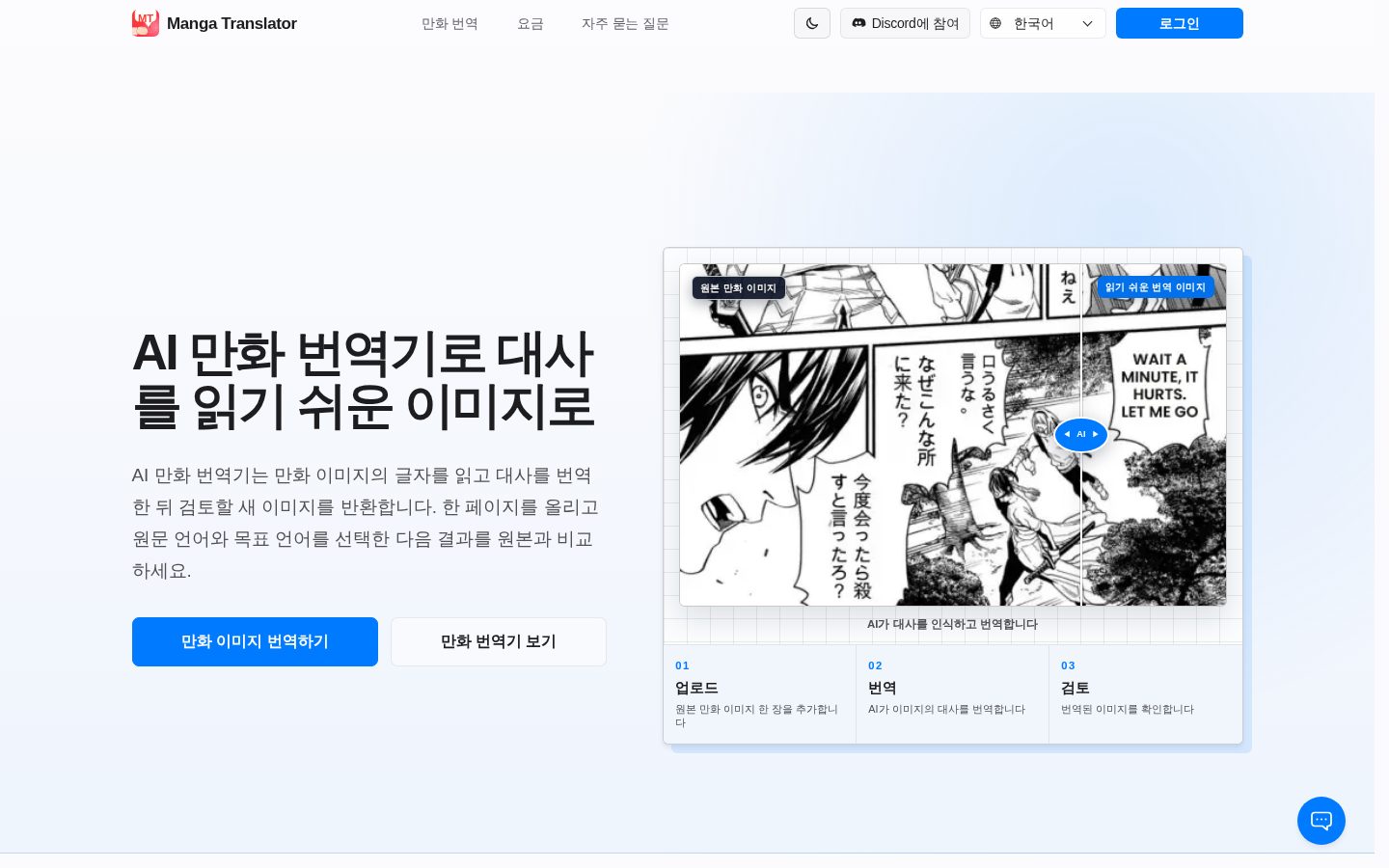
사용자는 만화나 동인지 이미지를 업로드하면, 플랫폼이 OCR을 통해 말풍선 속 텍스트를 인식하고, 원본 텍스트를 지운 후, 번역된 텍스트를 같은 자리에 재배치합니다. 이 과정은 온라인에서 이루어지며, 별도의 소프트웨어 설치 없이 웹 브라우저를 통해 사용할 수 있습니다.
플랫폼이 강조하는 주요 기능은 말풍선 감지, 텍스트 지우기, 레이아웃 보존을 포함한 자동화된 번역 파이프라인입니다. 다국어 번역을 지원하며, 한국어, 일본어, 중국어(간체·번체), 영어, 아랍어, 벵골어, 독일어, 스페인어, 프랑스어, 힌디어, 말레이어, 포르투갈어, 러시아어, 터키어 등 여러 언어 버전의 페이지를 통해 다국어 사용자를 지원하고 있음을 알 수 있습니다.
이 서비스는 만화, 망가, 만화, 동인지를 번역하려는 사용자를 대상으로 하며, 무료로 이용할 수 있는 플랜이 제공됩니다. 가격 정책 페이지와 API가 공개되어 있습니다.
Uses built-in glossaries and translation memory (TM) alongside the translation model to ensure consistent, context-aware translations.
Translates manga text using multiple selectable translation backends including GPT-4o, Papago, and Google Translate.
Allows users to process multiple manga pages at once rather than translating one page at a time.
Enables quick export of completed, high-quality translated manga pages after processing.
Supports translation into and from over 100 languages.
Accepts manga page uploads in multiple formats including JPG, PNG, and WEBP.
Automatically detects and extracts text from manga images using optical character recognition.
Places translated text back into the manga page with automatic, layout-aware typesetting.
Offers the platform's interface in 15 different language versions for international users.
Provides API access so developers can integrate the manga translation engine into their own applications or workflows.
매일 출석하여 무료 크레딧을 받을 수 있는 체험 플랜
소량으로 크레딧을 구매하려는 사용자를 위한 일회성 구매 팩
중간 규모 사용량을 위한 크레딧 팩, 5% 할인 적용
대량 사용자를 위한 최고 가치 크레딧 팩, 23% 할인 적용
매월 크레딧이 갱신되는 구독형 요금제
연 단위로 결제하여 23% 할인된 최고 가치 구독 요금제
Niche manga OCR translation tool with real pricing and a surprisingly deep editor behind it.
“A narrow but well-built tool: OCR, auto-typesetting, and a Photoshop-like editor for manual fixes. Priced in usage credits, cheap enough to pilot for almost nothing.”
$10.83/month on the annual plan gets you 41,700 credits at $0.003 each. That's a real rate card, not a sales call. Three recognition models — Manga, Ultra, EagleEye — let you trade speed for quality, which is more granularity than I expected from a tool this specific.
The pipeline does the unglamorous work: detect bubbles, erase text, re-typeset translated copy in place. MangaTranslate Studio backs that up with manual font, color, and spacing control when the automation misses. API access with Python and cURL examples means this isn't just a consumer toy — a localization team could wire it in.
Multi-engine translation (GPT-4o, Papago, Google Translate) is a smart hedge against any one model's quality dips. The tradeoff: this is a single-use tool, not a platform. You're buying a sharp knife, not a kitchen.
Multi-engine translation choice (GPT-4o, Papago, Google Translate) plus a dedicated manual editor is more than a single-model translator offers.
Credits are described as long-lasting and pricing is transparent, though I couldn't find explicit data-handling or IP terms for uploaded manga pages.
Free daily credits plus a $0.003/credit rate mean a usable test run costs almost nothing before committing.
Solves a specific localization cost problem well but doesn't extend into broader creative or publishing workflows.
Published API docs, a full credit-based pricing page, and three named recognition models suggest active development.
Scanlation groups or small localization teams who need fast, cheap manga translation with manual cleanup options.
Skip it if you need a general-purpose creative platform rather than a single translation utility.
Smart typesetting is a real production pipeline, not a filter — but it only paints one picture.
“This is a single-purpose letterer's tool built for a very specific craft problem: comic text replacement at scale. Within that lane it's deeper than I expected; outside it, it doesn't pretend to exist.”
Three recognition models — Manga, Ultra, EagleEye — tells me someone on this team actually understands the difference between generic OCR and manga-specific text detection, where vertical Japanese, SFX lettering, and cramped Korean webtoon balloons each break differently. That's a craft decision, not a marketing one. Most translation tools treat all source text the same; this one doesn't.
The ceiling is production throughput, not creative range. Batch processing multiple pages and exporting fast matters enormously for a scanlation team or a publisher clearing a backlog, but there's no asset library, no style guide layer, no brand-voice consistency tool beyond glossaries and translation memory for terminology.
Three-year view: this slots in as a utility step in a larger pipeline, not a creative hub. If your studio's workflow is upload-translate-export-done, it fits cleanly at $10.83/month on the annual tier for 41,700 credits. If you need this tool to anchor a broader localization or publishing suite, you'll outgrow it fast — it was never built to be the center of anything.
A focused single-purpose translator in a space where the obvious alternative is a general-purpose translation tool with no layout awareness.
Balloon detection, erase, and layout-aware typesetting map directly onto how letterers actually rework a page.
API access with Python and cURL examples lets it slot into an existing pipeline rather than demand a new one.
Credit-based usage at $0.003-$0.005 per credit scales cleanly for volume, but locks you into a narrow tool rather than a platform.
Three distinct recognition models for manga-specific text shows real domain-specific engineering, not a generic OCR wrapper.
A scanlation group, indie publisher, or localization team that needs fast, layout-preserving comic translation at production volume.
You need a creative suite that handles brand voice, asset management, and publishing workflow beyond the translation step itself.
$12.90 monthly or $10.83 on annual — the math favors committing early.
“Credits scale from $0.005 down to $0.003 each as volume rises. Annual billing locks in the best rate but assumes steady usage.”
Monthly is $12.90 for 3,200 credits — $0.004 each. Annual drops to $10.83/month for 41,700 credits/year, $0.003 each. That's a 23% discount for committing twelve months out. Fine if your translation volume is steady. Wasteful if it's seasonal — scanlation drops aren't a monthly cadence for most teams.
Credit packs above the subscriptions — 1,100, 4,600, 28,700 — list per-credit rates but no total price in dollars, so you're doing the multiplication yourself before checkout.
Ultra recognition costs 2 credits against 1 for Manga or EagleEye. Run a 20-page chapter through Ultra and you've doubled your per-page cost versus the base models — a real line item at volume, not a rounding error.
Billing model reads usage-based and self-serve. No contract term, no auto-renewal clause, no cancellation friction visible anywhere I looked. That's the kind of simplicity procurement likes.
Self-serve subscription and pay-as-you-go packs, no sales call needed to see a number.
Usage-based billing with no stated term length or auto-renewal clause I could find.
Per-credit math is published down to $0.003, though the three credit packs show no dollar total.
Cost-per-page is calculable from credits, but value depends on how often re-runs are needed to fix OCR misses.
Ultra model at 2 credits versus 1 for the others means cost scales with model choice, not just page count.
Teams with steady monthly translation volume who want the lowest per-credit rate.
Avoid if your translation volume is sporadic and the annual discount would go unused.
Three recognition models to pick from, but the picking itself is a daily tax
“Choosing between Manga, Ultra, and EagleEye on every batch adds a decision point most scanlation workflows don't need. The Studio editor saves the job when OCR guesses wrong, but that's a repair tool, not a prevention one.”
Having three OCR models — Manga at 1 credit, Ultra at 2, and the early-access EagleEye with auto language detection — sounds like depth until you're thirty pages into a chapter and re-running the same page through a different model because the first one mangled a sound effect. That's credits spent twice on one panel. A letterer picking fonts in Clip Studio doesn't re-choose their tool mid-page; here you do, per upload.
The Studio editor (font, size, color, outline, tracking, line-height) is the real save — it means a bad auto-placement doesn't kill the page, you just nudge it. But every nudge is manual time against a tool whose pitch is zero manual editing.
PDF, ZIP, and TAR support in the upload list suggests someone building this actually ships raw scan folders, not just single JPGs. That's a good sign for a team pipeline, less good for discoverability — nothing in the pricing page explains when you'd want EagleEye over Manga.
The Studio editor catches OCR misses, but fixing font and tracking by hand after an automated pass undercuts the no-manual-editing pitch.
The API Examples page with V1/V2 Python and cURL samples reads like it was written by someone who integrates it, though I couldn't find deeper docs on model selection logic.
Picking between Manga, Ultra, and EagleEye per batch is a recurring decision with no visible guidance on when each wins.
The manual Studio editor with outline, tracking, and line-height controls gives power users real override room beyond the automated pipeline.
Accepts PDF, ZIP, TAR, and TAR.GZ uploads at 15MB per page, which fits raw scan folders better than single-image tools do.
A scanlation or localization team that wants raw-folder uploads and is willing to hand-correct typesetting in Studio when the automated pass misses.
Avoid if you want a single default pipeline without per-batch model decisions eating into your credits and your time.
Solid credit-based translation tool, but the daily-login free plan feels like a side hustle you have to clock into.
“A focused manga translation pipeline with real pricing transparency and a legit editor for cleanup. The free tier's attendance-check structure is the kind of thing that feels clever on day one and like a chore by month two.”
First ten minutes here is straightforward: upload a page, pick a model, let OCR and typesetting do their thing. No install, which is table stakes but still nice. The free plan gives daily credits if you show up, or you can hop into their Discord or Telegram for bonus credits. That's a fun gimmick for a week. Three months in, 'log in daily or lose value' starts feeling less like a reward loop and more like homework with extra steps.
The $12.90/month subscription tier (3,200 credits) versus the $10.83/month annual option is clean math, I'll give them that. Batch processing matters for throughput, and the Studio editor covering font, outline, and spacing means you're not stuck if OCR mangles a bubble.
What I can't tell from the outside is how the product behaves when something goes wrong mid-batch — no visible word on error recovery or whether a failed page eats a credit anyway. For a single-purpose tool, that gap matters more than it would in something bigger.
The attendance-based free credits are a neat hook early but add friction as a daily habit rather than removing it.
Three recognition models and a Photoshop-style Studio editor give room to grow past the basic OCR-and-export flow.
Listed as web-only with no mobile-specific mention, so phone use is likely just a cramped browser tab.
Upload-to-export flow with no install and a free trial plan makes the first session low-commitment and clear.
I couldn't find anything on error handling or failed-job credit refunds, which matters for a credit-metered tool.
Someone translating manga or doujinshi pages regularly who wants predictable per-credit costs and manual cleanup tools.
You want a true no-strings free tier instead of one that requires daily check-ins to stay useful.
A single-purpose translator pricing itself by the credit, not the roadmap.
“Fairly priced and feature-specific for manga localization, with per-credit transparency down to $0.003. But a company called Ficory LLC with no named backers and a crowded OCR-translation lane makes this a watch, not a bet.”
Ficory LLC runs this. That's the whole company story I could find. No funding, no headcount, nothing — which is normal for a tool at this size, but it means the entire bet rests on one unnamed team keeping EagleEye and Studio updated.
The pitch is grounded, mostly. Glossaries, translation memory, three swappable recognition models — specific claims, not vague superlatives. GPT-4o, Papago, Google Translate as selectable backends is a real differentiator; most manga-OCR tools I've seen lock you into one engine. That's a genuine gap, not a copycat move.
Exit portability worries me more. Translated pages export fine, but the credit system — $12.90/month for 3,200 credits, or the annual plan at $10.83/month — means your leftover balance doesn't travel if you leave. OCR tools come and go fast in this category. I'd want a data-deletion answer before trusting it with a full backlog.
Selectable translation backends (GPT-4o, Papago, Google Translate) is a real feature most single-engine OCR translators don't offer.
Exported pages are yours, but unused credits and any uploaded originals have no stated portability or deletion path.
API with V1/V2 examples suggests active development, but I couldn't confirm a changelog or support SLA beyond Discord/Telegram mentions.
Claims like 'multi-engine' and named models (Manga, Ultra, EagleEye) are specific enough to check, not just aspirational copy.
Credit costs per model (1 vs 2 credits) and stated 15MB page limits back up the pipeline claims with real numbers.
Scanlation groups or small localization teams who want engine choice without building their own OCR pipeline.
You need assurance that your uploaded pages and paid credits survive a vendor shutdown or pivot.
Common questions answered by our AI research team
세 가지 인식 모델을 선택할 수 있습니다. Manga(1 크레딧)는 만화 처리에 특화된 1세대 모델로 한국어·중국어·일본어 전용 인식 모델을 갖추고 있고, Ultra(2 크레딧)는 세부 표현을 정교하게 처리하는 고품질 모델이며, EagleEye(1 크레딧)는 최신 연구 기술을 적용한 얼리 액세스 모델로 원문 언어를 자동 감지합니다.
네. MangaTranslate Studio에서 번역된 이미지를 열어 대사와 텍스트 상자 위치를 수정하고, 글꼴, 크기, 색상, 외곽선, 정렬, 줄 간격, 자간까지 조정할 수 있는 Photoshop과 유사한 온라인 편집기를 제공합니다.
네. 기업 팀은 API Key로 인증한 뒤 이미지 배치를 제출하고 작업 상태와 크레딧을 조회할 수 있습니다. API Examples 페이지에서 V1·V2용 Python과 cURL 요청 예제를 확인할 수 있습니다.
네, 제한된 무료 사용량을 제공합니다. 매일 출석 체크나 Discord 또는 Telegram 커뮤니티 이벤트 참여를 통해 무료 크레딧을 받을 수 있으며, 남은 이용량과 유료 옵션은 계정 페이지에서 확인할 수 있습니다.
JPG, JPEG, PNG, WEBP, AVIF, PDF, ZIP, TAR, TAR.GZ 형식을 지원하며, 페이지당 최대 15MB까지 업로드할 수 있습니다.
Ficory LLC operates MangaTranslate, an online platform that uses AI-based OCR and translation to convert manga, webtoons, and comics into other languages.