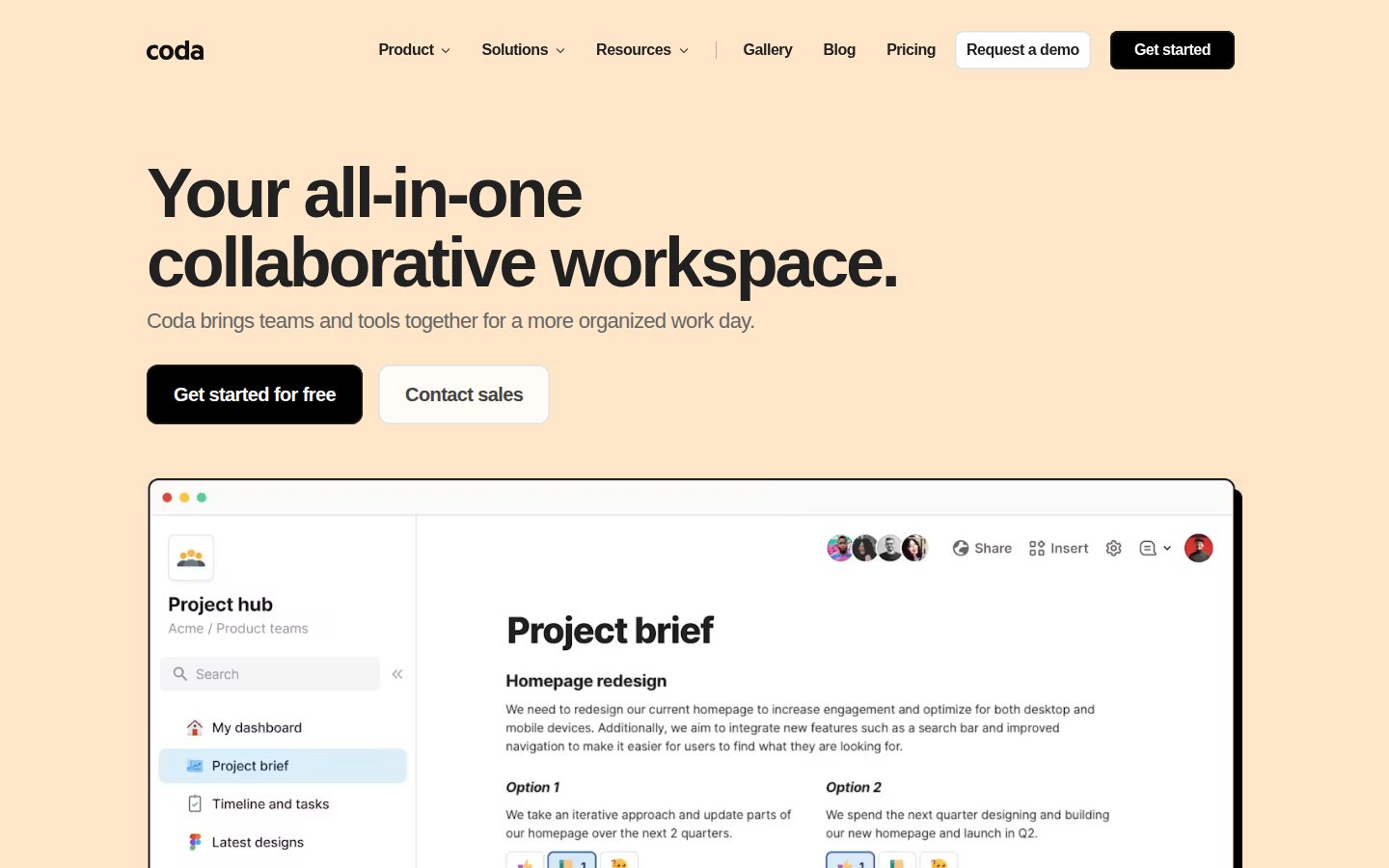
Collaborative workspace combining docs, tables, and automations in one place
Coda is a collaborative document and database platform for teams that need to combine writing, tracking, and workflow automation.
AI Panel Score
6 AI reviews
Reviewed
In practice, users work inside docs that behave like a hybrid between a word processor and a spreadsheet. A single Coda doc can contain rich text pages alongside tables whose data references other tables, kanban or calendar views of the same data, and embedded content from external tools. Buttons and formulas can trigger actions—such as sending a Slack message or creating a Jira ticket—directly from within the doc, so teams can run processes without leaving the workspace.
Coda highlights several specific capabilities on its site: AI features that allow chat-based brainstorming, content generation, and AI-powered columns that apply automated logic to table data at scale; and over 600 integrations including Google Calendar, Slack, Figma, and Jira. Tables are designed to be relational—edits in one table propagate across linked views—which the product positions as a replacement for disconnected spreadsheets. The Gallery provides ready-made templates for product, sales, engineering, design, marketing, and HR teams.
Coda is aimed at cross-functional business teams, particularly those in product management, sales operations, engineering, design, marketing, and HR. It competes directly with Notion, Airtable, and Google Docs, and has been compared to all three in the press. Coda prices by doc maker rather than per seat for viewers and editors, which it frames as a cost advantage for growing teams. A free plan is available, with paid tiers for additional features and scale.
Coda is web-based and also offers mobile apps for iOS and Android. Its integration layer connects to external services via native connectors and supports embedding live content from third-party tools directly inside docs.

Let Coda AI start documents from scratch, summarize existing content, or generate tables to accelerate sharing work.
Engage in dynamic dialogue with Coda AI to brainstorm ideas, create content, or ask questions about your workspace.
Apply AI at scale across table columns to automatically turn data into insights or generate content for repetitive tasks.
Build lightweight internal apps using formulas, buttons, and automations without engineering resources, replacing niche tools in the stack.
Set up automated workflows that push updates to tools like Slack or create Jira tickets from feedback tables without manual intervention.
Build a centralized place for teams to align on strategy, schedules, and resources in a single shared workspace.
Tables sync edits across views automatically, allow personalized views per user, and replace manual spreadsheet workarounds.
Coda prices workspaces differently from per-seat models, removing cost barriers that limit team expansion and collaboration.
Create collaborative documents that combine the familiarity of a doc with app-like interactivity, enabling teams to collaborate and make decisions together.
Allow individual team members to view the same underlying table data in personalized ways without affecting others' views.
Access a gallery of pre-built, team-specific templates published by real teams for use cases across product, sales, engineering, design, marketing, and HR.
Connect Coda to over 600 tools including Slack, Google Calendar, Figma, and Jira to pull, push, and embed data across your workflow.
Get started for free with Coda's collaborative workspace
Custom pricing for larger or enterprise teams. The page references 'Explore pricing' and 'Contact sales' but does not list specific paid tier names or prices in the scraped content.
Coda earns its place against Notion with relational tables and real automation.
“Solid cross-functional workspace with 600+ integrations and a pricing model that doesn't punish team growth. Competes hard with Notion but requires more upfront setup than most teams expect.”
They've been at this long enough to have real templates, a changelog, and a coherent pricing philosophy. The per-doc model instead of per-seat is a genuine differentiator — it removes the tax on growth that kills Notion adoption at scale. AI Column is the feature worth watching: automated logic across table data without touching code.
The tradeoff is complexity. Interconnected relational tables are powerful when someone builds them right. When nobody owns that setup, they become expensive shelfware. This isn't a Notion drop-in. It's a commitment.
Pricing page shows a free tier but paid tiers require a sales call — no self-serve number visible. That's a yellow flag for teams that want to move fast without a procurement cycle. Pilot with one cross-functional team before standardizing anything.
Non-seat pricing and built-in automations give it a real edge over Notion for ops-heavy teams.
Widely compared to Notion and Airtable in the press; adopting it reads as a credible, considered choice to any board.
Templates Gallery accelerates onboarding, but relational table setup requires an owner — value isn't instant.
Replaces multiple tools — docs, trackers, lightweight apps — which advances team efficiency beyond simple cost savings.
Established product with changelog, API, and 600+ integration partnerships — category staying power, though no public funding data available.
Cross-functional ops teams that need docs, trackers, and lightweight automation in one place without per-seat pricing.
Your team wants a simple writing tool and won't invest time in building out the relational structure.
Coda consolidates cross-functional ops without per-seat pricing killing your headcount budget.
“Relational tables, no-code automations, and 600+ integrations make Coda a serious operational backbone for mid-size teams. The pricing model alone removes one of the most common friction points in scaling collaboration tooling.”
Coda's doc-maker pricing model is the first thing I'd bring to a leadership discussion. Most COOs have watched per-seat costs balloon as Notion or Airtable invoices compound with headcount — Coda's explicit rejection of that model is a structural advantage, not a marketing line. For a team scaling from 30 to 120 people, that's a materially different budget conversation in year two.
The operational architecture is genuinely solid. Interconnected tables that propagate edits across linked views, buttons that fire Slack messages or create Jira tickets without eng involvement, and AI columns that process table data at scale — that's a workflow layer most COOs are currently stitching together across three separate tools. The 600+ integration surface means it plugs into existing stacks rather than demanding a migration.
The honest constraint: pricing page opacity on paid tiers is a planning problem. "Contact Sales" with no published price points makes multi-year budget forecasting harder than it should be. Notion publishes its tiers clearly; Coda asks you to get on a call first, which slows procurement.
Coda sits between Notion's doc-first flexibility and Airtable's table-first power, occupying a defensible middle position that neither competitor fully owns.
Cross-functional ops teams — product, sales, HR, engineering — are explicitly served with templates and automation primitives that match how those functions actually run processes.
600+ integrations including Slack, Jira, Figma, and Google Calendar cover the standard cross-functional stack without requiring custom connectors.
If we adopt Coda, in 3 years we have operational workflows embedded in a proprietary doc-plus-database schema — migration isn't trivial, but the pricing model stays friendly as the org grows.
Relational tables plus no-code automation plus AI columns shows genuine product thinking — closer to Airtable's depth than Google Docs' surface.
Cross-functional teams that need docs, trackers, and lightweight automations unified without a per-seat pricing model punishing headcount growth.
Your org needs enterprise-grade admin controls, published SLA pricing, or a pure database-first architecture at scale.
Doc-maker pricing model is clever; zero published paid tier numbers kills TCO math.
“Coda's per-doc pricing rejects the per-seat tax that burns teams in Notion and Airtable. But no published tier prices means procurement builds a blind 3-year model.”
Coda's pricing philosophy is genuine. Charging per doc maker rather than per seat is a real structural advantage at scale — 50 editors in Notion at $16/seat runs $9,600/year before AI add-ons. Coda's model can undercut that materially, based on their pricing page framing. But 'can' isn't a number, and no number means no model.
Free tier includes 600+ integrations and templates. Useful floor. Paid tiers: entirely behind a sales call. No published price, no tier names, no overage rates. Category norm is at least 2 visible paid tiers. Airtable publishes $20/seat. Notion publishes $16/seat. Coda publishes nothing. That's a procurement problem, not a marketing one.
Year 3 TCO is genuinely unknowable without a quote. Add implementation time — formulas and buttons have a learning curve — and migration from existing spreadsheets. Call it 40–80 hours of setup for a 50-person team. At $75/hour blended, that's $3K–$6K before the first invoice.
Sales-led onboarding with no self-serve paid tier means procurement friction is above category average.
No public auto-renewal terms, cancellation policy, or term length — standard sales-led opacity.
Zero published paid tier prices; 'Contact Sales' only — can't model this without a call.
Relational tables and 600+ integrations have measurable workflow consolidation value, but no published ROI benchmarks.
Per-doc model likely cheaper than Notion at scale, but no numbers means year 3 TCO is a guess.
Cross-functional teams of 20+ who've been burned by per-seat scaling costs and can tolerate a sales-led buying process.
Your procurement team requires published pricing before approving a vendor conversation.
Coda earns its keep if you're willing to build before you browse
“Coda's relational tables and formula-driven automations genuinely replace the Notion-plus-Airtable-plus-spreadsheet pile for cross-functional teams. The learning curve is real, but the payoff compounds once your docs start talking to each other.”
Day three looks like this: you've got a beautiful product roadmap doc, your tables are linked, and then you realize a teammate is editing the same cell from a different view and nothing broke. That's the promise landing. The 600+ integrations mean Slack pushes and Jira ticket creation happen inside the doc, not via a separate Zapier chain. The per-doc pricing model removes the usual seat-count anxiety when looping in stakeholders.
The friction shows up in formula syntax. It's not Excel, it's not Notion — it's Coda's own language, and muscle memory from either won't carry over. New team members get lost before they find the Templates Gallery, which is genuinely good once discovered.
For knowledge workers who live in docs and trackers simultaneously, Coda sits above Notion in structural power. The tradeoff: Notion onboards faster, and Coda rewards the builder more than the casual reader.
Interconnected tables and button automations deliver real utility by day three, but formula syntax has a cold-start cost that frontloads frustration.
The changelog and template Gallery suggest docs are written with real use cases in mind, though depth for advanced formula use isn't confirmed from available evidence.
Formula language learning curve and unfamiliar doc-as-app mental model create recurring small fights for non-builder teammates.
AI Columns, relational tables, and formula-driven buttons give power users genuine depth that Notion's block model can't match structurally.
Native Slack, Jira, and Figma connectors from the 600+ integration list mean Coda can live inside existing workflows rather than beside them.
Cross-functional teams in product, ops, or sales who need docs and structured data in one place and have at least one motivated builder to set it up.
Your team wants a lightweight doc tool and won't invest time building the relational structure Coda's power depends on.
Coda does the three-tool job of Notion, Airtable, and Google Docs — mostly well
“Relational tables, real automations, and 600+ integrations in one doc is a genuinely useful promise. The learning curve is real, but the depth is there when you need it.”
The per-doc pricing model is quietly the best thing about Coda. Notion charges per seat, which means finance starts sweating every time you add a stakeholder. Coda says that doesn't sit well with them, and for cross-functional teams with lots of viewers, that math matters fast.
The interconnected tables are where Coda earns its keep. Edits in one table propagate across linked views, personalized per user — that's not spreadsheet behavior, that's closer to a lightweight database. The AI Column feature, which applies automated logic across table data at scale, is the kind of thing that sounds like a demo trick until you actually have 200 rows of feedback to triage. The 600+ integrations including Slack and Jira mean you're not context-switching just to file a ticket.
The tradeoff is the learning curve. This isn't a tool you'll have figured out by lunch. Formulas and buttons are powerful, but they demand investment. Month one feels like homework. Month three, if you've put in the time, it starts to feel like a genuinely custom workspace.
Interconnected tables and personalized views suggest real UX care, but no public changelog detail on micro-copy or empty state quality to push this higher.
Formulas, buttons, automations, and relational tables are genuinely powerful but the depth that makes month three great is the same thing that makes week one hard.
iOS and Android apps exist, but a tool this formula-and-table-heavy rarely delivers full parity on mobile — the docs suggest reading and light editing, not building.
The Templates Gallery covers product, sales, engineering, design, marketing, and HR — that's a strong first-session safety net, but formulas and buttons will slow new users down fast.
Relational table syncing across views is complex under the hood — category norm is that this kind of live-sync needs to be bulletproof or it erodes trust quickly; no red flags in public evidence.
Cross-functional teams willing to spend a few weeks learning in exchange for replacing three separate tools.
You need something your team will be productive in on day one without a learning investment.
600 integrations, opaque paid pricing — Notion competitor with real differentiation
“Coda has a genuine angle: per-doc pricing and relational tables in one doc surface. But the pricing page hides everything past Free, which is a yellow flag on its own.”
Three tells up front. One: 'all-in-one' is in the H1 — the kind of phrase that describes both Notion and a Swiss Army knife. Two: no paid tier prices visible in scraped content, just 'Contact Sales.' Three: the Free plan lists '600+ integrations' but there's no public ceiling on what breaks at scale.
The differentiation is real though. Per-doc pricing instead of per-seat is a concrete structural bet against Notion and Airtable. AI Columns — applying automated logic across table data at scale — isn't just rebranded ChatGPT. Relational tables that sync across views are closer to Airtable than Google Docs, but wrapped in a doc shell. That combo is genuinely harder to replicate quickly.
Exit portability worries me. Proprietary formula layer, button logic, and cross-table references don't export clean. If Coda pivots or prices you out, you're rebuilding, not migrating. Based on category history — Quip, Notion clones, Almanac — that's not hypothetical.
Per-doc pricing and AI Columns are structurally distinct from Notion's per-seat model and Airtable's standalone table approach.
Proprietary formula layer and cross-table references make clean export unlikely — category norm for this type of tool is poor portability.
Changelog exists, API exists, 600+ integrations suggest active development — no public funding data visible to verify runway.
'All-in-one' H1 and missing paid pricing signal aspirational positioning over grounded transparency.
Relational tables plus doc-native automation matches patterns from Airtable's early survival story, not its failure case.
Cross-functional teams that need docs and relational tracking in one place without paying per seat.
You need transparent enterprise pricing upfront or a clean exit path if vendor direction shifts.
Common questions answered by our AI research team
Coda explicitly rejects per-seat pricing, stating "charging per seat doesn't sit well with us" and that it prices differently to remove limits that hinder expanding teams.
Yes. Tables talk to each other, edits sync everywhere, and views are personalized—replacing hacky spreadsheets. Coda's interconnected relational tables are a core feature for building trackers.
Coda offers 600+ integrations, including Google Calendar, Slack, Figma, and Jira. You can pull, push, and embed data across these tools directly within a doc.
Yes. Coda provides customizable templates for every team—product, sales, engineering, design, marketing, and HR—covering use cases like roadmaps, OKR trackers, hiring hubs, and CRMs.
Anyone can build automations using formulas, buttons, and automations without engineering resources. Coda is designed so non-technical team members can create time-saving solutions independently.