Inkspira logo

Inkspira Review

Visit

AI tattoo design generator built for Germany, priced in euros

Inkspira is an AI tattoo generator for people in Germany who want tattoo-ready designs from a text description.

AI Panel Score

7.4/10

6 AI reviews

Reviewed

Facts checked against inkspira.de

AI Editor Approved

About Inkspira

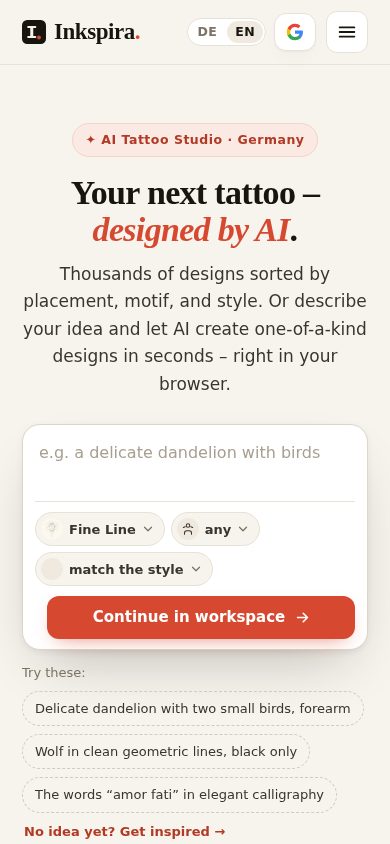
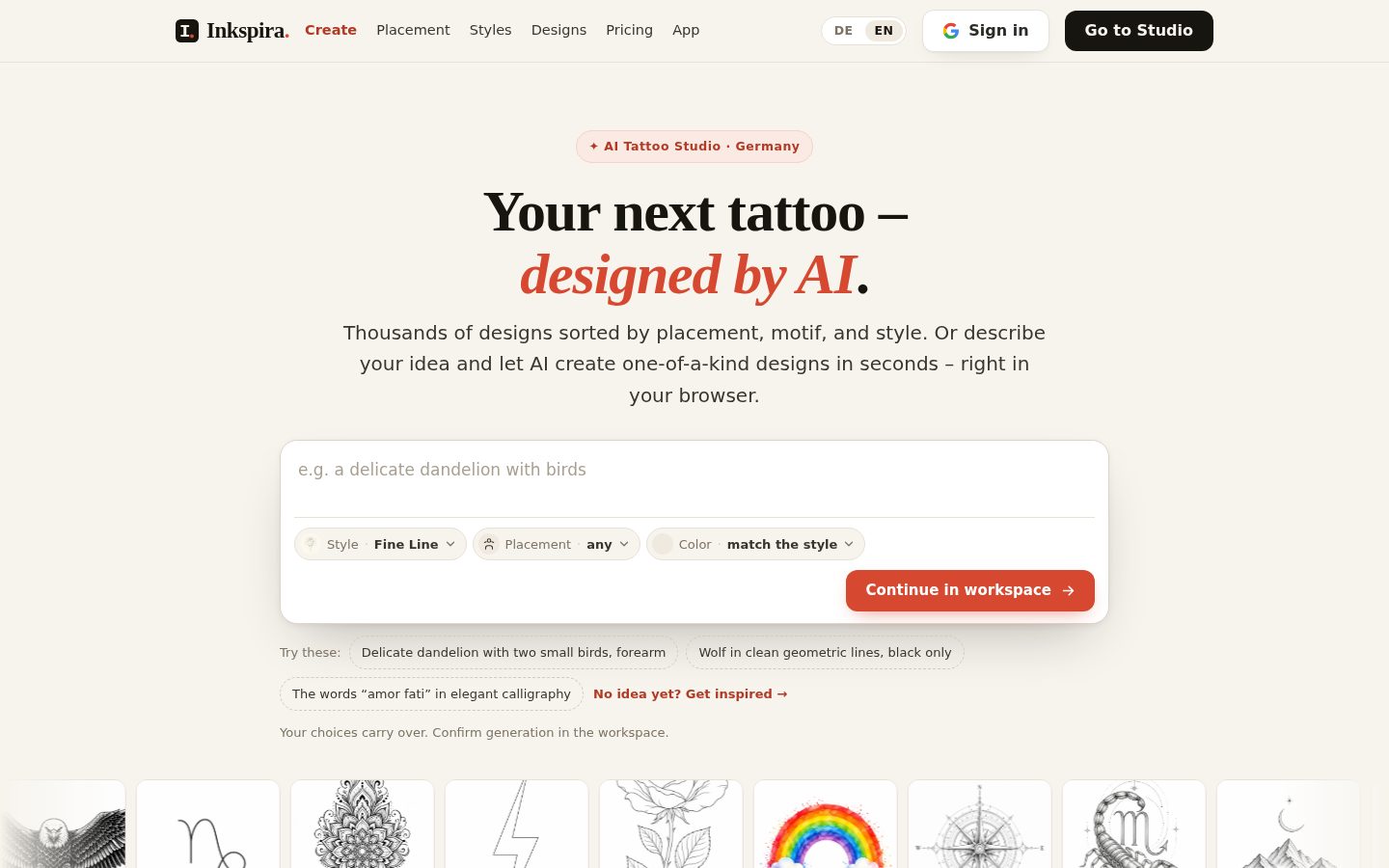
Inkspira works entirely in the browser: a user signs in with Google, types a description of a tattoo idea, selects one of 21 styles and optionally one of 10 body placements, and receives a finished design. Separate tools let users try a design on a photo of their own body via the Tattoo-Simulator, convert an existing photo into a tattoo design with Bild zu Tattoo, or use the Tattoo-Ideen-Generator, an idea chat that turns the story behind a tattoo into a concrete design brief.

The site is written natively in German rather than translated, including all 184 topic pages, the free tools, and German-language style names such as Aquarell, Geometrisch, and Japanisch, with an English version running in parallel under /en/. It includes Germany-specific free tools usable without sign-in: a tattoo cost calculator based on typical German studio rates, a tattoo size calculator, a laser removal cost calculator that references Germany's NiSV rule restricting laser removal to doctors, a tattoo font previewer covering 17 fonts with PNG download, and a name-tattoo preview tool covering 120 names in 12 fonts. Photos uploaded for the AI try-on feature are used only for the calculation and are not stored. Beyond the generator tools, the site hosts 184 topic pages with tattoo ideas and templates organized by body placement, motif, and style.

Inkspira is built for people in Germany looking for AI-generated tattoo designs and tattoo research tools in their own language. Pricing runs on pay-as-you-go Credits with no subscription and no expiry: 1 Credit equals one design or one AI tool action, sold in packs of 20 designs for €9.99, 40 designs for €14.99, and 80 designs for €24.99. New users can try the generator for free after signing in with Google, and designs created during this free trial are HD, watermark-free, and stored privately.

An iPhone app is available under the name Inkspira, offered in German and English, with iOS as the only mobile platform currently supported.

Features

AI

  • AI Tattoo Generator

    Generates a tattoo-ready design from a text description, letting users choose from 21 styles and 10 body placements.

  • Image-to-Tattoo Converter

    Converts an uploaded reference photo into a clean, tattoo-style motif.

  • Tattoo Idea Generator

    Chat-based tool that turns the personal story behind a tattoo into a concrete design brief.

  • Tattoo Simulator

    Lets users try a tattoo design on a photo of their own body before committing.

Core

  • Bilingual Browser Studio

    Runs the entire design studio in the browser, natively written in German with a full English version at /en/.

  • Tattoo Cost Calculator

    Estimates tattoo costs in Germany using typical German studio rates, without requiring sign-in.

  • Tattoo Ideas and Templates Library

    Provides browsable tattoo ideas and templates organized by body placement, style, and motif across 184 topic pages.

  • Tattoo Removal Cost Calculator

    Estimates laser tattoo removal costs in Germany, accounting for the rule that only doctors may perform removal (NiSV).

  • Tattoo Size Calculator

    Helps users find the right tattoo size for a given body placement.

Customization

  • Name Tattoo Previewer

    Generates name tattoo previews for 120 names across 12 fonts.

  • Tattoo Font Previewer

    Previews text in 17 tattoo fonts and allows download as a PNG.

Mobile

  • iOS App

    Provides a native Inkspira app for iPhone in German and English, currently iOS only.

Preview

Inkspira desktop previewInkspira mobile preview

Pricing Plans

Free Trial

Free

For new users trying Inkspira after signing in with Google; no subscription or payment required

  • Free after Google sign-in
  • HD, watermark-free designs
  • Designs stored privately
  • Access to free tattoo tools without sign-in

20 Designs

$9.99/one_time

Entry Credit pack for occasional users wanting a handful of tattoo designs, Credits never expire

  • 20 Credits (1 Credit = 1 design or AI tool action)
  • No subscription
  • Credits never expire
  • HD, watermark-free output
Popular

40 Designs

$14.99/one_time

Mid-size Credit pack for users wanting more design generations

  • 40 Credits (1 Credit = 1 design or AI tool action)
  • No subscription
  • Credits never expire
  • HD, watermark-free output

80 Designs

$24.99/one_time

Largest Credit pack for frequent users generating many tattoo designs

  • 80 Credits (1 Credit = 1 design or AI tool action)
  • No subscription
  • Credits never expire
  • HD, watermark-free output

AI Panel Reviews

The Decision Maker

The Decision Maker

Strategic bet, vendor viability, timing, adoption approval
7.3/10

A localized tattoo tool with real regional depth, built on a single-founder-sized surface area.

“Inkspira picked a narrow lane — German tattoo seekers — and built the calculators and copy to match. The question for a board isn't the idea, it's whether one team can maintain a dozen tools plus 184 pages.”

Germany-only positioning is either a moat or a ceiling, depending on how the next 18 months go. Priced in euros, written natively in German rather than translated, with a NiSV-aware removal calculator — that's real localization work, not a skin-deep rebrand with a flag icon.

But the business model is thin for a board defense. Three credit packs, €9.99 to €24.99, no subscription, which means no recurring revenue line to point to when someone asks about retention economics.

The iOS app plus full browser studio shows this isn't a weekend project. Still, a single-market, single-language core makes this a pilot for a Germany-specific use case, not a platform bet.

Competitive Positioning7.5

Euro pricing, German-native copy, and studio-rate calculators tied to German law are specific enough that a generic global tattoo generator can't easily replicate them overnight.

Reputation Risk7.0

Credits never expire and try-on photos aren't stored per their own claim, which lowers data-retention risk for a consumer-facing tool.

Speed to Value8.0

Free trial after Google sign-in returns HD, watermark-free output immediately, so you can judge fit before spending €9.99.

Strategic Fit6.0

Useful if your mandate is the German consumer tattoo market specifically; it doesn't generalize to broader image-gen needs.

Vendor Viability7.0

A working iOS app, 184 topic pages, and a functioning credit system point to active build-out, though I couldn't find a changelog to confirm cadence.

Pros

  • German-native build with euro pricing and no subscription required
  • iOS app plus full browser studio shows real platform investment
  • Free trial outputs HD, non-watermarked results before any payment

Cons

  • Single-market focus limits use outside Germany
  • No recurring revenue model to anchor a long-term vendor relationship
  • I couldn't find a changelog to gauge how often the tool set is maintained

Right for

A German consumer-facing tattoo studio or marketplace wanting localized design tools without building them in-house.

Avoid if

Skip it if you need a non-German market or an API for integrating design generation into another product.

The Domain Strategist

The Domain Strategist

Craft and strategy in the product's domain — adapts identity per category, same lens
7.6/10

A sharp, localized niche play on tattoo generation — not a general-purpose image tool and smart for it.

“Inkspira narrows the entire AI image generation category down to one craft: tattoo-ready designs for the German market. That narrowness is the whole strategy, and it mostly works.”

21 styles, 10 placements, and a Tattoo Simulator that lets a user try a design on their own skin before committing — that's a real production pipeline, not a prompt box with a tattoo filter slapped on. The Image-to-Tattoo Converter and the idea-chat brief generator show someone thought through the actual client journey: story to brief to design to try-on. That's craft depth most generic generators never bother building because it only matters for this one use case.

The German-native build is the real strategic bet. 184 topic pages, studio-rate cost calculators tied to actual German laser-removal law (NiSV), style names in German rather than translated labels like Aquarell and Geometrisch — this is a team building for one market's actual workflow, not bolting a locale switcher onto an English product. That's a three-year moat if maintained, and a three-year liability if the German-specific content goes stale.

Credits at €9.99 for 20 designs, no subscription, no expiry — fine pricing architecture for occasional users, less so for a studio doing volume work daily. iOS app exists; no sign of desktop-grade export or API, so integration into a professional design stack is thin. This is a consumer tool with genuine craft, not an atelier tool yet.

Category Positioning7.8

Sits apart from general AI image generators by refusing to be general — a defensible niche rather than a crowded feature comparison.

Domain Fit8.2

German-native copy, NiSV-aware removal calculator, and euro pricing match how an actual German client researches a tattoo, not how a translated SaaS template does.

Integration Surface6.5

Browser studio plus an iOS app covers consumer use; I found no sign of an API or export path into a professional studio's existing tools.

Long-term Implications7.0

Credits never expiring is good for the user, but a single-market, single-niche bet means the three-year ceiling is capped unless the catalog of 184 topic pages keeps expanding.

Strategic Depth7.8

Image-to-tattoo conversion, try-on simulation, and idea-to-brief chat form a real workflow rather than a single-shot generator.

Pros

  • 21 styles and 10 placements with a dedicated try-on simulator before committing to a design
  • Fully German-native build, including 184 topic pages and studio-rate calculators tied to German law
  • Credits never expire, and the free trial outputs HD, watermark-free designs

Cons

  • No subscription tier means no incentive structure for returning power users beyond buying bigger credit packs
  • iOS is the only mobile platform currently supported, so Android users are locked out
  • No visible API or export path for studios wanting to integrate this into a larger production pipeline

Right for

Someone in Germany researching or designing a personal tattoo who wants localized tools and pay-as-you-go pricing.

Avoid if

Avoid if you need a general-purpose AI image generator or professional studio integration beyond a browser and an iPhone app.

The Finance Lead

The Finance Lead

Money, total cost of ownership, contracts, procurement math
7.8/10

No subscription, no expiry. €9.99 for 20 designs. Math is clean.

“Credit packs with no expiry date and no auto-renewal. Procurement risk here is close to zero.”

€9.99 for 20 Credits, €14.99 for 40, €24.99 for 80. 1 Credit = 1 design or tool action. Price per design drops from ~$0.50 to ~$0.31 at volume. No subscription tier means no recurring line item to track, approve, or cancel.

TCO is just credits consumed. Heavy user doing 80 designs a year spends €24.99-€49.98. No seat count, no SSO tax, no renewal clock. Three-year cost scales with usage, not with headcount or contract term.

Free trial gives HD, watermark-free output after Google sign-in — real product, not a stripped demo. The tradeoff: no subscription means no bulk-discount-for-loyalty structure, so a frequent user keeps paying per pack rather than converging toward a lower flat rate. Fine for consumers. Studios doing volume should price out the 80-pack against actual monthly usage first.

Billing & Procurement7.5

One-time card purchase via Google sign-in; no vendor onboarding or invoicing process to navigate.

Contract Flexibility9.2

No subscription, no term, no auto-renewal clause to track or escape.

Pricing Transparency9.0

Three credit packs with exact euro prices listed, no sales call, no quote-gated tier.

ROI Clarity7.0

Cost per design is easy to compute, but value of a design itself is subjective, not measured.

Total Cost of Ownership8.2

Pay-as-you-go with no expiry caps worst-case spend at whatever credits you actually buy.

Pros

  • Credits never expire, so unused balance isn't a sunk cost
  • Three price points visible with no gated tier
  • Free trial outputs full HD, watermark-free designs

Cons

  • No bulk-loyalty pricing for frequent buyers beyond the 80-pack
  • Per-action credit burn makes multi-tool sessions (simulator plus generator) add up fast

Right for

Individuals in Germany who want a handful of tattoo designs without signing up for a recurring charge.

Avoid if

Avoid if you need per-seat invoicing or a procurement-friendly recurring contract.

The Domain Practitioner

The Domain Practitioner

Daily hands-on reality in the product's domain — adapts identity per category, same lens
7.3/10

Twelve-plus tools, one credit meter, and no map telling you which button to press first.

“Inkspira's generator and style library are deep for a vertical tool, but the layer of separate utilities around it reads like features shipped faster than the UX that should connect them. Fine for a one-off design session, less fine once you're actually iterating.”

Opening the studio, the first real decision is which tool solves your problem: the generator, the image-to-tattoo converter, or the idea-chat brief builder. Nothing in the flow nudges you toward the right one, so you're paying in credits to find out by trial. That's a different cost model than Procreate layers or a Midjourney prompt reroll — here, a wrong guess burns real money.

The 21 styles and 10 placements are genuinely useful filters, but there's no visible way to save a style preset or revisit a prompt history across sessions beyond whatever your browser remembers. For a tool meant to be used iteratively — tweak the motif, adjust placement, try again — that's a missing layer of state most design tools treat as baseline.

The German-native build is a real strength for the target market, and the free-trial HD output removes the usual "demo quality isn't real quality" doubt. But the font previewer, size calculator, and name-tattoo tool all sit at the same navigational level as the core generator, which dilutes what should be the main workflow.

Day-3 Reality7.0

Core generator holds up, but repeated multi-tool sessions mean re-learning which tool does what each time you return.

Documentation Practitioner-Fit7.0

The buyer Q&A answers practical questions clearly, like how credits work and what happens to uploaded try-on photos, suggesting real usage thinking rather than pure marketing copy.

Friction Surface7.0

Google sign-in and credit-per-action keep the entry smooth, but a dozen-plus separate tools with no routing guidance adds daily decision overhead.

Power-User Depth6.5

21 styles and 184 topic pages show breadth, but nothing describes a path from a first free design to a disciplined, repeatable power-user workflow.

Workflow Integration6.8

No prompt history or saved-preset system visible, so iterative design work resets each session rather than building on itself.

Pros

  • 21 styles and 10 placements give real creative range for a single generator
  • Free trial renders full HD, watermark-free output, so you can judge quality before paying
  • German-native calculators tied to actual studio rates and NiSV regulation show domain-specific care

Cons

  • No visible prompt history or saved presets, so iterating on a design means starting from memory each time
  • A dozen-plus tools sit at equal navigational weight with no guidance on sequencing them
  • Per-action credit burn turns a trial-and-error workflow into a metered one fast

Right for

A German-based tattoo shopper who wants one finished design and is willing to pay per attempt.

Avoid if

You want to iterate heavily on a single concept across many sessions with history and presets intact.

The Power User

The Power User

Daily human experience, onboarding, polish, learning curve, reliability
7.6/10

Sign in, type an idea, get a design in seconds — the first ten minutes just works.

“Inkspira's onboarding is genuinely frictionless: Google sign-in, free HD trial, no watermark hassling you into paying. Where it gets shakier is everything after that first session.”

First ten minutes here feels like a gift, not homework. Sign in with Google, type what you want, pick from 21 styles, get a finished design in seconds — and the trial output is full HD with no watermark, which is rare generosity for a first touch. That's the kind of decision that makes day one feel good.

Day three is where I get curious. There's a Tattoo-Ideen-Generator idea chat, a separate image-to-tattoo converter, a simulator, three calculators, 184 topic pages — that's a lot of distinct tools scattered across one browser studio, and nothing I found describes how it teaches you which one to reach for when. Discoverability across that many surfaces is a real design problem, not just a feature count.

Mobile only exists as an iPhone app, so whatever polish exists on web doesn't automatically carry to your pocket. And since everything's credit-based with no subscription, there's no habit-forming nudge pulling you back — you show up when you need a design, not because the product built a daily rhythm. Fine for occasional use, less so if you wanted a tool that grows with you month three.

Daily Polish7.5

HD watermark-free trial output and a font previewer with PNG download show attention to finish, but I couldn't find detail on empty states or in-studio transitions.

Learning Curve7.0

Twelve-plus distinct tools and 184 topic pages give depth, but nothing describes guided discovery across that many entry points.

Mobile Parity6.0

A native app exists but iOS-only, per the product's own platform listing, leaving Android users with browser access at best.

Onboarding Experience8.5

Google sign-in straight into a free HD, watermark-free design removes nearly every normal first-session barrier.

Reliability Feel7.0

Private, unstored try-on photos signal a thoughtful data stance, though nothing I found addresses loading behavior or error handling during generation.

Pros

  • Free trial produces full HD, watermark-free designs right after Google sign-in
  • Image-to-tattoo converter and idea-chat brief tool add real variety beyond text prompts
  • Germany-specific calculators, including one tied to the NiSV removal rule, add practical utility beyond design generation

Cons

  • iOS-only app means mobile parity depends entirely on the browser for everyone else
  • A dozen-plus separate tools with no described guidance on which to use when
  • No subscription means no built-in reason to return beyond buying more credits

Right for

Someone in Germany who wants a quick, German-native tattoo design or cost estimate without committing to a subscription.

Avoid if

Skip it if you're on Android and want the same polish as the iPhone app.

The Skeptic

The Skeptic

Contrarian. Watch-outs, deal-breakers, broken promises, category patterns
6.9/10

Credits never expire. The 184 topic pages better not either.

“A German-first tattoo generator with a real niche and real regional tooling. The depth works against it a little — a dozen-plus tools with no clear funnel between them.”

Localization is the whole pitch here, and it's more than a language toggle. Studio-rate calculators tied to actual German law — the NiSV removal rule — isn't something you fake with a translation layer. That's a genuine moat against a generic Midjourney-style prompt box.

But moat against what, exactly? I couldn't find a named competitor in this space, which cuts both ways — nobody to directly benchmark against, but also no proof this lane is worth defending long-term. Pay-as-you-go at €9.99 for 20 credits is clean pricing, no hidden tier, no quote-call nonsense.

What I can't verify: maintenance cadence. No changelog I could find, no docs trail. Could mean nothing — plenty of small regional tools run lean and stay fine. Could mean the 184 topic pages are a one-time SEO push that goes stale. Exit is trivial, though: it's just image files, no lock-in format to escape.

Competitive Differentiation7.0

German-native build and NiSV-based removal calculator are specific, but I couldn't find a named rival to measure the gap against.

Exit Portability7.8

Output is just image files with no subscription lock-in and credits that don't expire.

Long-term Viability5.8

No changelog or docs trail visible to me; absence isn't damning but gives nothing to confirm active upkeep either.

Marketing Honesty7.6

Claims are narrow and checkable — €9.99 packs, HD watermark-free trial — not inflated superlatives.

Track Record Match7.2

Specific named tools (Bild zu Tattoo, Tattoo-Simulator) back the pitch, though real design quality isn't verifiable from the outside.

Pros

  • NiSV-referenced removal calculator shows real regional research, not a template
  • Flat one-time pricing with no subscription trap
  • Image-to-tattoo converter adds a distinct input path beyond prompts

Cons

  • No changelog or update cadence visible to check on maintenance
  • No named competitor to benchmark the design quality claim against
  • Tool sprawl risks diluting the core generator's focus

Right for

Someone in Germany who wants tattoo research tools and designs in native German without a subscription.

Avoid if

Skip it if you need proof of ongoing updates before trusting a newer tool with your money.

Buyer Questions

Common questions answered by our AI research team

Pricing

Is the Inkspira tattoo generator free to try?

Yes. Sign in with Google to try the generator for free, with results in the same HD quality as paid designs and no watermark.

Pricing

How much do Inkspira Credit packs cost?

Credit packs start at €9.99 for a one-time purchase. There's no subscription, and Credits never expire.

Features

Can I turn a photo into a tattoo design?

Yes. Upload a reference photo and Inkspira turns it into a clean, tattoo-ready motif.

Features

Does Inkspira have a try-on simulator?

Yes. The try-on simulator lets you see a design on your own skin before booking, and AI try-on photos are not stored.

Features

Is Inkspira available in German?

Yes. Inkspira is built for Germany with German text, style names, and guides written natively rather than translated, plus a cost calculator based on German studio rates. The studio runs in both German and English.

Product Information

  • Company

    Inkspira
  • Pricing

    From $9.99
  • Free Trial

    Available

Platforms

webios

About Inkspira

Inkspira is a German-language AI tattoo design generator based in Germany, priced in euros with no subscription model.

Also in AI Image Generation