Teamwork logo

Teamwork Review

Visit

AI-powered professional services automation built for profitability

Teamwork.com is a professional services automation platform for agencies and client services teams.

Teamwork.com·Founded 2007·From $10/moFree PlanFree TrialProject ManagementCollaboration Tools

AI Panel Score

7.9/10

6 AI reviews

Reviewed

AI Editor Approved

What is Teamwork?

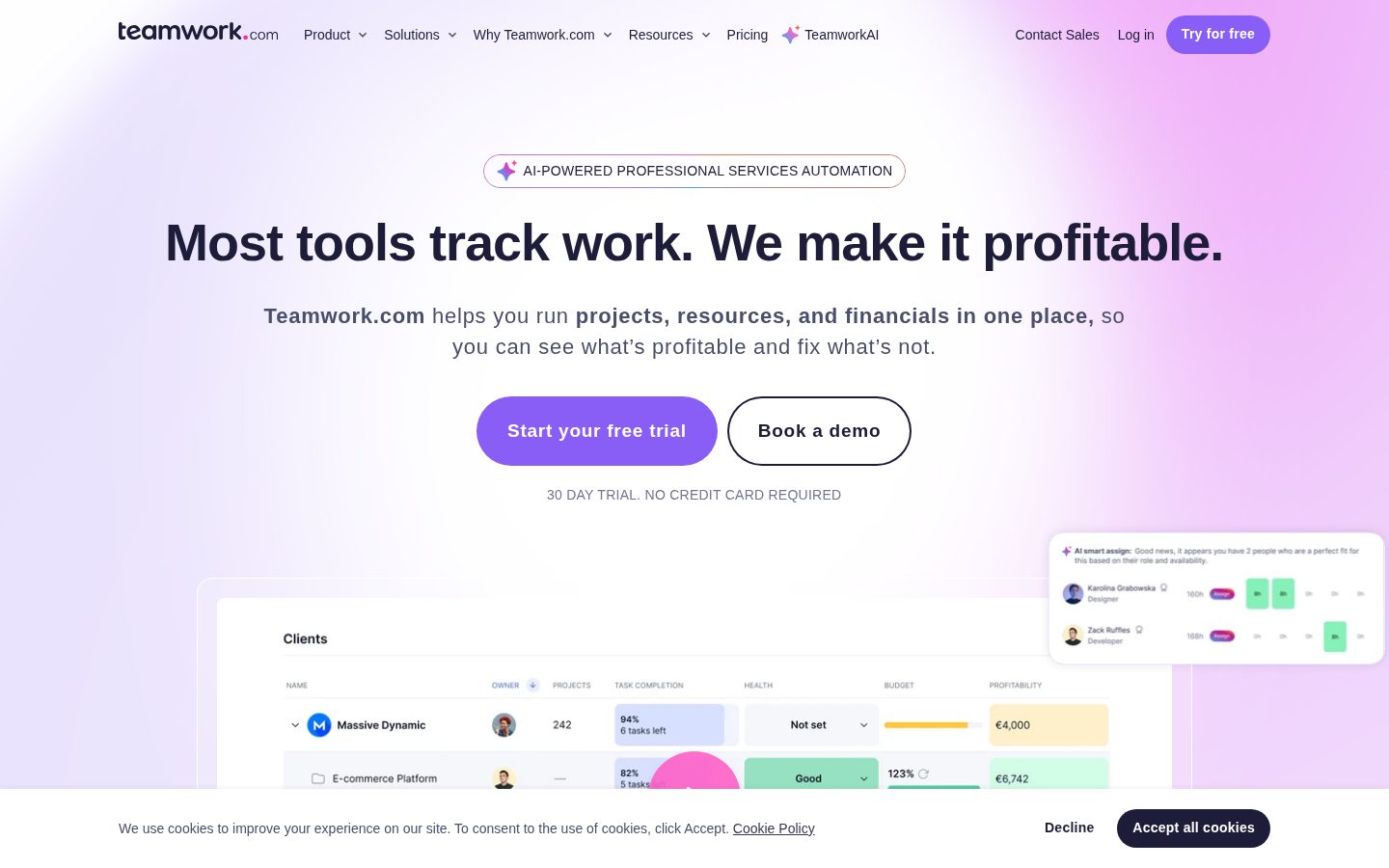
Teamwork.com is a professional services automation (PSA) platform that combines project management, resource scheduling, and financial tracking for teams delivering client work. It is aimed at agencies, consultancies, IT services firms, and other professional services teams that bill for their time. A free plan covers up to five users and five projects, and paid tiers start at $9.99 per user per month billed yearly, with a 30-day trial and custom-priced Optimize and Enterprise plans. Core capabilities include billable time tracking with client invoices generated from logged hours, capacity planning and utilization tracking, retainer and budget management, and TeamworkAI features such as a project wizard, smart scheduler, and profitability forecaster, alongside more than 150 integrations including Slack, HubSpot, and QuickBooks. It fits best where project delivery and profitability need to live in one system; alternatives include Asana, Monday.com, Wrike, and PSA tools like Scoro and Kantata.

About Teamwork

Client work enters Teamwork.com through intake forms, gets turned into projects with task lists, boards, Gantt charts, and table views, and moves through delivery with time logged against billable rates. Teams track budgets as work progresses, collect client feedback and approvals through Proofs, and handle support requests alongside project tasks by unifying tickets from Teamwork Desk. Repetitive steps like task assignments and status changes can be handed off to trigger-based automations, with a My Calendar view for planning each person’s day.

The platform’s distinguishing layer is TeamworkAI: an AI project wizard builds a full project from a scattered brief, a smart scheduler picks the best people based on role and availability, and an AI Forecaster produces instant profitability predictions. Named AI agents extend this per tier (Scout and Flo on Basics, the Remi planning agent on Accelerate, the Kash profitability agent on Optimize), and the AI connects to ChatGPT and Claude. Resource management goes deeper than most project tools, with capacity planning, resource forecasting, utilization tracking against targets, retainer management, and recurring budgets. Integrations span more than 150 apps, including Slack, HubSpot, QuickBooks, Xero, Salesforce, NetSuite, Google Calendar, and Microsoft Outlook.

Teamwork.com is built for agencies, consulting firms, IT services companies, and other professional services teams that bill clients for their time. It uses a freemium model: a free plan covers up to 5 users and 5 projects, Basics starts at $9.99 per user per month billed yearly, Accelerate at $24.99, and the Optimize and Enterprise tiers are quote-based; every paid plan carries a 30-day trial with no credit card required. In the project management space it competes with Asana, Monday.com, ClickUp, and Wrike, while its PSA and profitability focus positions it against tools like Scoro, Kantata, and Productive.

The platform runs on the web with iOS and Android apps and offers an API for developers. It is SOC 2 Type 2 certified, private data is never used to train third-party models, and single sign-on plus advanced security controls are available on the Enterprise plan. Accounting integrations connect logged billable time to invoicing, and usage-based AI credits are scheduled to launch in September 2026 after an introductory period in which TeamworkAI is included in all paid plans.

Features

AI

  • AI Forecaster

    Generates instant profitability predictions for projects from live financial data.

  • AI project wizard

    Turns a scattered brief into a fully built project with tasks mapped to timelines.

  • AI smart scheduler

    Finds and assigns the best people to work based on role and availability.

Collaboration

  • Proofs client approvals

    Collects client feedback and approvals on deliverables inside the project.

Financial

  • Budget and profitability tracking

    Tracks project costs, recurring and retainer budgets, and real-time profit visibility.

Integration

  • 150+ app integrations

    Connects to Slack, HubSpot, QuickBooks, Xero, Salesforce, NetSuite, Google Calendar, and Outlook, plus ChatGPT and Claude.

Project Management

  • Multiple project views

    Presents work as task lists, boards, Gantt charts, and tables.

Resource Management

  • Resource and capacity planning

    Plans short- and long-term resource allocation, forecasts future needs, and tracks utilization against targets.

Support

  • Teamwork Desk ticket integration

    Unifies helpdesk tickets and project tasks so client requests and delivery live together.

Time Tracking

  • Billable time tracking

    Logs billable hours against rates and creates client invoices from logged time.

Workflow

  • Client intake forms

    Gathers incoming client requests through structured intake and smart forms.

  • Trigger-based automations

    Automates repetitive steps like assignments and status changes, scaling from 100 runs on Free to 100,000 on Optimize.

Preview

Teamwork desktop previewTeamwork mobile preview

Pricing Plans

Free

Free

Free forever for teams of up to 5 users getting started with client work.

  • Up to 5 projects
  • Task list, board, Gantt, and table views
  • Time logging
  • 100 automations
  • Chat integration

Basics

$10/monthly

For teams organizing projects and billable time; $9.99/user/month billed yearly with a 30-day free trial.

  • Unlimited templates
  • Billable time tracking
  • TeamworkAI access (AI summaries, project wizard)
  • Scout and Flo AI assistants

Accelerate

$25/monthly

For teams managing capacity and client billing; $24.99/user/month billed yearly.

  • Smart forms
  • 20,000 automations
  • Team capacity planning
  • Retainer management
  • Client invoices from logged time
  • Remi AI planning agent

Optimize

Contact sales

Quote-based tier for services businesses running scheduling and profitability at scale; pricing requires contacting sales.

  • Quotes
  • 100,000 automations
  • Role and skill-based scheduling
  • Multi-currency budgets
  • Revenue, cost, and profitability insights
  • Salesforce and NetSuite integrations

Enterprise

Contact sales

Quote-based tier adding advanced security and dedicated support; pricing requires contacting sales.

  • Advanced security
  • SSO
  • Dedicated success manager
  • Priority support
  • Expert implementation support

AI Panel Reviews

The Decision Maker

The Decision Maker

Strategic bet, vendor viability, timing, adoption approval
8.2/10

Teamwork.com sells profitability, not task-tracking, and for services firms that's the whole ballgame.

A profitable, founder-led vendor that turned project management into margin visibility for client-services teams. The entry tiers are cheap, but the scheduling depth that justifies the platform sits behind a sales quote.

Most project tools tell you what's late. Teamwork.com tries to tell you what's losing money, with an AI Forecaster that projects profitability off live budget data. For a services CEO, that's the report the board actually asks about.

The vendor side is unusually calm. Bootstrapped from 2007, its first outside money was a single $70M round from Bregal Milestone in 2021, and it runs at 20,000-plus teams. That's a company that didn't need the check, which is the kind I trust to still be here in three years.

Against Asana or Wrike this isn't a fair fight on price; those win on generic task management. Teamwork.com wins when billable hours and margins are the point. The catch is that the Optimize tier unlocking real scheduling is quote-only, so budget the sales call. Pilot it with one delivery team for a quarter before standardizing.

Competitive Positioning8.0

Differentiated on profitability versus generic PM tools like Asana and Monday.com.

Reputation Risk8.0

SOC 2 Type 2 and a long profitable track record make this an easy board defense.

Speed to Value7.7

The AI Project Wizard speeds setup, but PSA depth takes a ramp before payback.

Strategic Fit8.3

AI Forecaster and billable tracking make project margin a first-class metric, not an afterthought.

Vendor Viability8.7

Bootstrapped and profitable since 2007, first raise a single $70M round in 2021, 20,000-plus teams.

Pros

  • Bootstrapped and profitable since 2007, with its first raise a single $70M round in 2021.
  • AI Forecaster turns live budget data into project-level profitability calls.
  • Resource scheduling and retainer management run deeper than generic PM rivals.

Cons

  • The Optimize tier that unlocks real scheduling is quote-only.
  • Overkill for teams that just want task lists and boards.

Right for

Services firms that need live visibility into project profitability.

Avoid if

Teams that only need lightweight task tracking without billing.

The Domain Strategist

The Domain Strategist

Craft and strategy in the product's domain — adapts identity per category, same lens
8.0/10

Teamwork.com fuses delivery, resourcing, and financials into one system agencies usually stitch by hand.

A genuine PSA architecture where scheduling and profitability sit on the same projects your team logs time against. The deepest resourcing lives on the quote-only Optimize tier, so the public pricing understates the platform.

The strategic bet isn't the task board, it's whether utilization and margin data live in one system with delivery. Teamwork.com stacks capacity planning, the Smart Scheduler, and retainer management on the projects your team already logs hours against. For an ops leader, that closes a gap most firms fill with a spreadsheet exported from Asana.

Skill- and role-based scheduling is the tell that people who've run a resourcing meeting built this. It forecasts utilization against targets, not just who's free. Kantata goes deeper for 100-plus billable headcount, but carries implementation weight this doesn't.

The integration surface is broad, 150-plus apps including NetSuite and QuickBooks, so the financial spine reaches your ledger. However, the sharpest scheduling and multi-currency budgets sit on the quote-only Optimize tier, so the architecture you want isn't on the public pricing page. Over three years that's a fair bet, unless the September 2026 AI-credit meter reprices it.

Category Positioning7.8

Strong PSA position, though Kantata and Certinia sit above it on pure depth.

Domain Fit8.3

Skill- and role-based scheduling matches how services firms actually staff work.

Integration Surface8.0

150-plus integrations including NetSuite and Salesforce connect the financial spine.

Long-term Implications7.6

The September 2026 AI-credit meter and quote-only depth are three-year variables to watch.

Strategic Depth8.2

Capacity planning, utilization forecasting, and retainer management go well beyond generic PM.

Pros

  • Capacity planning and utilization forecasting live inside delivery, not a separate spreadsheet.
  • Skill- and role-based Smart Scheduler forecasts against targets, not just availability.
  • 150-plus integrations including NetSuite and Salesforce connect the financial spine.

Cons

  • Multi-currency budgets and advanced scheduling require the quote-only Optimize tier.
  • Crowded PSA field with deeper specialists like Kantata above it.

Right for

Services firms that resource by skill and manage billable utilization at scale.

Avoid if

Small teams that only need a shared task board.

The Finance Lead

The Finance Lead

Money, total cost of ownership, contracts, procurement math
7.8/10

$9.99 entry and a 29% annual discount, but the September 2026 AI-credit meter is the unpriced risk.

Transparent low tiers and a real free plan make the entry cost easy to model. The quote-only top tiers and a 2026 AI-credit meter leave the full three-year number unresolved.

Two tiers priced in the open, two behind a sales call. Basics runs $9.99 per user monthly, Accelerate $24.99, both billed yearly. Annual billing cuts 29% off monthly. Procurement can model the bottom half without a meeting.

Run the math. Accelerate at $24.99 times 50 seats times 12 is about $15K a year. Add the seat creep finance teams always underestimate, and year three lands near $22K. Against Monday.com's comparable tier, that's competitive, not cheap.

The real line item is TeamworkAI. It's included now, but usage-based credits start metering in September 2026. However you price seats today, that meter is an invoice you can't forecast yet. The free plan, 5 users and 5 projects, makes piloting zero-cost, which is the honest part.

Billing & Procurement7.8

Client invoices generate from logged time, and the free plan removes pilot cost.

Contract Flexibility7.7

A 30-day trial with no card and a 29% annual discount; terms are category-standard.

Pricing Transparency7.5

Basics and Accelerate are public, but Optimize and Enterprise are quote-only.

ROI Clarity8.3

Billable time tracking and the AI Forecaster make ROI measurable, not hand-wavy.

Total Cost of Ownership7.4

The September 2026 AI-credit meter leaves three-year cost partly unmodeled.

Pros

  • $9.99 Basics and a free 5-user plan make entry and piloting cheap to model.
  • Annual billing saves 29% versus monthly.
  • Billable time tracking feeds client invoices, so ROI is measurable.

Cons

  • Optimize and Enterprise are quote-only, so top-end TCO is opaque.
  • Usage-based AI credits start metering in September 2026 with no public rate yet.

Right for

Finance leads at services firms that bill time and track utilization.

Avoid if

Buyers who need a fixed all-in price before signing.

The Domain Practitioner

The Domain Practitioner

Daily hands-on reality in the product's domain — adapts identity per category, same lens
7.9/10

Brief-to-invoice stays in one tool, and Proofs keeps client feedback out of email.

The daily agency loop of intake, delivery, time, and invoice holds together without hopping tools. The AI Project Wizard speeds setup but still hands you scaffolding that needs a cleanup pass.

The workflow that matters in an agency is brief-to-invoice, and Teamwork.com keeps it in one lane. Client requests arrive through intake forms, become a project across list, board, Gantt, and table views, and logged hours convert straight into a client invoice. That last hop is where Asana sends you off to Harvest.

Proofs is the quiet standout, letting clients mark up deliverables and approve inside the project so feedback stops living in email threads. My Calendar gives each person a planned day instead of a 40-tab task pile. Automations scale from 100 runs on Free to 100,000 on Optimize.

The catch is depth. The AI Project Wizard builds a full project from a brief in seconds, but the output needs a human pass before it's client-ready, scaffolding rather than a finished plan. Next to ClickUp's everything-everywhere sprawl this feels opinionated, which after a week reads as relief, not limitation.

Day-3 Reality7.8

The brief-to-invoice loop holds up daily, though depth means more menus to learn.

Documentation Practitioner-Fit7.7

The site ships docs, a changelog, and an API, signaling practitioner-facing material.

Friction Surface7.5

Feature depth makes the first week steeper than a lighter tool like Asana.

Power-User Depth8.1

Four views, 100,000 automations, and resource planning give real headroom.

Workflow Integration8.2

Intake, delivery, time, and invoicing live in one lane without tool-hopping.

Pros

  • Logged hours convert straight into client invoices without exporting to Harvest.
  • Proofs pulls client markup and approvals inside the project.
  • Four project views plus My Calendar fit different roles on one team.

Cons

  • AI Project Wizard output needs a human pass before it's client-ready.
  • The feature depth makes the first week steeper than Asana.

Right for

Delivery managers at agencies who run billable client work end to end.

Avoid if

Solo users who want a minimalist personal task list.

The Power User

The Power User

Daily human experience, onboarding, polish, learning curve, reliability
7.7/10

The free plan isn't a locked demo, but this is a lot of tool to grow into.

A genuinely usable free plan and a wizard that turns briefs into projects make the first hour feel good. It's a heavy platform, though, and lighter teams will feel the weight by month one.

Free plans usually feel like a locked demo. This one lets you actually run, 5 users, 5 projects, real time logging, and a phone app that isn't read-only. More generous than most, and it says they're not scared of you kicking the tires for a month.

The AI Project Wizard is the fun part. Hand it a messy brief and it hands back a whole project with tasks and a timeline. There are named helpers too, Scout and Flo on the cheap tier, which is either genuinely useful or just a lot of mascots.

The honest bit, though: this is a lot of tool. Four views, forecasting, retainers, capacity planning, and day thirty you're still finding menus. If you just want Trello-simple, it'll feel heavy. But if your work is client work with real money attached, the weight starts earning its keep.

Daily Polish7.6

A mature product with real depth, though the sheer surface can feel busy.

Learning Curve7.4

It scales from first hour to power user, but the climb is real.

Mobile Parity7.7

Real iOS and Android apps, not a read-only afterthought.

Onboarding Experience7.5

The AI Project Wizard eases setup, but there's a lot to meet on day one.

Reliability Feel7.9

A long-running platform with SOC 2 Type 2 feels solid under the hood.

Pros

  • The free plan is genuinely usable, with 5 users, 5 projects, and real time logging.
  • iOS and Android apps aren't read-only afterthoughts.
  • The AI Project Wizard turns a messy brief into a built project fast.

Cons

  • A lot of tool to learn, and lighter needs will feel the weight.
  • Named AI helpers like Scout and Flo can feel more like mascots than muscle.

Right for

People running client projects who want billing and planning in one place.

Avoid if

Anyone who just wants a simple personal to-do board.

The Skeptic

The Skeptic

Contrarian. Watch-outs, deal-breakers, broken promises, category patterns
7.5/10

Fourteen years bootstrapped and profitable is the real moat; the 2026 AI-credit meter is the watch item.

A long-bootstrapped, profitable survivor with clean exit paths and an honest security posture. The one thing to watch is the September 2026 shift from included AI to metered credits.

Bootstrapped 14 years before taking a dime. That's rare, and it's the strongest thing on this page. Firms that stay profitable without VC oxygen tend to still be around in five years.

One watch item. TeamworkAI is included now, then usage-based credits start metering in September 2026. I've seen the free-now-metered-later move before; not a lie, but a repricing you should assume. The named agents per tier, Scout, Flo, Remi, and Kash, are marketing paint, not four separate products.

Exit is clean enough, project data with 150-plus integrations and standard exports, so leaving for Asana or Scoro isn't a hostage situation. The yellow flag is a crowded field, with Kantata and Certinia above it on depth. But SOC 2 Type 2, a $70M balance sheet, and 20,000 teams make this a fair bet, not a gamble.

Competitive Differentiation7.1

The profitability angle is real, but the PSA field is crowded with specialists.

Exit Portability7.6

Standard project data and 150-plus integrations keep migration low-friction.

Long-term Viability7.6

A $70M balance sheet, 20,000 teams, and SOC 2 Type 2 signal durability.

Marketing Honesty6.9

Mostly grounded, but named-agent branding and included-then-metered AI add gloss.

Track Record Match7.8

Fourteen profitable bootstrapped years match the pattern of category survivors.

Pros

  • Bootstrapped and profitable for 14 years before its first raise.
  • Clean exit with standard project data and 150-plus integrations.
  • SOC 2 Type 2, and private data isn't used to train third-party models.

Cons

  • Included AI shifts to metered credits in September 2026.
  • Crowded PSA field with deeper specialists like Kantata and Certinia.

Right for

Cautious buyers who value a profitable vendor with clean exit options.

Avoid if

Teams that need the deepest resource planning on the market.

Buyer Questions

Common questions answered by our AI research team

Pricing

How much does Teamwork.com cost?

Paid plans start at $9.99 per user per month for Basics, billed yearly, with Accelerate at $24.99 per user per month. Optimize and Enterprise are custom-priced, and annual billing saves 29% compared with monthly billing.

Features

What AI features does Teamwork.com include?

TeamworkAI includes a project wizard that turns briefs into fully built projects, a smart scheduler that assigns people by role and availability, and an AI Forecaster for profitability predictions. It is included in all paid plans for an introductory period.

Integration

Does Teamwork.com integrate with accounting software?

Yes. QuickBooks integration is included in the Accelerate plan and Xero is also supported, connecting logged billable time to client invoicing. In total Teamwork.com offers more than 150 integrations, including Slack, HubSpot, and Salesforce.

Setup

Can I try Teamwork.com before paying?

Yes. Paid plans come with a 30-day free trial that requires no credit card, and there is a permanently free plan for up to 5 users and 5 projects. iOS and Android apps are available alongside the web platform.

Security

Is Teamwork.com SOC 2 compliant?

Yes, Teamwork.com is SOC 2 Type 2 certified, and private data is never used to train third-party AI models. Single sign-on and advanced security controls are available on the Enterprise plan.

Also in Project Management