ActivTrak logo

ActivTrak Review

Visit

Workforce analytics used by 9,500+ organizations to boost productivity

ActivTrak is a workforce analytics platform for teams and enterprises.

AI Panel Score

8.0/10

6 AI reviews

Reviewed

AI Editor Approved

What is ActivTrak?

ActivTrak is a workforce analytics and productivity platform that helps managers and leaders understand how work gets done across people, tools, and AI. A lightweight agent on Windows and macOS devices records application and website activity, then classifies it as productive, unproductive, or neutral for reporting. It suits small businesses through enterprises, with a permanently free plan for up to three users and paid tiers starting at $10 per user per month, plus custom Enterprise pricing. Core capabilities include Executive Insights dashboards, Schedule Adherence and Work Location Visibility for hybrid teams, Capacity Planning to balance workloads, Activity Alerts for off-policy behavior, and a conversational Work Advisor assistant that answers workforce questions. AI Usage Measurement tracks adoption of AI tools, while ActivConnect exports activity data to BI systems. ActivTrak works best for organizations optimizing hybrid productivity, with alternatives including Hubstaff, Teramind, Time Doctor, and Insightful.

About ActivTrak

A lightweight agent installed on Windows and macOS devices records application and website usage, then classifies each activity as productive, unproductive, or neutral. Managers view the results in customizable dashboards and reports covering focused time, meeting load, and daily activity summaries.

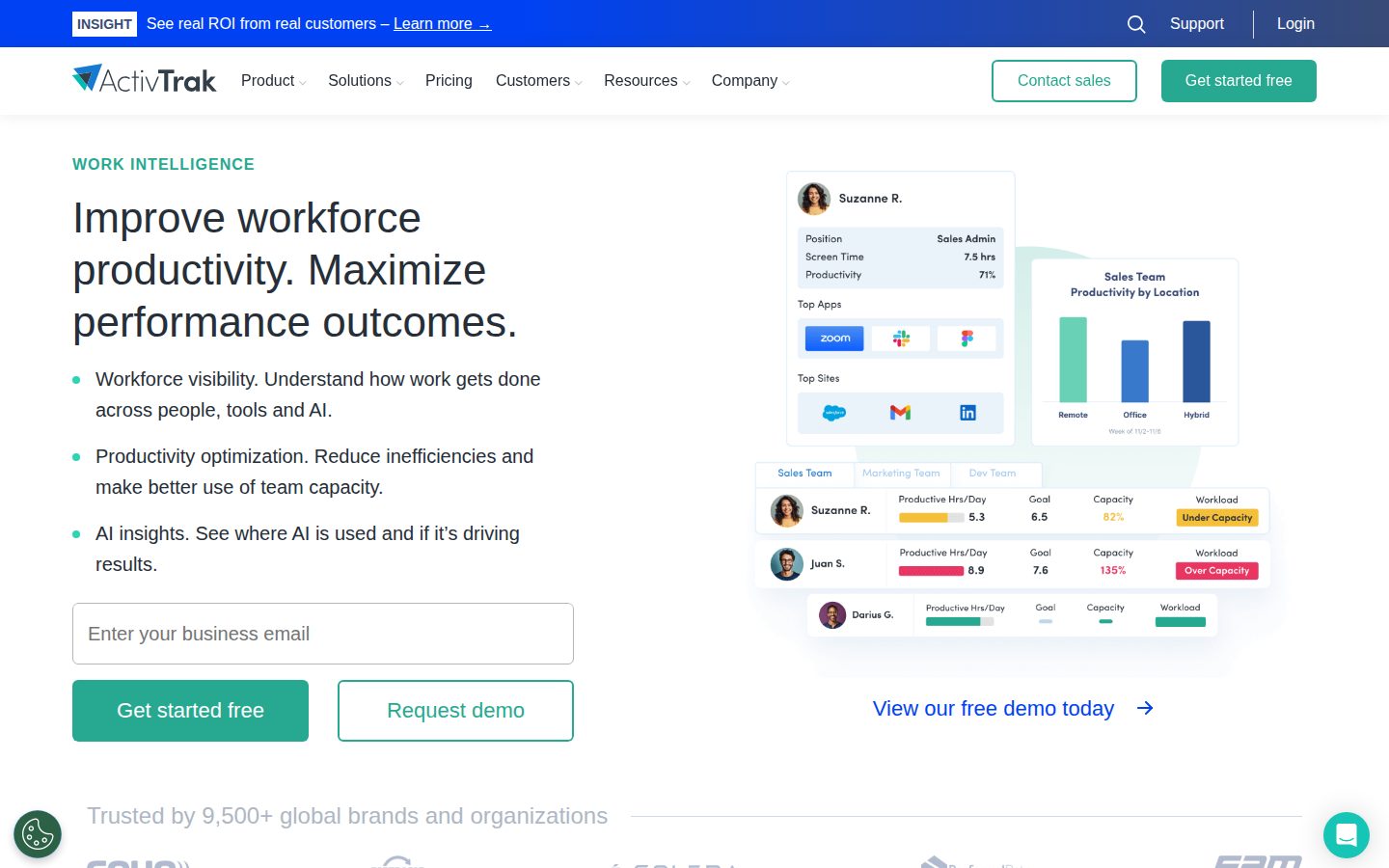
Beyond basic tracking, ActivTrak adds Executive Insights for leadership summaries, Schedule Adherence and Work Location Visibility for hybrid teams, Capacity Planning to spot over- and under-utilization, and Activity Alerts that flag off-policy behavior. Work Advisor, a conversational AI assistant, surfaces answers on demand, and AI Usage Measurement reports on how the workforce is adopting AI tools.

ActivTrak fits small businesses through enterprises, with a free plan for up to three users and paid tiers priced per user per month: Essentials at $10, Essentials Plus at $15, and Professional at $19, plus custom Enterprise pricing. Competitors in the category include Hubstaff, Teramind, Time Doctor, and Insightful.

ActivConnect exports raw activity data to BI tools and data warehouses, while a developer API and prebuilt integrations connect ActivTrak to the wider tech stack. Screen Details captures screenshots to support compliance investigations, and the platform is built privacy-by-default with configurable data collection.

Features

AI

  • Work Advisor

    A conversational AI assistant that answers workforce and productivity questions in plain language.

Analytics

  • AI Usage Measurement

    Tracks how teams adopt and use AI tools across the workforce.

  • Capacity Planning

    Identifies over- and under-utilized team members using workload and activity data.

  • Executive Insights

    Leadership dashboards that summarize productivity, focus time, and performance trends across the organization.

Automation

  • Activity Alerts

    Configurable alerts that flag risky or off-policy behavior as it happens.

Integration

  • ActivConnect

    Exports raw activity data to BI tools and data warehouses for custom reporting.

Monitoring

  • Real-time Visibility

    Live view of team activity, availability, and current focus throughout the workday.

Security

  • Screen Details

    Captures screenshots and screen context to support compliance investigations.

  • Technology Usage & Compliance

    Reports application and website usage to optimize software spend and monitor policy adherence.

Workflow

  • Productivity Goals

    Sets productivity targets and tracks progress against them for teams and individuals.

Workforce

  • Schedule Adherence

    Compares logged work time against scheduled shifts to surface attendance gaps.

  • Work Location Visibility

    Shows where employees work across remote, office, and hybrid arrangements.

Preview

ActivTrak desktop previewActivTrak mobile preview

Pricing Plans

Free

Free

For small teams needing basic time tracking, limited to three users.

  • Up to 3 users
  • 30-day data history
  • Productivity reports
  • Activity time tracking
  • Activity logs & summary

Essentials

$10/monthly

For small businesses wanting core productivity insights with unlimited users.

  • Unlimited users
  • 6-month data history
  • Meeting time tracking
  • Activity alerts
  • Organizational performance dashboards

Essentials Plus

$15/monthly

For medium to large businesses needing goals and work-location visibility.

  • Everything in Essentials
  • Productivity goals
  • Exception reporting
  • Work location visibility
  • 6-month data history
Popular

Professional

$19/monthly

For enterprises needing team performance analytics and capacity planning.

  • Everything in Essentials Plus
  • Team performance
  • Capacity planning
  • Activity alignment
  • 1-year data history

Enterprise

Contact sales

For large organizations needing custom deployment, retention, and premium support.

  • Custom user volume
  • Multi-year & volume discounts
  • Extended data retention
  • ActivConnect API access
  • Premium support
  • Dedicated consultation

AI Panel Reviews

The Decision Maker

The Decision Maker

Strategic bet, vendor viability, timing, adoption approval
8.2/10

A durable monitoring vendor whose real risk is workforce trust, not whether it survives renewal.

ActivTrak is a well-funded, mid-market workforce analytics platform with the vendor stability a board wants and privacy controls that blunt the obvious objection. The buying question isn't survival, it's whether your people read it as analytics or as surveillance.

Employee monitoring is the one software category where the wrong rollout costs you trust, not just dollars. ActivTrak knows it. The platform ships privacy-by-default and lets admins disable Screen Details entirely, which is the posture the board will want to hear about first.

The vendor's durable. $50M Series B from Sapphire Ventures in 2020, 9,500+ organizations on the books, more than a decade in market. Renewals like that don't come from a company circling the drain.

Professional runs $19 per user monthly, cheaper than Teramind's enterprise-tilted pricing and squarely mid-market. The catch is positioning: sold as workforce analytics, it still reads as surveillance to the people being measured. Pilot it with one department, publish the data policy first, then decide on the org.

Competitive Positioning8.0

Analytics-first framing at $19 differentiates it in a mid-market slot Teramind and Hubstaff crowd.

Reputation Risk7.4

Even with privacy-by-default, the monitoring category carries employee-trust exposure a board must manage.

Speed to Value8.2

Lightweight Windows and macOS agent plus a 14-day trial gets dashboards live fast.

Strategic Fit8.0

Directly serves hybrid-workforce productivity and capacity mandates most leaders now own.

Vendor Viability8.6

$50M Series B, 9,500+ organizations, and a decade-plus in market signal real staying power.

Pros

  • $50M Series B and 9,500+ organizations signal a vendor that will still be here at renewal.
  • Privacy-by-default posture and toggleable Screen Details reduce the employee-trust exposure.
  • Professional at $19 per user lands within reach of most mid-market budgets.
  • Lightweight Windows and macOS agent means a fast, low-friction rollout.

Cons

  • The workforce-analytics framing doesn't erase the surveillance perception among staff.
  • Category positioning overlaps heavily with Teramind and Hubstaff.

Right for

Mid-market leaders who want defensible productivity data without betting on a fragile vendor.

Avoid if

Executives who can't commit to a transparent monitoring policy with staff.

The Domain Strategist

The Domain Strategist

Craft and strategy in the product's domain — adapts identity per category, same lens
8.2/10

ActivTrak becomes a people-analytics source rather than a silo, if you treat its data as one input.

ActivTrak delivers decision-grade workforce views through Executive Insights and Capacity Planning, and ActivConnect keeps that data joinable to the wider analytics stack. The strategic caveat is treating activity classification as one signal among many, not the system of record.

For a people-analytics function, activity capture is table stakes; every tool here does it. What separates a real platform is whether the signal is decision-grade. Executive Insights and Capacity Planning turn raw application data into over- and under-utilization views, the layer that informs staffing calls rather than individual scorecards.

Its real leverage is ActivConnect, which exports raw activity data into your warehouse and BI stack. A people-analytics team that can't join workforce signal to HRIS data is stuck inside someone else's dashboards. ActivConnect keeps ActivTrak a source, not a silo, but it's gated to Enterprise, so the integration story sits behind a paywall.

Long term the risk is cultural, not technical. Anchor capacity models to activity-classified productivity and you're trusting a proxy that Insightful measures identically. Treated as one input beside outcomes data, at $19 per user it's a defensible three-year bet.

Category Positioning8.1

Analytics depth differentiates it from monitoring-first rivals in the mid-market.

Domain Fit8.3

Purpose-built for hybrid workforce productivity measurement across remote and office arrangements.

Integration Surface8.0

ActivConnect and a developer API export raw data, though full access is gated to Enterprise.

Long-term Implications7.6

Over-anchoring workforce strategy to an activity proxy is the durable cultural risk.

Strategic Depth8.0

Executive Insights and Capacity Planning move past scorecards into staffing-grade utilization views.

Pros

  • Executive Insights and Capacity Planning produce staffing-grade views, not just individual scorecards.
  • ActivConnect exports raw data to your warehouse, keeping ActivTrak a source rather than a silo.
  • A decade-plus in market and 9,500+ organizations make it a safe long-term platform bet.
  • Privacy-by-default configuration supports a defensible people-analytics governance model.

Cons

  • ActivConnect access is gated to the custom Enterprise tier.
  • Activity-classified productivity is a proxy that rivals like Insightful measure the same way.

Right for

People-analytics leaders who feed activity data into a broader measurement stack.

Avoid if

Teams who want a single system of record for workforce performance.

The Finance Lead

The Finance Lead

Money, total cost of ownership, contracts, procurement math
8.0/10

At $19 per user for Professional, ActivTrak charges an analytics premium over the $10-seat crowd.

Four fully public tiers from a free plan to $19 Professional make ActivTrak easy to budget and easy to buy. The gaps are top-tier: Enterprise pricing is quote-only and there's no published overage or annual-discount rate.

Every tier sits on the public pricing page, no sales call to see a number. Procurement won't fight that. Free covers three users, then $10, $15, and $19 per user monthly for Essentials, Essentials Plus, and Professional.

Run the math. Professional at $19 x 200 users x 12 = $45,600 a year. Essentials Plus at $15 does the same headcount for $36,000. The $9 jump from Essentials buys Capacity Planning and 1-year data history, worth it only if you actually staff on that data.

Compare Time Doctor and Hubstaff, both starting under $10 per seat; ActivTrak sits higher for analytics depth. Billing is per-user monthly, so seat creep is the real cost, not the sticker. The catch: no published overage or annual-discount rate, and Enterprise pricing is quote-only. Predictable enough for a budget, opaque at the top tier.

Billing & Procurement8.0

Self-serve public tiers make procurement painless below the Enterprise line.

Contract Flexibility7.5

Monthly standard tiers are flexible, but Enterprise terms are quote-only.

Pricing Transparency8.5

Four tiers priced publicly with no sales call needed for the standard plans.

ROI Clarity7.6

Capacity Planning value depends on whether the team actually staffs on the data.

Total Cost of Ownership7.8

Per-user monthly billing makes seat creep the main variable at $19 per user.

Pros

  • All four standard tiers are priced publicly, no sales call required.
  • Free plan for three users lets teams validate before paying.
  • At $19, Professional undercuts most enterprise monitoring suites on analytics depth.
  • Monthly per-user billing avoids long lock-in on the standard tiers.

Cons

  • No published overage or annual-discount rate to model against.
  • Enterprise pricing is quote-only, so top-tier cost of ownership is opaque.

Right for

Finance teams who want transparent per-seat pricing without a mandatory sales call.

Avoid if

Buyers who need locked-in volume discounts before signing.

The Domain Practitioner

The Domain Practitioner

Daily hands-on reality in the product's domain — adapts identity per category, same lens
8.0/10

ActivTrak rewards analysts who nail classification early, then hands leadership the summary views they ask for.

For a workforce analyst, ActivTrak's activity-level classification and Executive Insights turn raw logs into the leadership summaries the job actually demands. The daily friction is retention and its desktop-only reach, both of which push serious longitudinal work toward Enterprise.

A workforce analyst lives in classification hygiene, every app and URL sorted productive, unproductive, or neutral before a report means anything. ActivTrak classifies at the activity level and lets you tune the rules, which Insightful buries. Get the map right early and the dashboards mostly build themselves.

Executive Insights is where the job happens; leadership wants the summary, not the raw log, so focus time, meeting load, and utilization land in one shareable view. Schedule Adherence handles the hybrid attendance questions. The friction is retention: Professional caps history at 1 year, so multi-year trend work needs Enterprise.

ActivConnect is the analyst's escape hatch, raw data piped to the warehouse when the built-in charts can't do the custom cut a VP wants. The lightweight agent installs clean on Windows and macOS. But it's desktop-only, so field and mobile work goes dark, and Time Doctor covers that better.

Day-3 Reality7.9

Once the classification map is tuned, dashboards largely build themselves.

Documentation Practitioner-Fit7.8

Solid docs and a lightweight agent that installs cleanly on Windows and macOS.

Friction Surface7.4

The 1-year retention cap and desktop-only reach are the recurring daily limits.

Power-User Depth8.0

Tunable activity-level classification plus Capacity Planning give real analytical depth.

Workflow Integration8.0

ActivConnect and the developer API pipe raw data into the analyst's own warehouse.

Pros

  • Activity-level classification is tunable, not a black box you fight.
  • Executive Insights packages focus time and utilization into leadership-ready views.
  • ActivConnect exports raw data so you're not stuck with the built-in charts.
  • Lightweight agent installs cleanly on Windows and macOS.

Cons

  • Professional retention caps at 1 year, pushing longitudinal work to Enterprise.
  • Desktop-only agent leaves mobile and field workers uncovered.

Right for

Workforce analysts who build leadership productivity reports from desktop activity data.

Avoid if

Analysts who track field teams working primarily off mobile devices.

The Power User

The Power User

Daily human experience, onboarding, polish, learning curve, reliability
7.8/10

ActivTrak wins you over with a genuinely free start, then asks for a patient first week.

ActivTrak makes a strong first impression with a real free plan and no-sales-call setup, and the day-to-day dashboard feel is considered. The catch is a real learning curve up front and a mobile story that's basically a browser tab.

What earns trust fast is the free plan, three users, no credit card, plus a 14-day Professional trial. Most tools here make you talk to sales before you see a dashboard. ActivTrak just lets you install the agent and go.

Day to day it feels like a considered dashboard product. Real-time Visibility shows who's active without a refresh, and Activity Alerts ping you instead of making you hunt. But the learning curve is real, this is analytics, not a stopwatch, so week one is sorting apps into productive and unproductive before it looks useful.

Where it goes quiet is mobile. The agent runs on Windows and macOS, the dashboards live on the web, and there's no real phone app, so managing on the go means a browser tab. Fine for desktop analytics, but Hubstaff's mobile app does more.

Daily Polish7.9

Real-time Visibility and Activity Alerts feel like a considered dashboard, not an afterthought.

Learning Curve7.3

The first week is classification setup before the dashboards feel useful.

Mobile Parity7.0

No dedicated mobile app; dashboards are web-only, so on-the-go use is a browser tab.

Onboarding Experience8.2

Free plan, no credit card, a 14-day trial, and an agent that installs and goes.

Reliability Feel7.8

Lightweight agent and live visibility read as a dependable monitoring backbone.

Pros

  • Genuinely free plan for three users with no credit card up front.
  • Real-time Visibility and Activity Alerts surface problems without manual digging.
  • Agent installs and runs without a sales call or heavy setup.

Cons

  • The first week is classification setup before the dashboards feel useful.
  • No dedicated mobile app; managing on the go means a browser tab.

Right for

Managers who want productivity dashboards they can set up without sales calls.

Avoid if

People who need to manage their team primarily from a phone.

The Skeptic

The Skeptic

Contrarian. Watch-outs, deal-breakers, broken promises, category patterns
7.5/10

Well-funded and durable, ActivTrak's real weakness is how little separates it from Teramind.

For a product built on activity classification, ActivTrak backs its durability claims with real funding, scale, and tenure. The honest caveats are a proxy-based productivity story and thin differentiation from cheaper rivals.

Nine thousand five hundred organizations and a decade-plus in market. Those numbers earn a real look. Still, the honest catch: what ActivTrak sells as productivity is activity classification, apps bucketed productive or not, a proxy rather than an outcome.

The reasons to relax are concrete. $50M Series B from Sapphire Ventures in 2020, not another monitoring startup that folds at year five. Privacy-by-default and the option to disable Screen Details are real, not garnish. Exit holds up too: ActivConnect exports your raw data, so you're not hostage to their charts.

The yellow flag is differentiation. Strip the branding and AI Usage Measurement looks a lot like what Teramind and Hubstaff already ship. Pricing's honest and public, $10 to $19 per user, and the track record backs the claims. Skeptical, but this one earns its spot.

Competitive Differentiation6.8

AI Usage Measurement overlaps heavily with what Teramind and Hubstaff already offer.

Exit Portability7.6

ActivConnect exports raw data, so you leave with your own information intact.

Long-term Viability7.8

Funding, scale, and tenure make continued survival a safe bet.

Marketing Honesty7.0

The boost-productivity claim overreaches an activity proxy, though pricing and privacy claims are straight.

Track Record Match8.0

$50M Series B, 9,500+ organizations, and a decade-plus back the durability claims.

Pros

  • $50M Series B and 9,500+ organizations make survival a safe bet.
  • Pricing is public and honest, $10 to $19 per user with no games.
  • ActivConnect gives a real exit; your raw data leaves with you.
  • Privacy-by-default and disable-able Screen Details aren't just marketing.

Cons

  • AI Usage Measurement overlaps heavily with Teramind and Hubstaff.
  • The boost-productivity claim rests on an activity proxy, not outcomes.

Right for

Buyers who want a proven monitoring vendor with a clean data exit.

Avoid if

Teams who need clear differentiation from Teramind before committing.

Buyer Questions

Common questions answered by our AI research team

Pricing

How much does ActivTrak cost per user?

ActivTrak offers a free plan for up to three users. Paid tiers are billed per user: Essentials at $10, Essentials Plus at $15, and Professional at $19 per user/month, with custom Enterprise pricing for larger deployments.

Features

Does ActivTrak track AI tool usage?

Yes. AI Usage Measurement reports how teams adopt AI tools, and the Work Advisor assistant answers workforce questions in plain language. Executive Insights dashboards summarize productivity, focus time, and workload trends for leaders.

Security

Is ActivTrak employee monitoring private and compliant?

ActivTrak is built privacy-by-default, letting admins limit data collection and disable screenshots. Technology Usage & Compliance reporting and role-based access help teams monitor policy adherence without logging keystrokes or personal content.

Setup

How does ActivTrak get installed on computers?

A lightweight agent installs on Windows and macOS devices and records application and website activity automatically. Data flows to a cloud dashboard, and a 14-day Professional trial starts with no credit card required.

Integration

Can ActivTrak export data to BI tools?

Yes. ActivConnect exports raw activity data to business intelligence tools and data warehouses, and a developer API plus prebuilt integrations connect ActivTrak to the wider tech stack for custom reporting.

Product Information

  • Company

    ActivTrak
  • Founded

    2009
  • Pricing

    From $10/mo
  • Free Trial

    Available
  • Free Plan

    Available

Platforms

webwindowsmac

About ActivTrak

ActivTrak develops cloud-based workforce analytics software that tracks employee activity across applications and AI tools to measure productivity. Based in Austin, Texas.

Resources

Documentation
API
Blog

Also in AI Workforce Analytics