Circleback logo

Circleback Review

Visit

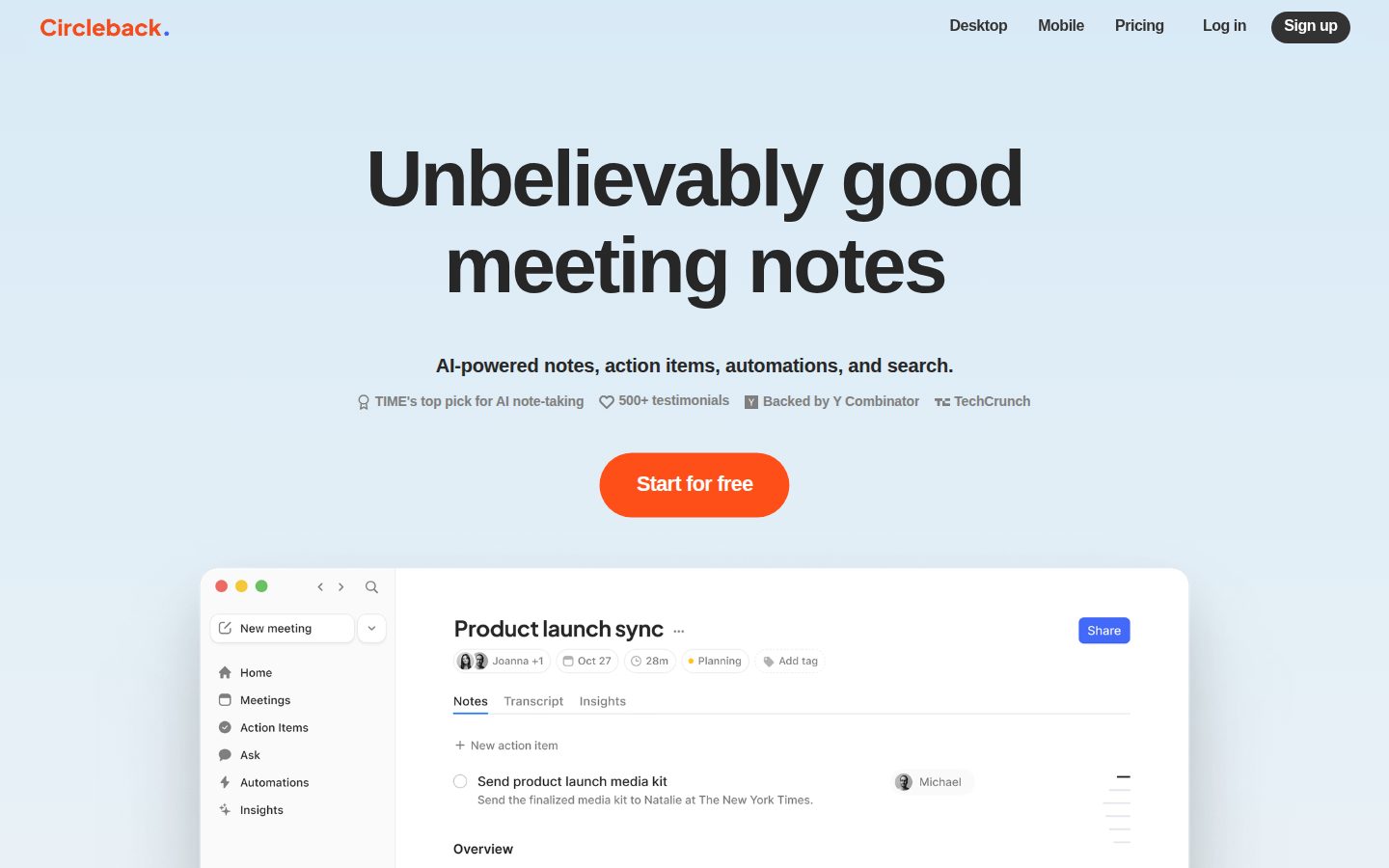
AI meeting notes and action items, automatically.

Circleback is an AI-powered meeting assistant that records, transcribes, and summarizes meetings.

AI Panel Score

6.9/10

6 AI reviews

Reviewed

AI Editor Approved

About Circleback

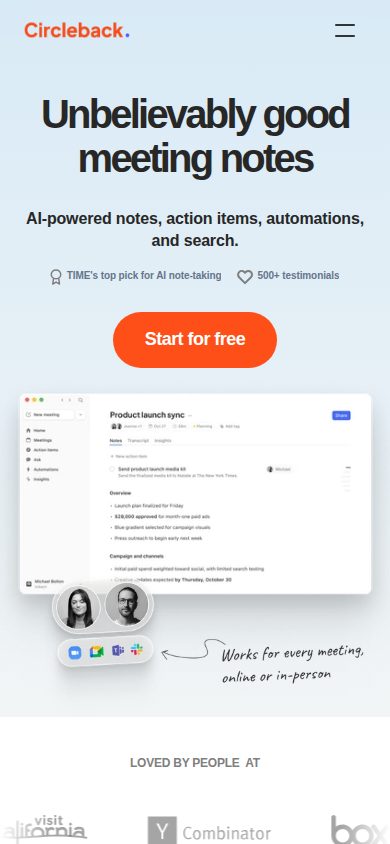
Circleback is an AI meeting assistant that automatically captures what happens in meetings by recording, transcribing, and summarizing conversations. After a meeting ends, users receive structured notes organized by topic, a list of action items assigned to participants, and a full transcript they can search and reference later.

The product supports meetings held on major video conferencing platforms including Zoom, Google Meet, and Microsoft Teams. It can join calls as a bot participant or process uploaded audio and video files, giving users flexibility in how they capture meeting content.

Circleback is aimed at professionals, teams, and organizations that hold frequent meetings and want to reduce time spent on manual documentation. Use cases span sales calls, team standups, client meetings, and interviews, among others.

Key capabilities include automated action item detection, speaker identification, and the ability to ask questions about meeting content through a conversational AI interface. Integrations with tools like Notion, HubSpot, and Slack allow summaries and action items to flow into existing workflows without manual copying.

In a market that includes competitors such as Otter.ai, Fireflies.ai, and Notion AI, Circleback positions itself on the quality of its structured output and the accuracy of its action item extraction, targeting users who want meeting intelligence that goes beyond a raw transcript.

Features

AI

  • AI Meeting Search

    Allows users to ask questions and get answers drawn from all past meetings using AI that understands context across conversations.

  • State-of-the-Art Transcription

    Produces accurate transcripts with technical term and accent recognition, automatic speaker identification by name, and support for over 100 languages.

Automation

  • Workflow Automations

    Connects meeting data to external apps to automate post-meeting workflows and keep tools updated automatically.

Collaboration

  • Slack Integration

    Automatically shares meetings to Slack and allows users to ask Circleback questions directly within Slack.

Core

  • Action Item Capture

    Automatically captures, assigns, and organizes action items from every meeting.

  • Automatic Meeting Notes

    Generates structured, organized meeting notes automatically after every meeting without manual input.

Integration

  • CRM Integration

    Automatically updates deals, contacts, and opportunities in HubSpot, Salesforce, Attio, and Zoho from meeting data.

  • Calendar and Email Integration

    Connects with Google Calendar, Gmail, and Outlook to record meetings and surface relevant email context.

  • MCP and CLI Access

    Provides connectivity for AI tools like Claude, ChatGPT, Cursor, and Raycast, and allows agents to access conversation context via CLI.

  • Project Management Integration

    Creates and updates tasks and boards automatically in Linear, Notion, and Monday from meeting content.

  • Webhook and Zapier/Make Support

    Exposes all meeting data via webhooks and connects to thousands of apps through Zapier and Make for custom integrations.

Security

  • Private and Secure Data Handling

    Built with best-in-class security practices to keep meeting data private and secure, with details published at security.circleback.ai.

Preview

Circleback desktop previewCircleback mobile preview

Pricing Plans

Individual

$21/monthly

For solo creators and independent professionals

  • AI notes for unlimited meetings
  • Auto-assigned action items
  • Transcription + speaker recognition
  • Build automations to perform actions after meetings
  • Ask and search across all conversations
  • Support for over 100 languages
Popular

Team

$25/monthly

For small teams and growing businesses

  • Share meetings across your team
  • AI search across all shared meetings
  • Custom data retention settings
  • Collaborate with inline comments
  • Centralized billing and usage dashboard
  • Access management controls

Enterprise

Contact sales

For large organizations operating at scale

  • Priority support
  • Onboarding and automation support
  • Advanced security controls
  • Everything in Team plan included

AI Panel Reviews

The Decision Maker

The Decision Maker

Strategic bet, vendor viability, timing, adoption approval
6.8/10

Clean product, real integration depth, but zero visibility on who's behind it.

Circleback does the core job well at $20.83/user and connects to HubSpot, Salesforce, Linear, and Slack without much friction. The vendor story is a blank page, which is the only thing giving me pause.

The integration list is the real differentiator here. MCP and CLI access for Claude and Cursor, CRM writes to Salesforce and HubSpot, Zapier and webhook support — that's not a transcript tool, that's meeting data as infrastructure. Otter.ai and Fireflies.ai don't ship that depth on the workflow side.

The pricing is fine. $25/user for the Team plan gets you shared search and access controls. That's board-defensible. The individual plan at $20.83 is oddly priced — monthly billing at a non-round number suggests annual-only discounting, which means read the contract before you commit seats.

Two things concern me. One: no company name, no funding data, no support email in the scraped evidence. That's not a red flag on its own, but it means I can't answer the 36-month viability question with any confidence. Two: the data training policy question in their own FAQ has no visible answer. That's a compliance conversation waiting to happen.

The product is worth a 90-day pilot for a team that runs heavy meeting loads and already lives in HubSpot or Slack. Don't standardize the org on it until they disclose who they are and what they do with your data.

Competitive Positioning7.0

Deeper integration stack than Otter.ai or Fireflies.ai, but differentiation relies on execution quality that public evidence can't fully confirm.

Reputation Risk6.0

The unanswered data training FAQ is a real compliance exposure, especially for regulated industries or enterprise procurement.

Speed to Value8.5

Automatic action item capture and same-day Slack distribution means payback starts on day one for meeting-heavy teams.

Strategic Fit7.5

MCP/CLI access and CRM auto-updates push this beyond cost savings into workflow automation territory.

Vendor Viability4.5

No public funding data, no named company, no support email surfaced — can't assess runway or team size with any confidence.

Pros

  • CRM writes to Salesforce, HubSpot, Attio, and Zoho without manual copying
  • AI search across all past meetings, including Slack-native querying
  • In-person recording via mobile app expands coverage beyond video calls
  • MCP/CLI access signals a serious bet on agentic workflows

Cons

  • No public company identity, funding data, or support contact visible
  • Data training policy question exists in their FAQ with no visible answer
  • CRM integration tier eligibility isn't explicitly confirmed per plan
  • $20.83 non-round pricing suggests annual-lock terms that need scrutiny

Right for

Teams running 10+ meetings a week who already use HubSpot or Slack and want meeting data flowing into those tools automatically.

Avoid if

Your compliance team needs a clear data retention and model training policy before any vendor gets near recorded calls.

The Domain Strategist

The Domain Strategist

Craft and strategy in the product's domain — adapts identity per category, same lens
7.4/10

Solid operational leverage on meeting overhead, but the governance story needs work.

Circleback automates the documentation layer most organizations treat as inevitable tax. At $25/user/month on the Team plan, it covers the workflow surface — CRM writes, Slack distribution, project task creation — that actually moves work forward after meetings end.

The action item capture plus CRM integration combination is where Circleback earns its keep operationally. Automatic writes to HubSpot, Salesforce, Attio, and Zoho after a call means the gap between 'meeting happened' and 'CRM reflects reality' compresses to near zero. That's a real process problem with real compounding cost when it isn't solved. Most teams at scale are losing hours weekly to manual CRM hygiene that should be table stakes by now.

The integration surface is genuinely broad — Linear, Notion, Monday, Slack, Zapier, Make, and now MCP/CLI access for Claude and Cursor. That last one matters if your organization is building internal AI tooling, because conversation context piped into agents is infrastructure, not just convenience. If we adopt this and build workflows on top of the webhook layer, in three years we have a meeting-data pipeline that feeds broader organizational intelligence. That's the upside scenario.

The governance gaps are where I'd push hard before committing at enterprise scale. There's no public answer on whether meeting data trains their models — the FAQ question exists, the answer doesn't, based on the scraped evidence. For organizations with client confidentiality obligations or regulatory exposure, that's not a minor detail. Fireflies.ai has the same disclosure problem at similar price points, which tells me the category hasn't standardized here yet.

The $20.83 Individual versus $25 Team tier split is operationally sensible but creates shadow IT risk. Individuals can expense the lower tier, get comfortable with the tool, and the organization never gets shared search or access management controls. That's how you end up with fragmented meeting intelligence across dozens of personal accounts. Centralized rollout at Team tier from day one, or don't roll it out.

Category Positioning7.0

Positions on structured output quality above Otter.ai and Fireflies.ai, but the $25/user Team price point needs that differentiation to be demonstrably defensible as the category commoditizes.

Domain Fit8.1

CRM auto-update, project task creation, and Slack distribution map directly to the post-meeting workflow breakdown most ops teams are trying to fix.

Integration Surface8.5

Webhook plus Zapier/Make plus native CRM writes plus MCP access covers nearly every layer of a modern ops stack without requiring custom engineering.

Long-term Implications6.8

MCP/CLI access suggests a path toward meeting data as organizational memory infrastructure, but the unanswered data-training question creates long-term compliance exposure for regulated industries.

Strategic Depth7.2

AI Meeting Search across all past conversations shows product maturity beyond raw transcription, but no public changelog depth on how the summarization models are differentiated from Otter.ai or Fireflies.ai.

Pros

  • CRM auto-write to Salesforce, HubSpot, Attio, and Zoho closes the meeting-to-record gap without manual intervention
  • MCP and CLI access makes meeting data available to internal AI agents — that's infrastructure-grade utility
  • Webhook plus Zapier/Make surface means custom workflow coverage without dedicated engineering resources
  • Team plan access management and centralized billing dashboard are the controls an ops leader actually needs

Cons

  • No public answer on AI model training from meeting data — a compliance liability that can't be papered over
  • Individual tier at $20.83 creates shadow IT risk if rollout isn't centrally managed from the start
  • Company ownership and funding are undisclosed, which matters for a tool that will hold sensitive client and internal conversations
  • No free plan means every evaluation requires a trial commitment, which slows enterprise procurement cycles

Right for

Operations or revenue teams that hold high-volume external meetings and need CRM and project management kept current without manual effort.

Avoid if

Your organization operates in a regulated industry where client conversation data governance must be contractually guaranteed before any tool goes live.

The Finance Lead

The Finance Lead

Money, total cost of ownership, contracts, procurement math
6.8/10

$25/seat team plan: transparent tiers, but data training policy is a blank.

Three tiers visible without a sales call — procurement will appreciate that. But missing answers on data training and CRM tier eligibility leave real contract risk.

Individual at $20.83/seat/month, Team at $25. Enterprise listed at 'Free' — that's a placeholder, not a price. 50-user team on Team plan: $25 × 50 × 12 = $15K/year. Add 30% seat creep by year 3, you're at roughly $19.5K annually. Call it $52K over 3 years before any enterprise uplift. Otter.ai Business runs cheaper on sticker; Fireflies.ai Pro comes in around $10/seat. Circleback's premium is real. Whether the action item accuracy justifies it depends on what your manual documentation costs today.

The CRM integration question is unresolved. HubSpot and Salesforce updates are listed as features, but which tier unlocks them isn't confirmed in the pricing page evidence. Procurement hates that. If CRM sync is Individual-only accessible, the $4.17/seat step-up to Team needs a different justification.

No published auto-renewal window in the evidence. No termination-for-convenience clause visible. No overage rate — meeting volume appears unlimited at both paid tiers, which is good. Data training policy isn't answered publicly. That's a legal review flag for any enterprise deal, not just a curiosity.

Billing & Procurement7.0

Centralized billing and usage dashboard on Team plan is a real procurement win; enterprise onboarding support listed but no SLA detail published.

Contract Flexibility5.5

No auto-renewal window, cancellation terms, or termination-for-convenience clause surfaced in public evidence.

Pricing Transparency7.5

All three tiers visible on the pricing page with per-seat figures, but Enterprise pricing and CRM tier eligibility aren't disclosed.

ROI Clarity6.0

Action item capture and CRM sync are measurable, but no published time-saved benchmarks and the data training gap complicates enterprise ROI sign-off.

Total Cost of Ownership6.5

Unlimited meetings removes overage risk, but 30% seat creep plus unconfirmed CRM add-on scope pushes 3-year TCO estimates wide.

Pros

  • Tiers and per-seat prices public — no demo required to build a model
  • Unlimited meetings at both paid tiers removes the overage exposure common in this category
  • Team plan centralized billing dashboard reduces finance reconciliation time
  • 100+ language support included in Individual — no add-on tax

Cons

  • CRM tier eligibility (HubSpot, Salesforce) unconfirmed — material procurement ambiguity
  • Data training policy not publicly answered — legal flag for enterprise
  • No auto-renewal or cancellation terms visible in public evidence
  • At $25/seat, Circleback runs 2-3x Fireflies.ai Pro on sticker without clear benchmarked accuracy delta

Right for

Teams under 50 seats that want predictable per-seat billing and strong post-meeting workflow automation without enterprise procurement cycles.

Avoid if

Your procurement team requires published contract terms, data processing agreements, or confirmed CRM tier eligibility before signing.

The Domain Practitioner

The Domain Practitioner

Daily hands-on reality in the product's domain — adapts identity per category, same lens
7.2/10

Circleback's action item extraction is the real pitch, not the transcript.

Structured notes and auto-assigned action items beat Otter.ai's raw-transcript-first approach for anyone drowning in follow-ups. The $20.83 Individual plan is functional but quietly missing team search, which is where the daily value actually lives.

The MCP and CLI access feature is a tell. Someone here thinks about meeting data as an input to other systems, not just a document to file away. That's the right instinct for a knowledge worker who lives in Linear, Notion, or Slack all day. Integrations into all three are listed, and the Slack query capability — asking Circleback questions directly from Slack — is the kind of workflow shortcut that survives past week one.

Day three looks like this: notes land automatically, action items are assigned, and if you're on the Team plan at $25/user/month, your whole team can search across shared meetings. If you're on Individual, that cross-meeting AI search still works, but it's siloed to your own history. That's not a small distinction. Half the value of meeting intelligence is catching what your colleague committed to, not just what you did.

The in-person recording via mobile is worth flagging. Fireflies.ai has had this for a while, and Circleback appears to match it on the Individual plan. Whether the speaker identification holds up in a noisy conference room is something the docs don't address directly.

No free plan and no public answer on whether meeting data trains their models are the two things that'll slow enterprise conversations. The changelog exists, which signals active development. But the data training gap in the FAQ is a documentation failure that matters to any knowledge worker whose meetings touch client confidential work.

Day-3 Reality7.0

Automatic notes and action item assignment reduce daily documentation load, but Individual plan's siloed search limits compounding value over time.

Documentation Practitioner-Fit6.0

The changelog exists and security details are published at a dedicated subdomain, but the unanswered data training FAQ reads like a marketing oversight, not a practitioner oversight.

Friction Surface6.8

No free plan means any team evaluation requires credit card commitment upfront, and the data-training FAQ gap adds procurement friction.

Power-User Depth7.5

MCP and CLI access for tools like Claude, Cursor, and Raycast signals real power-user depth, though discoverability from the pricing page alone is low.

Workflow Integration7.8

Linear, Notion, Slack, and CRM integrations plus Zapier/Make support suggest genuine workflow embeddedness rather than copy-paste summaries.

Pros

  • MCP and CLI access lets meeting data feed directly into AI agent workflows
  • Auto-assigned action items with speaker identification reduces post-meeting admin
  • Slack query integration keeps meeting intelligence inside the tool where knowledge workers already live
  • Supports 100+ languages with technical term and accent recognition

Cons

  • No free plan — Otter.ai and Fireflies.ai both offer free tiers, making evaluation comparisons easier
  • Team search locked behind $25/user/month Team plan, not available on the cheaper Individual tier
  • No public answer on whether meeting data is used for model training
  • Support email not publicly listed, which matters when a bot joins the wrong call

Right for

Knowledge workers in client-facing or cross-functional roles who need action item accountability, not just a searchable transcript archive.

Avoid if

You need a free tier to evaluate before committing, or your organization requires explicit data-use policies before approving any recording tool.

The Power User

The Power User

Daily human experience, onboarding, polish, learning curve, reliability
7.4/10

Cleaner than Otter, but $25/month is doing a lot of heavy lifting

Circleback gets the core right — structured notes, auto-assigned action items, decent integrations. But no free plan and some murky tier boundaries will make cautious buyers hesitate.

The pitch is simple: join the call, walk away, get notes. And based on the feature list, Circleback mostly delivers that. Automatic action item capture with named assignments, speaker identification across 100+ languages, CRM hooks into HubSpot and Salesforce — that's a real toolkit, not a gimmick layer on top of a raw transcript. Compared to Otter.ai, which still leans heavily on the transcript itself, Circleback is clearly betting on structured output being the thing people actually want.

But $20.83/month for Individual and $25/month for Team, with zero free plan? That's a commitment before you've built any trust. The free trial exists, which softens it, but the pricing page evidence shows some genuine ambiguity — CRM integrations aren't explicitly confirmed for Individual tier, which is the kind of thing you only discover after you've already wired up your HubSpot. That'll frustrate people.

The mobile app exists across iOS and Android, and in-person recording is listed as a real feature. That's promising. But without evidence of what the mobile experience actually does versus the desktop, it reads like parity-on-paper rather than parity-in-practice. Category norm is that mobile is where these tools get quiet and apologetic.

The AI Meeting Search across all past conversations is genuinely interesting long-term. Month three, that's the feature you're actually using. Month one, you're just hoping the bot shows up to your standup.

Daily Polish7.5

The changelog and structured note format suggest an active, detail-oriented team, but no public evidence of how empty states or error handling are handled for new accounts.

Learning Curve7.8

AI Meeting Search and Slack Q&A suggest the tool rewards continued use, and workflow automations give power users somewhere to grow.

Mobile Parity6.5

iOS and Android apps exist and in-person recording is listed, but specifics on mobile feature depth versus web are absent from available evidence.

Onboarding Experience7.0

Calendar and email integration plus a free trial lower the friction, but no free plan means you're deciding before the tool has proved itself.

Reliability Feel7.2

Supports bot-join and file upload as capture methods, which shows fallback thinking, but no public uptime data or error-state documentation visible.

Pros

  • Action item capture with named assignments is a real differentiator over raw-transcript tools like Otter.ai
  • Integrations span CRM, project management, and Slack — meeting data can actually go somewhere
  • In-person recording via mobile is listed as a genuine Individual plan feature
  • AI search across all past meetings gets more valuable the longer you use it

Cons

  • No free plan means you're paying $20.83/month before the tool has earned it
  • CRM integration tier availability is ambiguous — not confirmed for Individual plan in the evidence
  • Mobile parity depth is unclear; apps exist but feature comparison to desktop isn't documented publicly
  • Data training policy question is literally unanswered on their own FAQ — that's a trust problem

Right for

A solo consultant or small team that runs back-to-back calls and genuinely needs structured output landing in Notion or HubSpot without touching it.

Avoid if

You want to try before spending real money, or your team needs confirmed CRM sync before committing to a plan.

The Skeptic

The Skeptic

Contrarian. Watch-outs, deal-breakers, broken promises, category patterns
5.8/10

Three yellow flags behind a polished $25/month pitch

Circleback does the meeting assistant thing competently. But the category is a graveyard, the company is unknown, and 'unbelievably good' is exactly the kind of superlative that ages poorly.

Three tells right up front. One: no company name anywhere visible. Two: no API listed despite MCP/CLI integration being a feature — odd asymmetry. Three: the data training question is explicitly dodged in their own FAQ. That last one bothers me most.

The feature set is real. State-of-the-art transcription, CRM sync to HubSpot and Salesforce, Webhook/Zapier support, MCP access for Claude and Cursor — that's a serious integration surface for a $25/month tool. The changelog exists, which is a green signal. Maybe this is a small team shipping hard. Could go either way.

Here's what I'd actually watch. Otter.ai survived partly because of enterprise contracts and a long head start. Fireflies.ai survived by going wide on integrations. Circleback is trying the same playbook at a slightly higher price point with unknown backing. No public funding, no named investors, no support email visible. If the team is two people, the 3-year viability picture gets uncomfortable fast.

Exit portability is decent — transcripts are exportable, integrations are standard. You won't be hostage. But you will lose the cross-meeting AI search context, and that's the stickiest part of the product by design.

Competitive Differentiation5.5

Positions on structured output quality vs. Otter.ai and Fireflies.ai, but no public benchmarks or third-party validation support that claim.

Exit Portability7.0

Transcripts and action items appear exportable, and Zapier/webhook support means data isn't siloed, though cross-meeting AI search context won't migrate.

Long-term Viability4.5

No public funding data, no company name, no support email visible — changelog exists which helps, but the institutional signals are thin.

Marketing Honesty5.5

'Unbelievably good meeting notes' is a headline doing no real work, and the training data question is visibly unanswered on their own FAQ page.

Track Record Match5.0

Matches the mid-tier challenger pattern — strong integrations, unknown funding — similar to tools that got acqui-hired or went quiet within 24 months.

Pros

  • Changelog exists — someone is shipping
  • Integration surface is genuinely broad: HubSpot, Salesforce, Linear, Notion, MCP/CLI
  • In-person recording via mobile is a real differentiator vs. bot-only competitors
  • Exit path is cleaner than most — standard export formats, no proprietary lock-in story

Cons

  • Company identity is invisible — no named founders, no funding, no support email
  • Data training policy question is publicly listed but publicly unanswered
  • No API despite positioning as an AI-first integration platform
  • $25/month team tier is hard to justify when Otter.ai and Fireflies both undercut on price

Right for

Solo professionals or small teams who need clean action item extraction and don't mind betting on an unknown vendor.

Avoid if

Your organization requires vendor vetting, a clear data policy, or SLA commitments before onboarding a tool into client-facing workflows.

Buyer Questions

Common questions answered by our AI research team

Pricing

What is the difference between the Individual plan at $20.83/user/month and the Team plan at $25/user/month — specifically around meeting sharing and search?

The Individual plan ($20.83/user/month) includes automatic notes sharing but does not include team-level meeting sharing or collaborative search. The Team plan ($25/user/month) adds the ability to share meetings across your team, AI search across all shared meetings, inline comments for collaboration, and access management controls — features not available on the Individual plan.

Integration

Can Circleback automatically update HubSpot or Salesforce deals and contacts after a meeting, and does this work on the Individual plan or only Team?

Yes, Circleback integrates with both HubSpot (to update deals and contacts automatically) and Salesforce (to update opportunities and contacts automatically). However, the content does not specify which plan tier these CRM integrations are available on — only that the Individual plan includes the ability to 'Integrate with 1,000+ apps,' which suggests it may be accessible there, but this is not explicitly confirmed.

Security

Does Circleback use my meeting data to train its AI models?

The homepage FAQ lists 'Is my data used to train AI models?' as a question, but the actual answer to that question is not shown in the provided content.

Features

Can I record in-person meetings on my phone, or does Circleback only work with online meeting platforms?

The content confirms that Circleback does work in-person and that the Individual plan includes the ability to 'Record in-person meetings.' The mobile app is also referenced, suggesting in-person recording is supported via phone, though specific details on how it works on mobile are not provided.

Product Information

  • Company

    Circleback
  • Founded

    2023
  • Pricing

    From $10/mo
  • Free Trial

    Available

Platforms

webmacwindowsiosandroid

About Circleback

Circleback is a San Francisco-based AI meeting notes tool that transcribes, summarizes conversations, and generates action items, with integrations for Zoom, Google Meet, Teams, and Slack.

Resources

Blog
Changelog

Also in AI Meeting Assistants