Read.ai logo

Read.ai Review

Visit

Meeting intelligence that captures, summarizes, and surfaces action items automatically

Read.ai is an AI-powered meeting intelligence platform for individuals and teams who want automated summaries, transcripts, and insights from their meetings.

AI Panel Score

7.8/10

6 AI reviews

Reviewed

AI Editor Approved

About Read.ai

In practice, users authorize Read.ai to join their video meetings automatically. During or after the meeting, the platform produces a transcript, a structured summary, and a list of action items extracted from the conversation. Users can then review these outputs, share them with teammates, or trigger follow-up workflows without manually reviewing recordings.

Read.ai highlights several specific capabilities beyond basic transcription: meeting analytics that track engagement and participation patterns, agentic workflows that help users act on follow-ups, and integration with productivity tools to route summaries and tasks into existing systems. The platform operates within user-configured permissions, meaning the automated assistant only joins and acts when explicitly authorized.

Read.ai targets knowledge workers, managers, and teams who participate in high volumes of video meetings across platforms like Zoom, Google Meet, and Microsoft Teams. Pricing includes a free tier with limited features and paid plans starting at a monthly subscription rate; exact plan pricing should be verified on the Read.ai website. Competitors in the meeting intelligence category include Otter.ai, Fireflies.ai, Fathom, and Microsoft Copilot for Teams.

Read.ai operates as a web-based platform with integrations into major video conferencing tools. The automated assistant joins meetings without requiring participants to install software, and outputs connect to downstream tools for task management and communication.

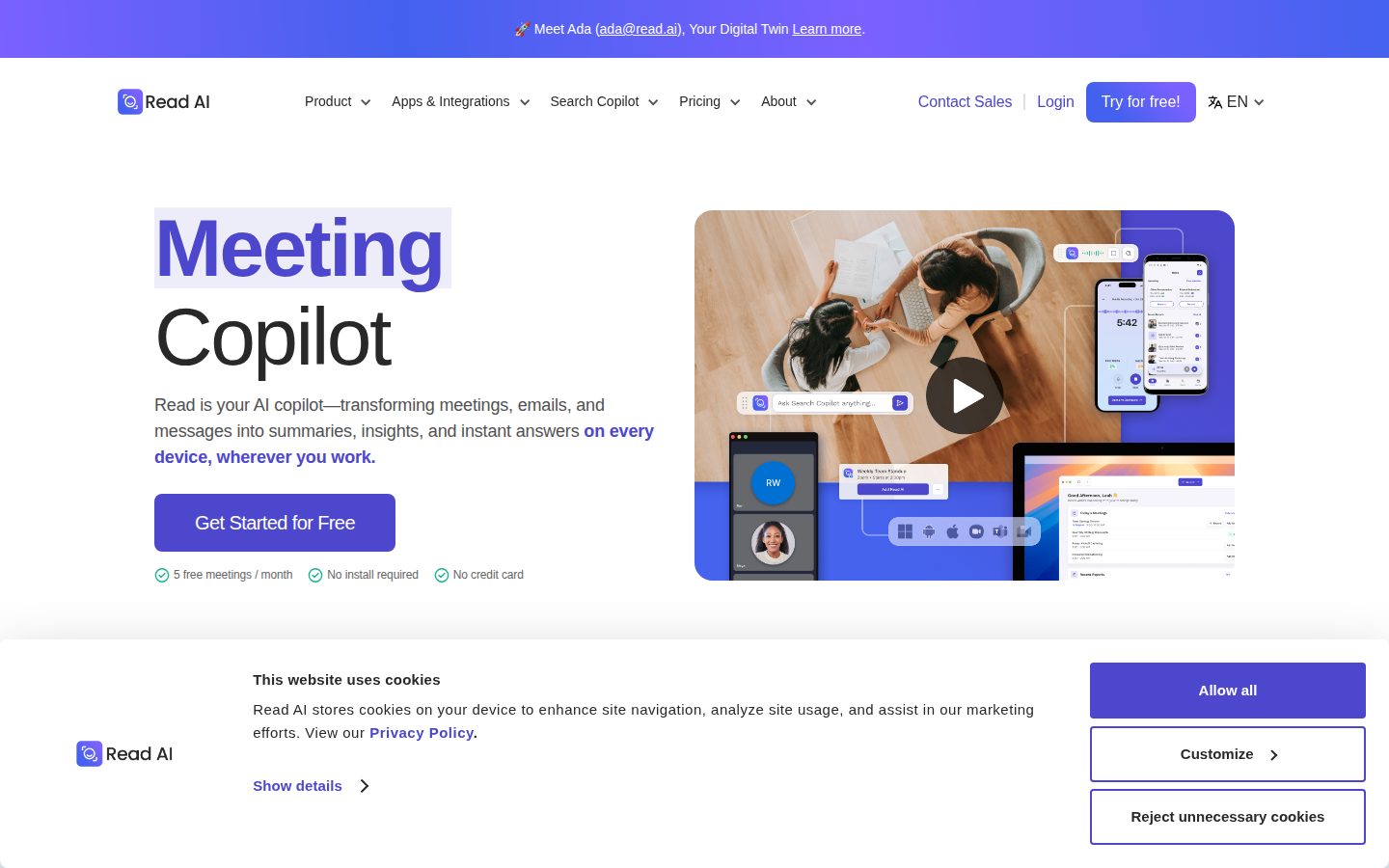
Features

AI

  • Digital Twin

    Personal AI that handles tasks and workflow management, learning from the user.

  • Meeting Assistant (Ada)

    AI agent that joins meetings, records, and delivers a recap automatically.

Analytics

  • Search Copilot

    Find answers across meetings, emails, and messages with AI-powered search returning cited sources.

  • Speaker Coach

    Analyzes talk time, sentiment, and engagement metrics during meetings.

Automation

  • Email Summaries

    Creates concise summaries of key email conversations from Gmail and Outlook.

  • Real-Time Meeting Notes

    Generates topics and action items during active meetings as they occur.

Collaboration

  • Slack Integration

    Shares meeting summaries and decisions directly to Slack channels.

Core

  • Meeting Playback

    Allows users to review recorded meetings with searchable transcripts.

  • Meeting Transcription & Summaries

    Automatically records meetings across Zoom, Google Meet, and Teams, generating transcripts and AI-generated recaps with action items.

  • Multi-Language Support

    Processes meetings and content in 20+ languages.

Customization

  • Workspace Management

    Enables team-level configuration and knowledge sharing across organizational units.

Integration

  • Chrome Extension

    Provides in-browser access to Read.ai across Google Meet, Gmail, and Google Workspace.

Preview

Read.ai desktop previewRead.ai mobile preview

Pricing Plans

Free

Free

For individuals starting out, with 5 meetings per month complete with summaries, transcription, and search.

  • 5 meeting transcripts per month
  • Unlimited enterprise search
  • Best-in-class summaries for meetings, email, and messaging
  • Personalized meeting coach
  • Basic integrations
  • 20+ languages supported

Pro

$15/monthly

For individuals and small teams who want basic transcription, search, and premium integrations.

  • Unlimited meeting transcripts
  • Priority report processing
  • 100 file upload credits per month
  • Premium integrations (Notion, Salesforce, HubSpot, Jira, Confluence, Zapier, webhooks)
  • Unlimited meeting reports
  • Unlimited storage
Popular

Enterprise

$23/monthly

For individuals and teams who want video playback and other supercharged capabilities.

  • Audio & video playback
  • Video highlights
  • 200 file upload credits per month
  • Premium support
  • Unlimited meeting reports
  • Unlimited storage

Enterprise+

$30/monthly

For larger teams and organizations who need security and controls for scale. Requires 10+ licenses.

  • HIPAA compliance
  • SSO & SAML
  • Domain capture
  • Custom data retention policy
  • 300 file upload credits per month
  • Workspace onboarding

AI Panel Reviews

The Decision Maker

The Decision Maker

Strategic bet, vendor viability, timing, adoption approval
7.8/10

$15/seat gets you real meeting intelligence, not just another transcription bot.

Read.ai moves past Otter.ai-style transcription into actual workflow automation with its Digital Twin and Search Copilot. SOC 2 Type 2 certified, HIPAA at the Enterprise+ tier, and no install required — low friction to pilot.

$15/month for unlimited transcripts, Notion, Salesforce, HubSpot, and Jira integrations. That's a hard price to argue against. The free tier caps at 5 meetings, which is enough to validate before anyone asks for a budget line.

The Search Copilot is the feature worth watching — cited answers across meetings, emails, and messages in one query. That's not transcription. That's institutional memory. Speaker Coach adds talk-time and sentiment analytics, which managers either love or find intrusive. Know your culture before you roll this out.

Fathom is free and sharp for individuals. Microsoft Copilot owns the enterprise if you're Teams-heavy. Read.ai wins the middle — teams on mixed stacks who need cross-platform intelligence without an enterprise contract.

Competitive Positioning7.5

Priced below Microsoft Copilot for Teams and more capable than Fathom for cross-platform teams on mixed stacks.

Reputation Risk8.2

HIPAA, SOC 2 Type 2, GDPR, and a no-install model make this defensible to legal, IT, and the board.

Speed to Value8.5

No install, 5 free meetings with full summaries and action items — a team gets signal within a single sprint.

Strategic Fit8.0

Digital Twin and Search Copilot push this past cost-saving into genuine workflow acceleration across meetings, email, and messaging.

Vendor Viability7.5

No public funding data, but SOC 2 Type 2 and HIPAA compliance suggest real infrastructure investment and a vendor operating at professional scale.

Pros

  • Search Copilot surfaces answers across meetings, email, and messages with cited sources — not just transcripts
  • $15/month Pro tier includes Salesforce, HubSpot, Jira, and Zapier integrations
  • HIPAA and SOC 2 Type 2 compliance removes the security objection early
  • No participant install required — zero friction for external meetings

Cons

  • No public changelog or API docs, so custom integrations beyond listed connectors are unclear
  • 5-meeting free cap limits meaningful team evaluation before committing
  • Speaker Coach sentiment tracking may create cultural resistance in some orgs
  • Enterprise+ HIPAA compliance requires 10+ licenses — solo healthcare users are out

Right for

Teams on mixed video stacks who need meeting intelligence routed into CRM and project tools without an enterprise contract.

Avoid if

You're already deep in Microsoft Teams and have Copilot licenses available.

The Domain Strategist

The Domain Strategist

Craft and strategy in the product's domain — adapts identity per category, same lens
8.1/10

Read.ai is the most operationally complete meeting intelligence platform at this price point.

At $29.75/seat for Enterprise+, Read.ai covers the full meeting-to-workflow loop — capture, summarize, route, search — without requiring IT to deploy anything. The operational coverage is serious; the open question is how deeply enterprises will let a third-party assistant sit inside sensitive conversations.

The feature architecture here isn't just transcription with a summary bolted on. Speaker Coach, Search Copilot, and the Digital Twin together suggest a platform built for operational throughput — tracking participation patterns, surfacing decisions across meetings and emails, and routing follow-ups into Jira, Salesforce, or Slack without manual steps. That's the workflow a ops-focused manager actually needs, not a prettier recording.

The $22.50 Enterprise tier unlocks video playback and highlights; the $29.75 Enterprise+ adds HIPAA, SSO, SAML, and custom data retention — the four non-negotiables for any regulated or security-conscious org. Compared to Fathom or Otter.ai, Read.ai's compliance stack and cross-platform breadth (Zoom, Meet, Teams, plus email) make it a real enterprise procurement conversation, not just a power-user subscription.

The tradeoff is consent and trust surface. An AI agent joining every meeting, reading emails, and learning user patterns creates a data footprint that legal and IT will scrutinize. If the org runs sensitive negotiations or board-level conversations, the governance controls at Enterprise+ need to be verified against internal data policy before rollout — the docs indicate custom retention exists, but implementation depth isn't public.

Category Positioning8.0

Sits above Fathom and Otter.ai on compliance and breadth; competes with Microsoft Copilot for Teams on enterprise accounts but wins on cross-platform flexibility.

Domain Fit8.5

Speaker Coach, action item extraction, and Slack/Jira/Salesforce routing map directly to how a COO manages meeting-heavy, cross-functional teams.

Integration Surface8.2

Notion, Salesforce, HubSpot, Jira, Confluence, Zapier, and webhooks at the $15 Pro tier is a wide integration surface for the price.

Long-term Implications7.8

If we adopt this at scale, in 3 years we have a searchable institutional knowledge layer — but also a deep vendor dependency on Read.ai's data model and retention policies.

Strategic Depth8.3

Digital Twin plus Search Copilot across meetings, email, and messages signals a platform built beyond note-taking — closer to organizational memory infrastructure.

Pros

  • HIPAA, SOC 2 Type 2, and SAML at $29.75/seat — compliance stack is enterprise-ready
  • Cross-platform capture across Zoom, Meet, and Teams with no software install
  • Search Copilot spans meetings, email, and messages — not just recordings
  • Actionable integrations into CRM and project tools at the Pro tier ($15/seat)

Cons

  • An AI agent reading emails and joining all meetings creates a consent and data governance surface that legal will flag
  • Free tier caps at 5 meetings/month — too shallow for real evaluation before committing
  • Implementation depth of custom data retention isn't publicly documented
  • Digital Twin and agentic workflows are compelling on paper but maturity is unverified

Right for

Ops and RevOps teams running 10+ person orgs who need meeting intelligence connected to CRM and project workflows.

Avoid if

Your org handles highly sensitive negotiations where a third-party AI participant creates legal or contractual exposure.

The Finance Lead

The Finance Lead

Money, total cost of ownership, contracts, procurement math
7.8/10

$15/seat with no SSO tax until $29.75 — clean tier structure, rare honesty

Four tiers, all priced publicly. SSO lives at Enterprise+, which requires 10+ licenses — that's where the math changes.

$15/seat/month for unlimited transcripts. $22.50 for video playback. $29.75 for SSO and HIPAA — 10-seat minimum required. 50 users at Enterprise+: $29.75 × 50 × 12 = $17,850/year. Add 20% seat creep by year 3 — call it $25K. No published overage rate on file uploads beyond the 300-credit cap at Enterprise+, which is the unpredictable line item.

SSO gating at the top tier is category-standard but still a procurement tax. Fathom offers a free unlimited tier with no bot — different model, different risk. Read.ai's Digital Twin and Search Copilot across email and meetings is a broader surface than Fathom covers. Broader surface means broader data permissions — procurement will ask about that.

Pricing page is legible. No sales call required. SOC 2 Type 2 and HIPAA at Enterprise+ are documented. Contract terms aren't public — auto-renewal window unknown. That's the gap. Budget owners should confirm term length before signing.

Billing & Procurement8.0

No install, self-serve signup, and documented compliance certifications reduce procurement friction significantly.

Contract Flexibility6.5

Auto-renewal terms and cancellation policy aren't public — standard risk, but unverified.

Pricing Transparency8.5

All four tiers publicly priced at $0, $15, $22.50, and $29.75 — no demo required.

ROI Clarity7.5

Speaker Coach and meeting analytics give measurable engagement data; time-saved ROI still requires internal benchmarking.

Total Cost of Ownership7.2

File upload credit caps and unknown overage rates create forecast risk at scale beyond the sticker.

Pros

  • All tiers publicly priced — no sales call friction
  • HIPAA + SOC 2 Type 2 documented at Enterprise+
  • SSO included in top tier, not a separate add-on
  • Covers Zoom, Meet, and Teams natively

Cons

  • SSO requires 10-seat minimum at $29.75 — small teams pay or go without
  • File upload credit caps unpredictable at scale
  • Auto-renewal and cancellation terms not publicly visible
  • Fathom offers free unlimited transcription — direct sticker competition

Right for

Teams of 10–50 who want meeting intelligence plus email and search coverage in one platform.

Avoid if

You need SSO for fewer than 10 seats without paying Enterprise+ rates.

The Domain Practitioner

The Domain Practitioner

Daily hands-on reality in the product's domain — adapts identity per category, same lens
7.8/10

Read.ai earns its seat in your calendar, but the free tier's 5-meeting cap ends the trial fast

Read.ai covers the full stack: transcription, summaries, action items, email digests, and cross-tool search, all without requiring participants to install anything. At $15/month for unlimited transcripts, it competes squarely with Fathom and Fireflies.ai on price while adding analytics most rivals skip.

Ada, the meeting assistant, joins automatically once authorized. The Speaker Coach tracking talk time and sentiment is the differentiator that separates Read.ai from basic notetakers — that's not Otter.ai territory, that's manager-grade insight baked into a daily workflow. Real-time action item extraction during active meetings, not just post-processing, means you're not waiting around for the recap.

The friction lives in the tier structure. Free caps at 5 meetings per month — barely enough for a single busy week. You'll hit the wall in day two and either upgrade or abandon. The jump to Pro at $15/month unlocks unlimited transcripts plus Notion, Jira, and Salesforce integrations, which is where the workflow routing actually becomes useful. Without those integrations, summaries sit in a silo.

The Digital Twin feature — personal AI learning your patterns — is listed but the docs don't indicate how much configuration it requires before it's genuinely useful. That's a day-three unknown. Search Copilot pulling cited answers across meetings, email, and messages is the sleeper capability here. Knowledge workers drowning in context-switching will feel that one.

Day-3 Reality7.5

Automated joining and real-time notes work without friction, but the 5-meeting free cap forces an upgrade decision before the product has proven itself.

Documentation Practitioner-Fit6.8

No public changelog and no API docs listed suggest the documentation skews toward onboarding rather than power-user configuration or troubleshooting.

Friction Surface7.8

No install required lowers the adoption barrier significantly, but free-tier limits and unclear Digital Twin setup add weekly friction for new users.

Power-User Depth7.9

Speaker Coach analytics, Search Copilot with cited sources, file upload credits, and webhook support at Pro tier give advanced users real surface area to work with.

Workflow Integration8.2

Pro tier integrations with Notion, Jira, Salesforce, Slack, and Zapier mean summaries can route into existing systems rather than becoming a separate inbox to check.

Pros

  • Search Copilot spans meetings, email, and messages with cited sources — genuinely cross-context
  • Real-time action item extraction during the meeting, not just after
  • Speaker Coach adds engagement analytics most competitors don't offer at this price
  • No participant install required reduces adoption friction for external meetings

Cons

  • Free tier's 5-meeting cap is too low to evaluate the product honestly before paying
  • Digital Twin feature lacks public documentation on configuration depth
  • No public API docs limit custom workflow building
  • Video playback locked to $22.50/month Enterprise tier, not included in base Pro

Right for

Knowledge workers in back-to-back meeting cultures who need summaries, action items, and cross-tool routing without babysitting a notetaker.

Avoid if

You're on a tight budget and need more than 5 meetings covered before committing to $15/month.

The Power User

The Power User

Daily human experience, onboarding, polish, learning curve, reliability
8.0/10

Does more than Otter.ai, costs more too — and mostly earns it

Read.ai goes well past basic transcription into actual meeting intelligence — Speaker Coach, email summaries, cross-platform search, the whole thing. At $15/month for Pro, it's priced for people who live in meetings and want to stop manually writing follow-ups.

Five free meetings a month on the free plan is honest about what this costs. It's not a 'free forever' tool — it's a try-before-you-buy, and the hard limit will push you to Pro pretty fast if meetings are any real part of your week. That's fine. The feature set justifies it. Meeting Assistant Ada, Speaker Coach, email summaries from Gmail and Outlook, cross-app search with cited sources — this isn't a transcription tool wearing a blazer. It's doing actual work.

The breadth is also where you feel the weight. There's a lot here. Digital Twin, Search Copilot, Workspace Management — on day one, that's a lot of doors. Most people probably want summaries and action items and will find the rest slowly, or not at all.

Mobile parity isn't documented anywhere in the evidence, which, for a tool this ambient-meeting-focused, is a gap worth asking about before you commit. Web-only confirmed. That's the real tradeoff.

Daily Polish7.5

The Chrome Extension and real-time notes suggest someone cared about the in-meeting moment, but no changelog is public, which makes it hard to know how fast rough edges get sanded.

Learning Curve7.0

Core value (summaries + action items) is immediate, but features like Digital Twin and Search Copilot require deliberate discovery — the surface area is wide enough to feel overwhelming in week one.

Mobile Parity5.5

Platform listed as web-only — no mobile app evidence anywhere, which for a meeting assistant you'd want accessible between calls is a real gap.

Onboarding Experience8.0

No install required and a no-credit-card free tier with 5 meetings is a low-friction start — the docs indicate Ada joins automatically once authorized, which is exactly the right first impression.

Reliability Feel7.5

SOC 2 Type 2 and HIPAA compliance at the $29.75 Enterprise+ tier suggests serious infrastructure, but no public changelog makes it harder to gauge how incidents get handled.

Pros

  • Speaker Coach and engagement analytics go way beyond what Fathom or Otter.ai offer at comparable price points
  • Email summaries from Gmail and Outlook make this more than just a meeting tool
  • No install required — Ada joins automatically, which is the right default
  • 20+ languages and HIPAA compliance make it viable for global and regulated teams

Cons

  • Free plan caps at 5 meetings/month — hits the wall fast for anyone in a real job
  • Web-only platform with no confirmed mobile app
  • Feature breadth (Digital Twin, Search Copilot, Workspace Management) adds discovery overhead early on
  • Enterprise+ requires 10+ licenses minimum, so small teams get cut off from SSO and custom retention

Right for

Knowledge workers and managers on high meeting loads who want structured follow-ups without manual note-taking.

Avoid if

You need a polished mobile experience or only have a handful of meetings a month.

The Skeptic

The Skeptic

Contrarian. Watch-outs, deal-breakers, broken promises, category patterns
7.2/10

Solid meeting intelligence stack, but the moat is thinner than the feature list suggests

Read.ai does the core job well — transcription, summaries, action items across Zoom, Meet, and Teams. The 'Digital Twin' and Search Copilot push beyond Otter.ai territory, but no changelog and no API are yellow flags for a platform selling workflow depth.

Three tells upfront. One: 'fastest growing AI meeting assistant, ever' in the meta description — the kind of superlative that ages poorly. Two: no changelog visible. Three: no public API listed. For a product selling agentic workflows, that's a gap worth watching.

The feature set is genuinely broader than most. Speaker Coach, Email Summaries, Search Copilot across meetings plus Gmail — that's more surface area than Fathom or Fireflies.ai at comparable price points. $15/month for unlimited transcripts is competitive. The Enterprise tier at $22.50 locking video playback behind a paywall feels punitive, though.

Exit portability is acceptable — transcripts and summaries are exportable content, not proprietary formats. HIPAA compliance at the $29.75 Enterprise+ tier and SOC 2 Type 2 signal a real compliance investment. No funding data visible publicly. Could be fine. Could matter in 18 months.

Competitive Differentiation7.0

Search Copilot and Email Summaries extend beyond Fathom and Fireflies.ai, but Digital Twin AI positioning is unproven and easy to copy.

Exit Portability7.5

Summaries and transcripts are standard text outputs; no proprietary lock-in format visible, though no explicit export docs to confirm.

Long-term Viability6.5

No changelog, no public funding data, no API — hard to read shipping cadence; SOC 2 Type 2 and HIPAA suggest institutional seriousness, but signals are mixed.

Marketing Honesty5.5

'Fastest growing AI meeting assistant, ever' with no citation is a red flag; the feature claims are grounded but the headline voice oversells.

Track Record Match7.0

Pattern matches surviving players like Otter.ai more than failed ones — multi-platform support, compliance certs, freemium funnel all present.

Pros

  • Unlimited transcripts at $15/month is genuinely competitive against Otter.ai and Fireflies.ai
  • Search Copilot spanning meetings, email, and messages is broader than most in the category
  • HIPAA + SOC 2 Type 2 compliance already baked in — not an afterthought
  • No participant install required lowers adoption friction

Cons

  • No API listed — limits custom workflow depth despite the 'agentic' pitch
  • Video playback gated at $22.50 Enterprise tier feels like an artificial upsell
  • No changelog visible — can't verify shipping cadence
  • No public funding data; long-term runway is opaque

Right for

Knowledge workers and managers running high-volume meetings who want transcription plus email and Slack intelligence in one place at under $20/seat.

Avoid if

You need a programmable API or want verifiable product velocity before committing a team budget.

Buyer Questions

Common questions answered by our AI research team

Pricing

How many free meetings do I get per month?

You get 5 free meetings per month on the free plan. No credit card is required to get started.

Security

Is Read AI HIPAA compliant?

Yes, Read AI is HIPAA compliant. It is also SOC 2 Type 2 certified and GDPR compliant.

Integration

Does Read AI work with Google Meet and Zoom?

Yes, Read AI works with Google Meet, Zoom, and Microsoft Teams.

Setup

Do I need to install anything to get started?

No install is required to get started with Read AI.

Features

Can Read AI summarize my emails too?

Yes, Read AI summarizes emails. It offers Email Summaries with concise summaries of key conversations, and Inbox Insights with AI-generated summaries and topics from Gmail and Outlook.

Product Information

  • Company

    Read AI
  • Founded

    2021
  • Pricing

    From $15/mo
  • Free Plan

    Available

Platforms

web

About Read AI

Read AI is a Seattle-based meeting intelligence platform that provides automated transcription, summaries, and engagement analytics for video meetings across Zoom, Teams, and Google Meet.

Resources

Blog

Also in AI Meeting Assistants