Noty.ai logo

Noty.ai Review

Visit

Meeting AI assistant that turns conversation into tracked to-dos

Noty.ai is an AI meeting assistant for teams that record, summarize, and act on meeting discussions.

AI Panel Score

6.8/10

6 AI reviews

Reviewed

About Noty.ai

Noty.ai runs during a meeting to capture a live transcription, letting users highlight key moments, add comments, or clarify details without needing to take manual notes. After the meeting ends, it generates a summary of key details that can be reviewed, edited, commented on, or queried through a chat interface to find specific information from the discussion.

Beyond transcription and summarization, Noty.ai identifies action items discussed in a meeting, including tasks, deadlines, and the person each task is assigned to. These are compiled into a to-do list that users can review and approve before sending to assignees by email, and task progress can be tracked afterward. The product also organizes meetings so users can find past discussion data and see how conversations connect across sessions, pushing summaries and action items into a connected workspace.

Noty.ai is aimed at individuals and teams who run frequent meetings and want to reduce manual note-taking and follow-up work, such as marketing, project management, and other collaborative roles. It follows a freemium model with a 7-day free trial that does not require a credit card, competing in the AI meeting assistant category alongside products like Otter.ai, Fireflies.ai, and Fathom.

Features

AI

  • AI-Generated Meeting Summaries

    Automatically generates a post-meeting summary containing key details that is ready to review and share.

  • Chat with Noty

    Enables users to chat with Noty to quickly find specific information within a meeting's content.

  • Task and Deadline Detection

    Detects key tasks, deadlines, and assignees mentioned during the meeting conversation automatically.

Analytics

  • Task Progress Tracking

    Tracks task progress and confirms whether deadlines are met to hold team members accountable.

Automation

  • AI-Powered To-Do List Generation

    Turns detected tasks into an organized to-do list that can be prioritized and managed after the meeting.

  • Task Assignment via Email

    Sends approved tasks to assignees via email so they can begin work without delay.

  • Task Review and Approval

    Allows users to review and approve generated tasks before they are sent to assignees.

Collaboration

  • Editable Transcripts

    Lets users review, edit, and leave comments on the meeting transcript after the meeting ends.

  • Live Highlights and Comments

    Allows users to highlight key moments, add comments, or clarify vital details on the live transcript during the meeting.

Core

  • Meeting Organization

    Organizes meetings so users can easily find data and see how discussions connect across different sessions.

  • Real-Time Meeting Transcription

    Records and displays real-time transcriptions during meetings so users can follow along without taking manual notes.

Integration

  • Workspace Integration

    Sends meeting summaries and action items directly into the user's workspace to fit into existing workflows.

Preview

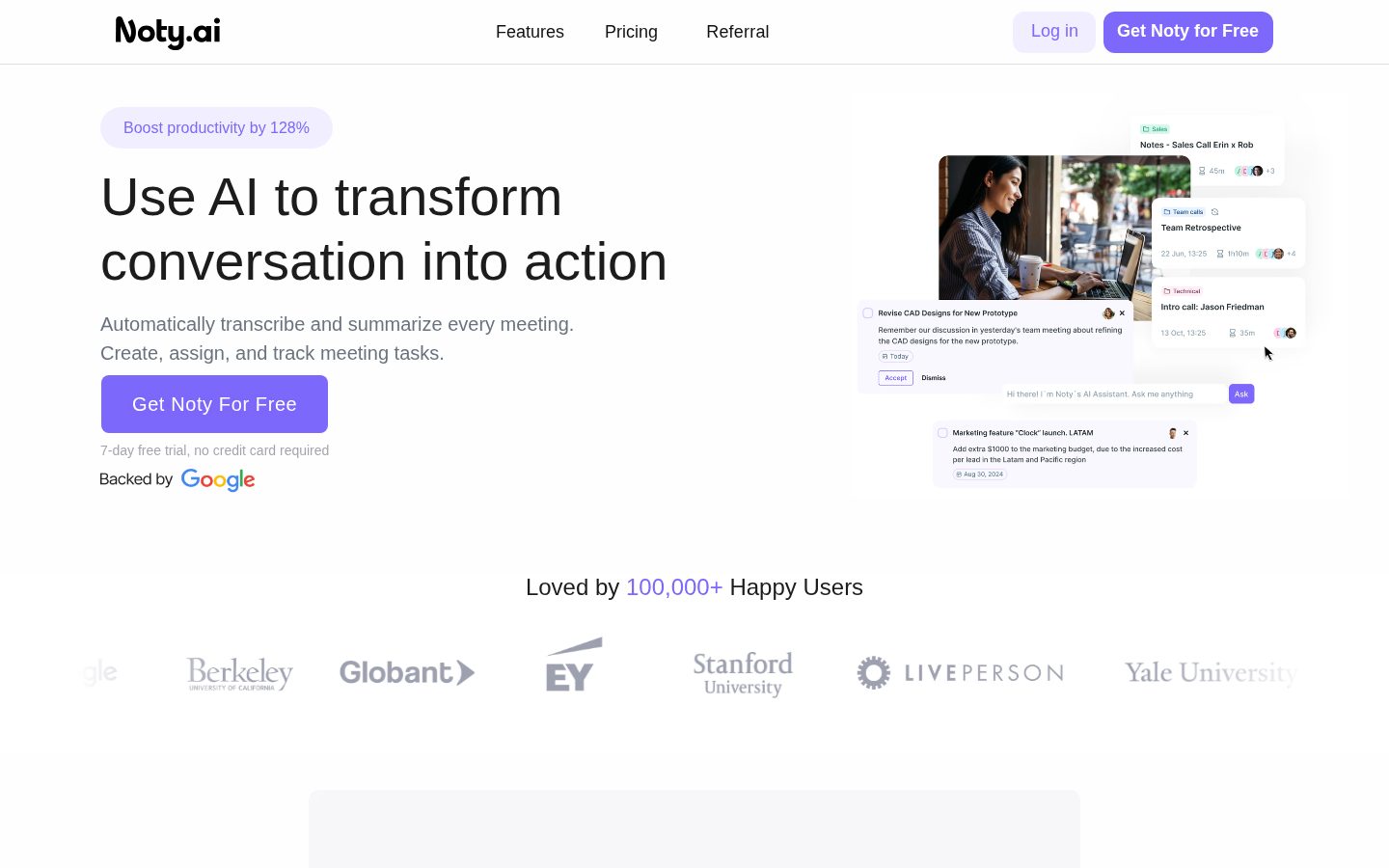
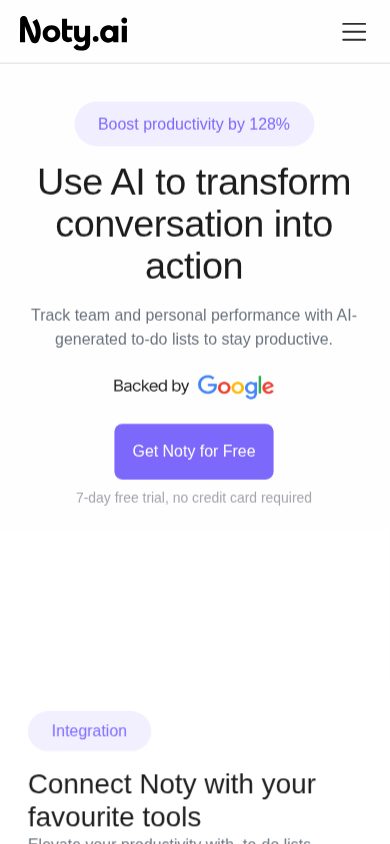
Noty.ai desktop previewNoty.ai mobile preview

Pricing Plans

Popular

Pro

$10/monthly

Best for busy individuals and small teams

  • 100 hours/month
  • 3 AI credits/meeting
  • Unlimited storage & access to meetings
  • Export to Docs, PDF, txt
  • Global Search across all meeting data
  • Priority Customer Support

Impact

$3/monthly

Best for schools, universities, and non-profits; $40 per user/year, eligibility required

  • All features included in Pro
  • Eligibility required
  • Discounted education pricing

Pay-as-you-go

$1/hourly

For those who don't know where to start and want to start small; no commitment, volume-based pricing

  • All included in Pro
  • No commitment
  • Volume-based pricing
  • Starts with 5 hours

AI Panel Reviews

The Decision Maker

The Decision Maker

Strategic bet, vendor viability, timing, adoption approval
6.2/10

Solid feature set at $10 a seat, but no signal this company survives a downturn.

Noty.ai does the job — transcription, task detection, to-do lists — at a price that won't spook the board. What it doesn't do is prove it'll be around to renew.

No docs page. No API. No funding data. Notyai Inc. isn't a name I've heard from any peer CFO, and the evidence here doesn't tell me team size or runway. That's the first question unanswered, and it's the one that matters most.

On features, it's real. Task and deadline detection, editable transcripts, task assignment via email, 90-language support — that's category-complete against Otter.ai and Fireflies.ai. Pro is $10/user/month for 100 hours, which is cheap enough that a bad bet doesn't hurt.

Two questions: does this move us forward, or just automate note-taking we already do manually? Mostly the latter. Fathom and Otter are already the safe, board-defensible picks in this category — Noty.ai isn't wrong, it's just not distinctive enough to explain why we chose it over them.

Competitive Positioning5.8

Feature-complete against Otter.ai and Fireflies.ai but no evidence peers are choosing it over them.

Reputation Risk6.0

Unknown vendor name means no downside from peer scrutiny but no upside either.

Speed to Value7.5

7-day no-card trial and $1/hour pay-as-you-go tier mean fast, low-risk proof of value.

Strategic Fit5.5

Automates existing note-taking workflows rather than advancing any new capability.

Vendor Viability4.5

No funding data, no team size, no public runway signal — just a pricing page and a blog.

Pros

  • Task detection with assignee and deadline extraction, sent via email for approval
  • Cheap entry point: $1/hour pay-as-you-go, $10/month Pro with 100 hours
  • 90 languages supported, wide integration with Zoom, Meet, Slack, Workspace

Cons

  • Zero visible funding or team data — viability is a guess
  • No API or docs page limits deeper workflow integration
  • Category already has entrenched, board-safe incumbents like Otter.ai and Fathom

Right for

Small teams wanting a cheap, low-commitment meeting assistant to pilot for 90 days.

Avoid if

Skip if you need a vendor with visible funding runway to defend the choice in 18 months.

The Domain Strategist

The Domain Strategist

Craft and strategy in the product's domain — adapts identity per category, same lens
6.9/10

Solid to-do engine for meetings, but the operating layer stops at email and workspace pushes, not accountability infrastructure.

Noty.ai turns meeting talk into tracked tasks at a low seat cost, which is real operational value. But the accountability loop closes at email, not inside the systems I actually run the business on.

Task and Deadline Detection plus Task Progress Tracking is the feature set that matters to me — not the transcript, the follow-through. Most meeting AI tools stop at summary; this one at least attempts the close-the-loop piece with review-and-approve before sending to assignees. That's the right shape for how ops leaders actually work: meetings generate commitments, and commitments need owners and dates, not just notes.

The gap is where those tasks land. Email assignment is a 2015 workflow. If my team runs Asana or Linear for actual task ownership, Noty becomes a second system someone has to reconcile against the first, and that reconciliation tax compounds over 100 hours/month of usage.

At $10/month Pro with 100 hours and 3 AI credits per meeting, pricing undercuts Otter.ai and Fireflies.ai on paper. Over three years, cheap-but-shallow integration is a worse bet than pricier-but-embedded, unless workspace integration deepens beyond a push.

Category Positioning7.0

At $10/month vs. Otter.ai and Fireflies.ai, it's priced to win volume but competes on cost, not depth.

Domain Fit7.5

Review-and-approve-before-send matches how ops managers actually delegate, rather than blind auto-assignment.

Integration Surface6.5

Integrates with Google Meet, Zoom, Google Workspace, and Slack, but no listed API limits deeper embedding into ops tooling.

Long-term Implications6.0

Email-based task assignment risks becoming a shadow system next to Asana or Linear over a 3-year horizon.

Strategic Depth6.5

Task detection and approval workflow go beyond basic transcription, but no evidence of deeper analytics like sentiment or meeting-load reporting.

Pros

  • Task review-and-approval step before assignee notification builds in a manager checkpoint
  • 100 hours/month and unlimited storage on Pro at $10/seat is aggressively priced
  • 90-language support suits distributed or global operating teams

Cons

  • Task assignment via email, not native integration into PM tools like Asana or Linear
  • No API listed, limiting how far this can embed into a broader ops stack
  • 3 AI credits per meeting cap could bottleneck teams running dense, recurring standups

Right for

Ops leaders running frequent internal meetings who want cheap, fast task capture without heavy tool consolidation.

Avoid if

Avoid if your team already runs task ownership through a dedicated PM tool and can't tolerate a second system of record.

The Finance Lead

The Finance Lead

Money, total cost of ownership, contracts, procurement math
7.2/10

$10/seat, 100 hours a month. Cheap until credits run out.

Noty.ai prices at $10/user/month, cheaper than most in category. But the 3 AI credits/meeting cap is the number nobody asks about upfront.

$10/seat/month. 100 hours. 3 AI credits per meeting. 50 users × $10 × 12 = $6K/year — half of Otter.ai Business at $20/seat. Cheap sticker.

But credits per meeting is a metered variable finance hasn't seen before. What happens meeting 4 when credits run out? No published overage rate. That's the real risk — not the sticker, the invoice you can't predict. Pay-as-you-go at $1/hour looks like a hedge for exactly this uncertainty.

Three tiers, all visible, no sales call required. Procurement won't fight this one. Impact tier at $3.33/month for education is a clean discount, not a bait-and-switch. Auto-renewal terms aren't published though — check before signing. Year 3 at 50 seats: roughly $18K-$20K if credit overages stay contained. If they don't, model breaks fast.

Billing & Procurement7.5

Monthly billing, no credit card trial, and pay-as-you-go option lower onboarding friction.

Contract Flexibility6.0

No published auto-renewal or cancellation terms in evidence provided.

Pricing Transparency7.8

Three tiers listed with dollar figures, no sales-gated pricing page.

ROI Clarity7.0

Task Progress Tracking gives a measurable deadline-met metric, rare in this category.

Total Cost of Ownership6.5

$10/seat is low, but undefined AI credit overage cost makes 3-year math unreliable.

Pros

  • $10/seat undercuts Otter.ai Business pricing
  • Pay-as-you-go option at $1/hour for low-commitment testing
  • Task Progress Tracking gives a concrete accountability metric

Cons

  • 3 AI credits/meeting cap with no published overage rate
  • No auto-renewal or cancellation terms disclosed
  • No SSO or API tier visible for larger procurement needs

Right for

Small teams under 100 meeting-hours a month wanting cheap transcription and to-do automation.

Avoid if

Avoid if your meetings regularly exceed 3 AI-credit actions and you need predictable overage costs.

The Domain Practitioner

The Domain Practitioner

Daily hands-on reality in the product's domain — adapts identity per category, same lens
7.4/10

Solid to-do generator for meetings, but 3 AI credits per meeting is a real ceiling

Noty.ai turns meeting chatter into an approvable to-do list, which is the actual daily unlock over plain transcription. The 100-hour cap and per-meeting credit limit on Pro are the kind of thing you don't notice until week three.

The task-detection-to-email pipeline is the feature that matters here: it skips the part where I re-read a transcript hunting for who owns what. Review-and-approve before sending is a smart guardrail — I've had Otter.ai summaries misattribute action items with no check step at all.

Day 3 is where the '3 AI credits/meeting' line on the $10/month Pro plan starts to itch. If I run four calls a day, I'm rationing which meetings get full AI treatment, which defeats the point of an assistant. Chat-with-Noty for pulling specifics out of old meetings is genuinely useful for prepping before a follow-up, but there's no docs page or API listed, so anything beyond the obvious UI flow is trial-and-error.

Workspace push and Slack/Zoom/Google Meet integration cover the basics. Fine for individuals and small teams; less convincing for anyone doing 8+ meetings a day who needs Fireflies.ai-style unlimited transcription without credit math.

Day-3 Reality7.3

To-do generation holds up past the demo, but the 3-credits-per-meeting cap on Pro creates rationing behavior fast.

Documentation Practitioner-Fit6.0

No docs page or API listed in the evidence, just blog and pricing page — thin for anyone wanting to self-serve edge cases.

Friction Surface7.0

Review-and-approve step adds a deliberate manual click before every task send, a small daily tax for accuracy.

Power-User Depth7.2

Global search, chat-with-Noty, and task tracking scale reasonably, though 100 hours/month on Pro caps heavy users.

Workflow Integration7.6

Integrates with Google Meet, Zoom, Google Workspace, and Slack, pushing summaries into existing tools rather than a separate silo.

Pros

  • Task detection with review-and-approve before emailing assignees cuts a real follow-up step
  • Chat interface for querying past meeting content is useful for prep, not just archiving
  • 7-day free trial with no credit card required lowers the try-it barrier

Cons

  • 3 AI credits per meeting on the $10/month Pro plan limits heavy meeting days
  • No docs or API listed, so troubleshooting beyond the UI is guesswork
  • 100 hours/month cap on Pro means power users doing back-to-back calls will hit ceilings

Right for

Individuals or small teams running a handful of meetings a day who want tracked to-dos without manual note-taking.

Avoid if

Avoid if you run high call volume daily and need unlimited AI processing without credit rationing.

The Power User

The Power User

Daily human experience, onboarding, polish, learning curve, reliability
6.8/10

Turns your meeting talk into a to-do list, but the app itself is web-only

Noty.ai does the job it says on the tin — transcribe, summarize, spit out tasks. Whether it feels good three months in depends on stuff the site just doesn't show.

The pitch is simple: talk in a meeting, walk out with a to-do list somebody already approved. Task Detection and the Review-and-Approve step before emailing assignees are the smart part here — most tools dump a summary on you and call it done, Noty.ai at least makes you sign off before it bugs your coworker. Real-time transcription plus live highlighting means you're not scrambling to write things down mid-call.

Pricing is honestly the best part. Pro is $10/user/month with 100 hours and unlimited storage, and there's a pay-as-you-go option starting at 5 hours for people who don't want to commit. That beats Otter.ai's structure for casual users testing the waters.

But there's no docs page, no API, and platforms list web-only — no mobile mentioned anywhere. For a tool meant to follow your meetings around, that's a gap. Compared to Fireflies.ai or Fathom, Noty.ai looks capable on paper, thin on the details that prove someone lived in it daily.

The Skeptic

The Skeptic

Contrarian. Watch-outs, deal-breakers, broken promises, category patterns
6.4/10

Solid feature list, but 'unlock 2 extra hours daily' is the kind of number marketing loves to invent.

Noty.ai does what Otter.ai and Fireflies.ai already do, at a slightly different price point. Nothing here looks broken. Nothing here looks unbeatable either.

Three tells before I trust the pitch. One: 'transform conversation into action' is aspirational, not descriptive. Two: no API, no docs page — odd for a tool that wants to sit inside your workspace. Three: '100% actionable' in the meta description is the kind of superlative that ages poorly.

Feature-wise, it's competent. Task detection, approval flow before email send, 90 languages, $10/month Pro tier with 100 hours. That's real breadth for the price. But Otter and Fireflies have years of head start and deeper integration lists.

Exit is fine — it's transcripts and to-dos, exportable to Docs and PDF, so migration risk is low. Viability is the open question. Blog and changelog exist, but no funding signal, no team page cited. Fair product. Unproven company.

Buyer Questions

Common questions answered by our AI research team

Pricing

How much does the Noty.ai Pro plan cost?

The Pro plan costs $10 per user/month and includes 100 hours/month, 3 AI credits per meeting, unlimited storage and access to meetings, export options, global search, custom summaries, and priority customer support.

Pricing

Is there a free trial for Noty.ai?

Yes, Noty.ai offers a 7-day free trial with no credit card required.

Features

Does Noty.ai turn meeting notes into to-do lists?

Yes, Noty.ai detects tasks, deadlines, and assignees mentioned in meetings and turns them into a to-do list that can be reviewed, approved, and sent to assignees via email.

Features

Can I export Noty.ai meeting summaries to PDF?

Yes, the Pro plan lets you export meeting summaries to Docs, PDF, and txt formats.

Features

How many languages does Noty.ai support?

Noty.ai supports 90 languages, including English, German, Spanish, Spanish (Mexico), French, French (Canada), Indonesian, Italian, Japanese, Korean, Dutch, Polish, Portuguese, Portuguese (Brazil), Romanian, Thai, Turkish, and Vietnamese.

Also in AI Meeting Assistants